
PaperBridge: Document Scanner App Icon

PaperBridge: Document Scanner

Utilities • LiChuan Lin
4+ v1.3 Recorded price: Free App Store →
🏆 Best: #99 Top Grossing (RUS)
IPA Analysis
Technical Specs
Bundle ID com.lichuanlin.paperbridge.scananything
Version 1.3
App Store Size 7.16 MB
Minimum iOS 26.0
Devices iPhone, iPad, iPod touch
Catalog release date 2026-09-22
Latest recorded version date 2026-10-29
Features & Support
Advisory 4+
Languages (17)
NL, EN, FR, DE, ID, IT, JA, KO, PL, PT, RU, ZH, ES, TH, ZH, TR, VI
Top In App Purchases
No In App Purchases Listed

Preview

PaperBridge: Document Scanner screenshot 1 PaperBridge: Document Scanner screenshot 2 PaperBridge: Document Scanner screenshot 3 PaperBridge: Document Scanner screenshot 4 PaperBridge: Document Scanner screenshot 5 PaperBridge: Document Scanner screenshot 6 PaperBridge: Document Scanner screenshot 7 PaperBridge: Document Scanner screenshot 8 PaperBridge: Document Scanner screenshot 9 PaperBridge: Document Scanner screenshot 10 PaperBridge: Document Scanner screenshot 11 PaperBridge: Document Scanner screenshot 12 PaperBridge: Document Scanner screenshot 13 PaperBridge: Document Scanner screenshot 14 PaperBridge: Document Scanner screenshot 15 PaperBridge: Document Scanner screenshot 16 PaperBridge: Document Scanner screenshot 17 PaperBridge: Document Scanner screenshot 18 PaperBridge: Document Scanner screenshot 19 PaperBridge: Document Scanner screenshot 20

Description

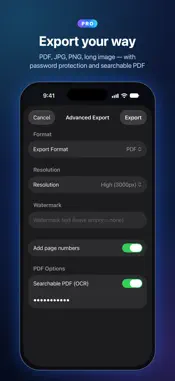
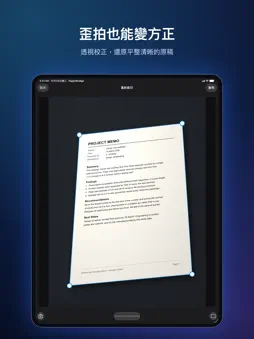
PaperBridge is a privacy-first document scanner. Scanning, recognition, organizing, and export all happen on your device — nothing is ever uploaded to a server. SCAN & ORGANIZE • Auto edge detection and perspective correction; photo imports are auto-cropped too • ID card mode (front & back on one A4), book mode with page splitting, PDF import • 7 filters: brighten, sharpen, grayscale, black & white, ink-saving, and more • Folders, tags, business card holder, full-text search, and Spotlight integration RECOGNITION & AI • Free: multilingual OCR, no page limits • Free: business card to contact, barcode/QR recognition • Free: AI smart naming and tag suggestions (Apple Intelligence devices) • Pro: translate into 17 languages, table to CSV, business cards to .xlsx spreadsheet, searchable PDF with text layer • Pro: AI summaries, receipt/invoice field extraction (Apple Intelligence devices) EXPORT & PROTECT • PDF/JPG/PNG/long image export • N-up printing (1/2/4 pages per sheet) via AirPrint • Annotation and mosaic redaction, Face ID app lock, 30-day trash • iCloud sync, Home/Lock Screen quick-scan widget, Siri Shortcuts • Pro: e-signature, watermark, page numbers, PDF password, folder lock, batch actions ONE-TIME PURCHASE, NOT A SUBSCRIPTION Core scanning is free with no page limits. A single Pro purchase unlocks every advanced feature forever — no ads, no tracking, no subscription. Your documents belong to you. Only you.

What's New

Version 1.3 2026-10-29
NEW: CLOSE-UP MODE (Free) Small labels, fine-print stickers, and nameplates come out sharp — even up close. • Choose Close-Up Mode from the More Scan Modes but...NEW: CLOSE-UP MODE (Free) Small labels, fine-print stickers, and nameplates come out sharp — even up close. • Choose Close-Up Mode from the More Scan Modes button in the scan bar on the home screen, or from the + menu in a folder; in an existing document, use the document menu → Add Pages → Close-Up Mode • On models whose camera supports macro, it switches to the macro lens automatically when you get very close; on other models it zooms in automatically, so the label fills the frame at a distance the camera can focus • Tap the screen to refocus, and turn on the Flashlight in low light • After each shot, the label is outlined automatically — drag the four corners to adjust or choose Full Page — and you can keep shooting NEW: iPhone Duo SUPPORT (Free) • When unfolded, PaperBridge fills the inner display and switches to the split layout below • Fold or unfold and you stay on the same folder and document • When half-folded, Re-crop, Flatten Page, Annotate / Mosaic, Book Mode, and ID Card Layout move to one side of the fold, so no corner handle or button sits on the crease NEW: SPLIT LAYOUT ON iPad AND iPhone Duo (Free) Finding and reading documents on a big screen is easier. • Documents, Business Cards, Folders, and Trash on the left, your documents in the middle, and the open document on the right • In landscape or on a wide screen, multi-page documents show two pages side by side and turn two at a time; tap a page to select it, and Re-crop, Rotate Page, Annotate / Mosaic, and other actions apply to that page • The iPhone interface is unchanged As always, everything happens on your device. Nothing is ever uploaded.

Technical Analysis

Package Overview Basic metadata
Bundle ID com.lichuanlin.paperbridge.scananything
Current Version 1.3
Minimum iOS 26.0
Package Size App Store Size
Package Metadata 0 / 0 version records
Detailed binary, privacy manifest, framework, and Info.plist results have not been indexed for this package yet. The verified App Store and archive metadata above remains available.

Developer Information

Known Version Records

0 version records with stored package metadata

Stored metadata does not guarantee a package is currently available to download.

Details Version / IDs Version date Action