Preview








Description
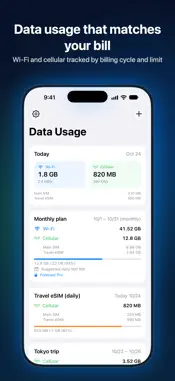
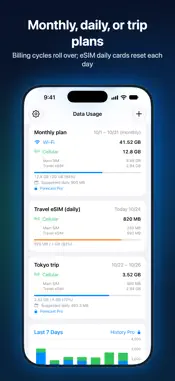
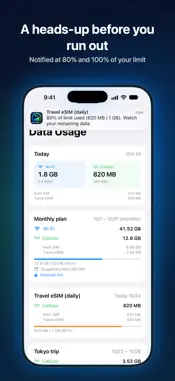
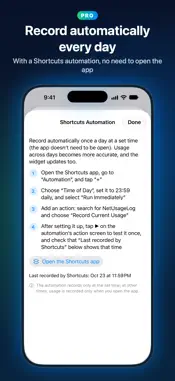
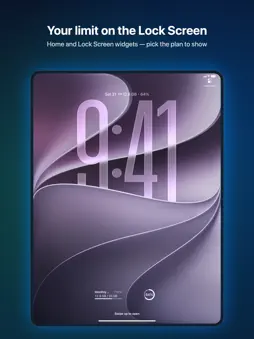
NetUsageLog helps you stay on top of your Wi-Fi and cellular data, grouped by plans that match your carrier bill. • Custom plans: fixed date range (trips/short term), monthly billing cycle (auto rollover), and per-day quota (eSIM daily cards reset every day). You can also "Restart counting now", handy for an eSIM you activate abroad • Limit alerts: a notification at 80% and 100% of your cap • Today at a glance: today's Wi-Fi and cellular usage and current speed on the main screen, plus a 7-day chart • Widgets: small and medium on the Home Screen, plus circular, rectangular, and inline styles on the Lock Screen. Choose which plan each widget shows • Multi-SIM / eSIM: cellular data tracked per line, with custom line names • 17 languages: switch right inside the app About accuracy (an honest note): iOS doesn't let apps read usage in the background. Usage accrues only when the app records it (when you open the app, or when a Pro Shortcuts automation runs); usage in between is added at the next recording, spread across the days by elapsed time (an estimate), and alerts and widgets only update after a recording. If your phone restarts in the meantime, usage not yet recorded before the restart is lost, and the app tells you which time span was affected. Numbers are for reference — rely on your carrier bill. Per-app usage can't be measured (a system limitation). Privacy: your usage data stays on device, no VPN needed. No ads, no tracking. Upgrade to Pro (one-time purchase, unlocked forever): • Forecast & alerts: see when you'll hit your limit, set custom alert thresholds, and get notified when you go over today's suggested usage • Usage calibration: match the usage your carrier shows, so limits, alerts, and widgets use the calibrated number • Shortcuts automation: record automatically at a set time every day (no need to open the app) for more accurate usage across days • Advanced history: 30-day / 12-month trends, per-line analysis, and summaries • Data backup: export / import full backups so you never lose data when switching phones, or export an Excel spreadsheet
What's New
Version 1.7 2026-10-31
Version 1.7 redesigns the layout for the large screen of iPhone Duo when it's open, and for iPad, so you can see more at a glance. • Two-column main screen: "T... Technical Analysis
Package Overview Basic metadata
Bundle ID
com.lichuanlin.netusagelog.recordnetdata Current Version 1.7
Minimum iOS 17.0
Package Size App Store Size
Package Metadata 1 / 5 version records
Detailed binary, privacy manifest, framework, and Info.plist results have not been indexed for this package yet. The verified App Store and archive metadata above remains available.
Developer Information
Known Version Records
1 version record with stored package metadata • 5 known version records
Stored metadata does not guarantee a package is currently available to download.
| Details | Version / IDs | Version date | Action |
|---|---|---|---|
| Not archived | v1.4 App Store ID: 888368706Build: 1.4 | 2026-07-16 20:13:15 | Request Version |
| 7.78 MB | v1.4 App Store ID: 887956099Build: 1.4 | 2026-07-16 20:13:15 | Get Version |
| Not archived | v1.2 App Store ID: 887572590Build: 1.2 | 2026-07-01 00:07:08 | Request Version |
| Not archived | v1.1 App Store ID: 887068872Build: 1.1 | 2026-06-17 23:19:29 | Request Version |
| Not archived | v1.0 App Store ID: 886700417Build: 1.0 | 2026-06-15 13:47:48 | Request Version |