
Preview





Description
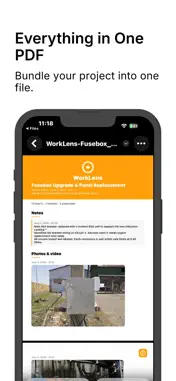
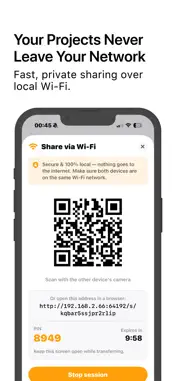
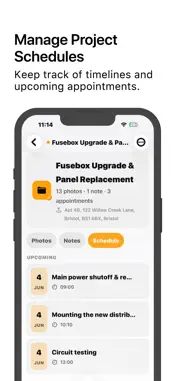
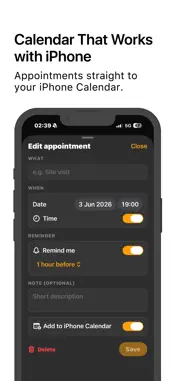
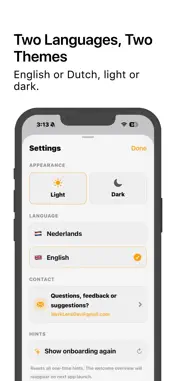
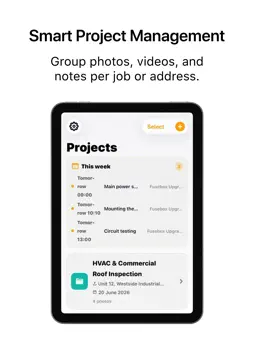
Your work photos and your personal life shouldn’t share the same camera roll. A photo of a fuse box ends up next to a beach selfie, a receipt hides between family snaps, and when a client asks for “that photo from Tuesday,” you’re scrolling forever to find it. WorkLens solves this. Everything you capture for work — photos, videos, receipts and notes — gets its own place on your iPhone, completely separate from your personal gallery and stored only on your device. Here is what you can actually do with it: Keep work and personal apart. Photos and videos you take inside WorkLens stay inside WorkLens. They never land in your camera roll, so your personal pictures stay private and your work stays easy to find. Organise everything by project. Group photos, videos, notes and appointments per job, client or address, so a whole assignment lives in one place instead of scattered across your phone. Turn a photo into text. Snap a receipt, a label, a serial plate or a meter reading and WorkLens reads the text for you and saves it as a note, so you never have to squint and retype numbers by hand again. Export a clean PDF in one tap. WorkLens bundles a project’s photos, notes and details into a tidy report with a cover page, ready to email or hand to your client straight from your phone. Plan appointments with calendar sync. Schedule a site visit or a handover, and with one switch WorkLens adds it to your own iPhone Calendar, reminder included. Run quick calculations on the spot. The built-in smart calculator works out measurements or quantities and drops the result straight into your notes. Calculate directly from a photo. Take a photo of a room, wall, floor or work area and let WorkLens help calculate dimensions, areas and quantities, with results that can be saved straight into your project notes. Made for the way people really work: * Estate agents building a photo record for each property. * Cafe owners and freelancers keeping receipts together for the books. * Electricians, plumbers and other trades documenting every job. * Photographers and inspectors who need each assignment kept apart. And the part that matters most: it is all local. No account, no sign-up, no cloud, no ads and no tracking. Everything stays on your iPhone and works without a connection, whether you are in a basement, on a remote site or on a plane. If you use iCloud Backup, your WorkLens data is included automatically, under your own account. Download WorkLens and give your work the place it deserves. Available in English and Dutch, with light and dark themes.
What's New
Version WorkLens 2026-06-19
• Bug fixes and performance improvements. • Improved app stability and reliability. • Minor UI and workflow enhancements. Technical Analysis
Package Overview Basic metadata
Bundle ID
com.werklens.app Current Version WorkLens
Minimum iOS 26.0
Package Size App Store Size
Package Metadata 0 / 4 version records
Detailed binary, privacy manifest, framework, and Info.plist results have not been indexed for this package yet. The verified App Store and archive metadata above remains available.
Developer Information
Known Version Records
0 version records with stored package metadata • 4 known version records
Stored metadata does not guarantee a package is currently available to download.
| Details | Version / IDs | Version date | Action |
|---|---|---|---|
| Not archived | App Store ID: 887196159 | Unknown | Request Version |
| Not archived | App Store ID: 886798300 | Unknown | Request Version |
| Not archived | App Store ID: 886781915 | Unknown | Request Version |
| Not archived | App Store ID: 886159544 | Unknown | Request Version |