
Preview







Description
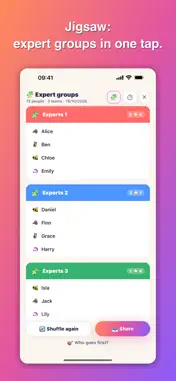
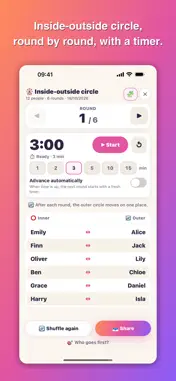
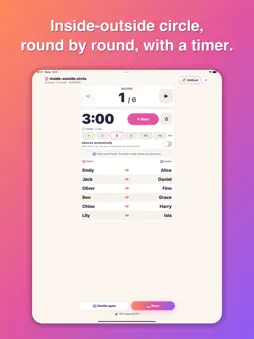
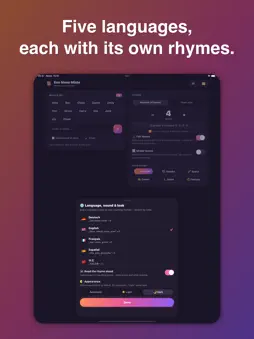
Names in, the box rattles, fair teams out. Ene Mene Miste turns a list of names into random, balanced teams in under ten seconds – and it feels like counting out on the playground, not like configuring admin software. THREE ACTIONS, DONE Enter names, pick how many teams, shuffle. Paste a whole class list at once – the app works out whether you used lines or commas. THE PREVIEW KEEPS ITS PROMISE “12 people → 4 teams: 3 · 3 · 3 · 3” appears before you shuffle – and that is exactly what you get. Where your rules make it mathematically impossible, the app says so beforehand instead of surprising you afterwards. EVERYTHING LIVES ON THE PERSON No settings graveyard. Tap a name to open what concerns them: • Skill in three levels for balanced teams • Always together with … (siblings, shy children) • Better apart from … (the pair that never stops chatting) • Sitting out – stays on the list, but isn't assigned • Mixed teams spreads boys and girls evenly DISCRETION BY DEFAULT Skill ratings are sensitive, and this app often runs on a projector in front of the whole class. So the stars appear only in the private per-person view – never on the overview, never on the team cards, never when sharing. Nobody can read off that they got “only one star”. COOPERATIVE LEARNING METHODS The method menu on the result turns the same teams into a way of working. Switch back to “Teams” and exactly the teams you had are back. • Jigsaw: expert groups with one person from each team; an icon next to each name shows the home group. Roles and numbers work here too. • Team roles: Speaker, Writer, Timekeeper, Materials, Checker, Quiet keeper – assigned at random, reassign any time. Customise the list, add your own roles, up to eight active. • Numbered heads: “Call a number” shows it big, and the matching person lights up in every team. Every number comes up once before any repeats. • Pair work (think-pair-share): pairs within each team, respecting “always together” and “better apart”. With an odd number there is one group of three – nobody is left alone. • Inside-outside circle: inner and outer circle, round by round – everyone outside meets everyone inside exactly once. People who are better apart stand in the same circle. • Stations: the rotation plan for station work, also with more stations than teams, required and optional stations and a set number of rounds. At the top, who is where right now; below, the whole plan as a table. • Round timer: 1 to 15 minutes, a sound when time is up, optionally straight on to the next round – or as a timer for work phases. BUILT FOR THE PROJECTOR Round number, called number and time left are shown big. On iPad the app works in landscape too. WHO GOES FIRST? The counting-out game from childhood, as a feature: the word hops from name to name, and whoever the last word lands on is out. Twenty genuine counting rhymes from five countries, all spoken aloud. Some ask your age halfway through and count on that many steps. FIVE LANGUAGES, EACH WITH ITS OWN RHYMES English, German, French, Spanish and Chinese – not merely translated, but with the rhymes children in each country actually chant. Team names are localised too. THE RESULT IS YOURS Something off? Tap a person, move them to another team. The algorithm suggests, you decide. SHARE WITHOUT RETYPING As text into the class chat, through the share sheet, or as a designed image for the notice board. You always share the view on screen – for the inside-outside circle and stations, the full round plan. NO INTERNET, NO ACCOUNT, NO ADS The app needs no network. It collects nothing, sends nothing and shows no advertising – it runs in front of children, after all. Names and lists stay on your device. For school, sports, workshops, birthday parties and game nights.
What's New
Version 1.2.0 2026-10-25
New in 1.2: cooperative learning methods The result now has a method menu. Each method is a view of the same teams – switch back to “Teams” and you see exactly ... Technical Analysis
Package Overview Basic metadata
Bundle ID
com.lernwunder.enemenemiste Current Version 1.2.0
Minimum iOS 16.4
Package Size App Store Size
Package Metadata 0 / 0 version records
Detailed binary, privacy manifest, framework, and Info.plist results have not been indexed for this package yet. The verified App Store and archive metadata above remains available.
Developer Information
Known Version Records
0 version records with stored package metadata
Stored metadata does not guarantee a package is currently available to download.
| Details | Version / IDs | Version date | Action |
|---|