
Preview





Description
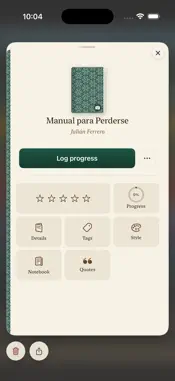
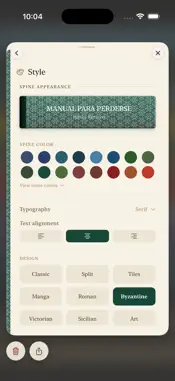
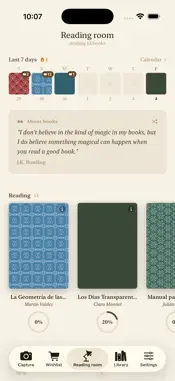
Folia is more than a book catalog: it's where you build the memory of everything you've read: what you felt, where you were, what else was going on in your life while you turned those pages. Every book you add becomes a spine you design yourself: you choose the color, texture and typeface until it feels like yours. Over time, your digital bookshelf starts to look like a real one. A JOURNAL, NOT JUST A TRACKER Note where you were reading, who you were with, how old you were, what else you were reading at the time, and even what music was playing. Add the mood of each session — energy, calm, nostalgia — and over time you'll have a real record of your relationship with each book, not just a "finished" date. BUILD YOUR LIBRARY • Design each book's spine: color, texture, typeface and alignment • Dozens of styles and textures to choose from — from classic to geometric, Japanese patterns, tiles, Victorian and more • Paper textures for your backgrounds and book cards • Shelf view or cover view, with shelves you can organize or hide • Search and filter by mood, length, reading status or your own tags • Free-form tags to build series, collections or lists your way • Rate with stars or simple reactions — you choose the system READING ROOM • Carousel of what you're reading now, with progress at a glance • "Reading now" widget for your Home Screen and Lock Screen • Reading challenges with goals of your own • A reading pile for what's next, with an automatic "to reread" section • Monthly summaries of your activity • Unlockable achievements • All your quotes, together in one place CAPTURE BEFORE YOU DECIDE • Snap photos of covers at the bookstore and decide later, no pressure • Scan the barcode or ISBN to find the book instantly • Wishlist kept separate from your library — move books between to-read, wishlist, library or discarded whenever you like • Duplicate detection, so you never add the same book twice YOUR DATA, YOURS Your library syncs with iCloud between your iPhone and iPad, and is also stored on your device. Export a full backup whenever you want, or share a book with another Folia user by scanning a QR code. THOUGHTFUL DETAILS Light and dark mode, several wood textures for the shelf, and available in Spanish and English, on iPhone and iPad. Folia is for people who read slowly and want to remember why each book mattered.
What's New
Version 1.2 2026-11-17
What's New - iCloud sync: your library on all your devices - Reading widgets: see what you're reading and how far along you are from your Home Screen or Lock S...What's New - iCloud sync: your library on all your devices - Reading widgets: see what you're reading and how far along you are from your Home Screen or Lock Screen - Paper textures for the notebook, cards and backgrounds, plus new paper themes - Alternate app icons - More complete backups, so you can recover your entire library - Sort and group your library by author; browse the list of all authors - Group by genre or tag in Covers and Mural views too - Reread mark on the book page: everything you mark shows up in a special list in your reading pile - Approximate page counts for digital books: reaching 20% of "Animal Farm" is not the same as 20% of "The Magic Mountain" - Option to show counters on the shelves - Search is now connected across all sections: if you search for a book and it's not where you expected, Folia tells you where to find it - In Capture, if you're entering the title and author of a book you already have, the app lets you know - In Capture, new button to jump to the next field on the book card - Open the locations of captured books in Google Maps as well as Apple Maps - Summaries now include a small note at the top with the total read this year - Redesigned top bar in Library on iPhone: larger icons and a more readable search field - Reading progress is always saved when you leave the card (the Save button is gone) - New version cover: 1.2 "Dostoevsky" Fixes - When logging progress, the card could be dismissed by swiping down and your changes weren't saved - The book card changed size when moving between fields while updating progress - In Log Progress, the date was misaligned - The keyboard stayed open after searching in Library - When tapping a book from search, the card appeared with the keyboard open - When changing the library material, the shelves didn't update - When only a few shelves are visible (for example, just Reading), books now stack from the top - When capturing a book with a photo and zooming in, the card thumbnail didn't reflect the zoom - In the notebook, "Where you read" shows as plain text if "What was going on" isn't filled in - The lines on notebook notes didn't reach the bottom Technical Analysis
Package Overview Basic metadata
Bundle ID
com.leonardodamian.foliaapp Current Version 1.2
Minimum iOS 26.4
Package Size App Store Size
Package Metadata 0 / 0 version records
Detailed binary, privacy manifest, framework, and Info.plist results have not been indexed for this package yet. The verified App Store and archive metadata above remains available.
Developer Information
Known Version Records
0 version records with stored package metadata
Stored metadata does not guarantee a package is currently available to download.
| Details | Version / IDs | Version date | Action |
|---|