Preview

Description
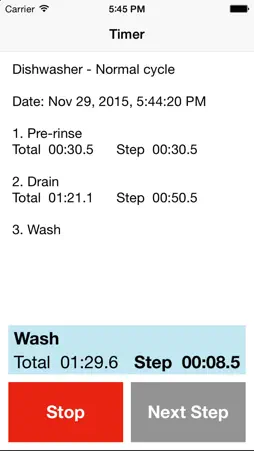
Sequence Timer is a stopwatch for a user-defined sequence of steps. Define a sequence of steps or intervals to time and assign the sequence a name. Time the sequence. When finished timing the sequence, save the results for recall at a later time.
Features:
• Easy to use: select a sequence and start stopwatch
• Easy to manage: add, edit, reorder and delete sequences and sequence steps • AutoStart feature automatically starts timing of next step • Total elapsed time and individual step/split time is displayed • Start timing from the beginning of a sequence or start timing from an intermediate step • Save timing results
• Highlight a sequence by selecting a highlight colour
• Sequences and sequence steps are ordered manually
• Email a sequence template • Email a timed sequence history with details
Uses:
• Measure elapsed times for a user defined sequence of steps
• Find how long it takes to prepare recipes, follow assembly instructions • Determine timings for professional sequences to determine labour charges • Verify the timing accuracy of a repetitive "assembly-line" process • Use to time a sequence in general (e.g. workouts, sports training) • Use to develop and verify sequence timings • Determine the timing of an industrial process or inspection process • Verify the efficiency of a process • Find how long it takes to make the "rounds" Instructions:
Sequence List:
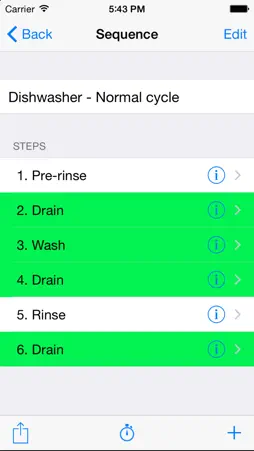
• Add a new sequence: Tap +, type the sequence name, tap Save.
• Select a sequence: Tap the sequence name.
• Delete a sequence: Swipe left over the sequence, and tap Delete.
• Reorder sequences: Tap Edit, move sequence to a new position, tap Done.
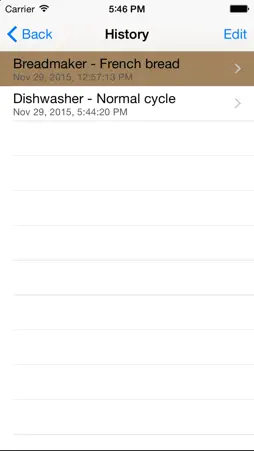
• Edit sequence name, highlight color or steps: Select a sequence, tap Edit, make changes, tap Done. • Time a sequence: Select a sequence, tap Stopwatch. • View timing history: Tap History.
Sequence Steps List:
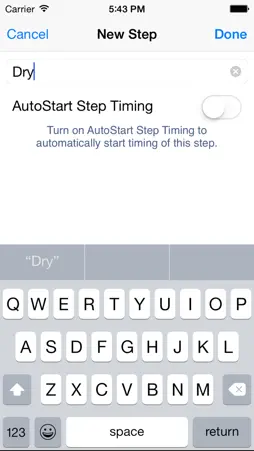
• Add step: Tap +, type the step description, select AutoStart Step Timing option, tap Done.
• DIsplay step details: Tap the step's detail disclosure button, tap Cancel.
• Edit step details: Tap the step's detail disclosure button, make changes, tap Done.
• Delete step: Tap Edit button, tap step's deletion control, and tap Delete.
• Reorder steps: Tap Edit button, move step to new position, tap Done.
• Email the sequence: Tap the Action button. • Start stopwatch beginning with the first step: Tap Stopwatch. • Start stopwatch beginning at an intermediate step: Tap step description. Timer: • Time sequence: Operate stopwatch controls
• Start: Starts timing step. • Stop: Stops timing step. • Next Step: Stops timing step and advances to next step in sequence. • If AutoStart Step Timing is on, timing of step starts automatically. • Save timing results: Tap Save. History: • View sequence detail: Tap sequence. • Email sequence detail: Tap sequence, tap the Action button. • Delete sequence: Tap Edit button, tap sequence's deletion control, and tap Delete.
Technical Analysis
Package Overview Basic metadata
Bundle ID
com.lc.95 Current Version 8.0
Minimum iOS 7.0
Package Size App Store Size
Package Metadata 0 / 0 version records
Detailed binary, privacy manifest, framework, and Info.plist results have not been indexed for this package yet. The verified App Store and archive metadata above remains available.
Developer Information
Known Version Records
0 version records with stored package metadata
Stored metadata does not guarantee a package is currently available to download.
| Details | Version / IDs | Version date | Action |
|---|