
Preview







Description
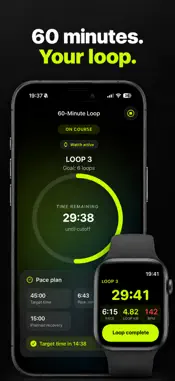
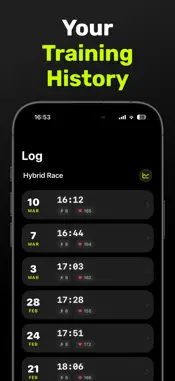
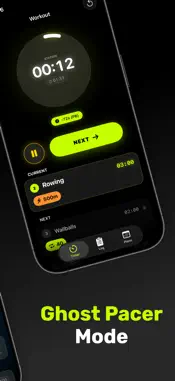
Overpace – Workout Timer for iPhone and Apple Watch Start your next training session with Overpace – the workout timer for functional workouts, interval training, hybrid training and custom circuits. Use Overpace as a timer while preparing for events such as Hyrox or similar fitness competitions – at the gym, outdoors or at home. The 60-Minute Loop also supports your training for races in the Backyard Ultra format and similar loop events. Plan your laps, keep track of running time, pace and recovery, and review your results in the training log. YOUR WORKOUT. YOUR STATIONS. Create custom workouts with individual stations and time targets – for functional fitness, hybrid training, HIIT, cross-training or circuit training. The interval timer always shows your current station and total workout time. Save, edit and duplicate your workout plans or share them with other athletes. Adapt every workout to match your training. 60-MINUTE LOOP FOR YOUR RUNS Plan recurring running loops with a new start every 60 minutes – suitable for the Backyard Ultra format with approximately 6.7 kilometres per loop. Choose your own lap target or start without a fixed number of laps. Set your own target time and pace, and add notes for fueling and recovery. After completing a loop, Overpace shows how much recovery time remains before the next start. The next loop begins automatically at the scheduled time. TRAIN ON YOUR APPLE WATCH Control your workout directly from your wrist. In Loop Mode, your Apple Watch displays: • remaining time for the current loop • distance covered • current pace • heart rate • remaining recovery time • time of the next start Confirm completed loops directly on your Apple Watch and keep all essential information in view during your recovery. TRAINING LOG AND ANALYSIS Track your progress and compare previous training sessions. For your 60-minute loops, the training log shows: • completed loops • total time and total distance • individual loop times • fastest and slowest loop • average recovery time • comparison with your target times GHOST PACER Compare your current workout with your previous best performance. During training, you can see whether you are ahead of or behind your personal comparison time. SHARE WORKOUT PLANS Share custom workouts using a QR code or file. Import workout plans from friends and adapt them for your next training session. APPLE HEALTH AND GPS Save your workouts to Apple Health with your permission. In Loop Mode, your Apple Watch also records your running distance and GPS route. LOCK SCREEN TIMER Follow your workout through Live Activities on the Lock Screen and, on supported iPhone models, in the Dynamic Island. Whether you need a workout timer, interval training, a custom circuit or a 60-minute running loop, you decide how you train. Overpace keeps track of your times, laps and progress. Privacy Policy: https://overpaceapp.de/datenschutz.html Terms of Use: https://overpaceapp.de/nutzungsbedingungen.html
What's New
Version 2.0 2026-09-13
New in Version 2.0: • New 60-Minute Loop for recurring runs with custom lap targets, pace goals and recovery times • Track distance, pace, heart rate and GPS... Technical Analysis
Package Overview Basic metadata
Bundle ID
Lennard.PaceFinder Current Version 2.0
Minimum iOS 18.2
Package Size App Store Size
Package Metadata 2 / 9 version records
Detailed binary, privacy manifest, framework, and Info.plist results have not been indexed for this package yet. The verified App Store and archive metadata above remains available.
Developer Information
Known Version Records
2 version records with stored package metadata • 9 known version records
Stored metadata does not guarantee a package is currently available to download.
| Details | Version / IDs | Version date | Action |
|---|---|---|---|
 Not archived | App Store ID: 883378811 | Unknown | Request Version |
| Not archived | App Store ID: 883311342 | Unknown | Request Version |
| 6.8 MB | v1.3.0 App Store ID: 882684406Build: 14 | 2026-02-22 16:42:16 | Get Version |
| Not archived | App Store ID: 881000003 | Unknown | Request Version |
| Not archived | App Store ID: 880217957 | Unknown | Request Version |
| Not archived | App Store ID: 880210933 | Unknown | Request Version |
 6.55 MB | v1.1.1 App Store ID: 875635849Build: 12 | 2025-06-16 18:26:30 | Get Version |
| Not archived | App Store ID: 875587458 | Unknown | Request Version |
| Not archived | App Store ID: 874186194 | Unknown | Request Version |