
Preview



Description
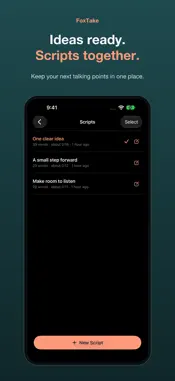
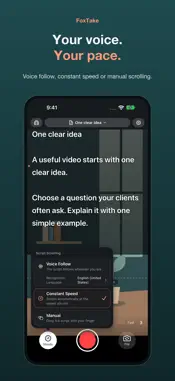
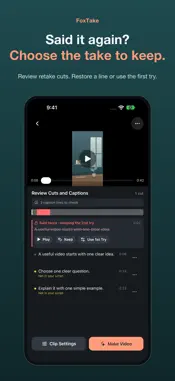
A video workspace for independent professionals. Prepare your own words, read close to the lens, and turn a recording into a captioned video. PREPARE A SCRIPT Type, paste, or dictate into one editable draft. Pick the spoken language and tap to start or stop dictation at your cursor. Explicitly choose AI Polish to fix recognition mistakes and repetition, turn a long article into a spoken script (keep the information, or condense it to a target length), or translate the whole draft faithfully. Preview before replacing, and undo recent edits. READ AND RECORD Voice Follow scrolls with your speech, waits when you pause and follows a repeated sentence. Constant-speed and manual scrolling work too. Tap the script to pause, double-tap to go back a sentence, long-press to edit, and pinch to resize text. Record portrait video with the front or back camera and save it to Photos. MAKE A VIDEO Detect retakes, trim silent ends and shorten long pauses. Captions come from on-device speech recognition, with the script as a correction aid, not a replacement for what you said. Choose caption styles, an optional translation line, video captions, .srt or both. Captions sit below the face guide; they do not avoid every platform's controls. Adjust loudness, speed and beauty, or export a project for editing on a computer. Add a name plate, a video title and covers in 9:16, 3:4 and 16:9. After making a video, fix flagged caption lines against the audio and make a new version; the earlier one stays in Photos. Check important facts, names, numbers and translations; automated results can be wrong. LANGUAGES Fully supported: English, Chinese, Japanese, Korean, German, French, Spanish, Portuguese and Italian. Other recognizable or translatable languages are Beta; check their captions carefully. PRIVACY AND REQUIREMENTS Requires iOS 26 or later; on-device speech and translation language support varies. Recording, editing, on-device speech recognition and Voice Follow run on your iPhone. Online AI stays off until you allow it once; one permission covers title suggestions, AI Polish, AI Check, caption translation and cloud transcription of languages your iPhone can't recognize. Then, opening a take not yet made into a video sends its script (or captions, if there is none) in the background for title suggestions. Only the text or audio clips needed are sent to our server, which passes them to AI providers in the US or EU through OpenRouter. Video pictures are never uploaded. Our proxy keeps no content; see the Privacy Policy for how providers handle data. Turn off AI Features in Settings at any time; on-device features keep working. FOXTAKE PRO The teleprompter and recording do not use credits. One-tap video, AI Check, online caption translation, AI Polish, cloud transcription, dictation (1 credit per draft; not charged when your balance runs short), Voice Follow and project export use AI credits, because they use limited AI computing. Each Apple Account gets starting credits once for trying these features. FoxTake Pro adds credits for each billing period (every month on the yearly plan); unused period credits do not carry over. Subscribers can add credit packs, which do not expire. There is no free trial period. Videos you have already made can still be remade on your iPhone. Monthly: $7.99/month. Yearly: $39.99/year (US prices). The App Store shows local prices before purchase. Online AI also has daily usage protection; at the limit, supported on-device results remain available. Payment is charged to your Apple Account on confirmation. The subscription renews automatically unless cancelled at least 24 hours before the current period ends; renewal is charged within its final 24 hours. Manage or cancel in Apple Account subscription settings. Your scripts and saved videos remain yours. Privacy: https://deskfox.ai/foxtake/privacy Terms: https://deskfox.ai/foxtake/terms Apple EULA: https://www.apple.com/legal/internet-services/itunes/dev/stdeula/
What's New
Version 2.3 2026-11-15
One-tap video now adds a video title, a name plate and cover images. • Video Title: when AI Features is on, a main title and subtitle can be suggested from your...One-tap video now adds a video title, a name plate and cover images. • Video Title: when AI Features is on, a main title and subtitle can be suggested from your script or captions. You can always type or edit the title yourself. • Name Plate: enter your name and profession once, and choose to use it for future videos. • Cover images in 9:16, 3:4 and 16:9. Adjust each size on its own. When using a frame from your video, FoxTake tries to pick one with your eyes open and your mouth relaxed, or you can use a custom image. • After making a video: Remake, Adjust Captions, or change just the covers. Earlier videos stay in Photos. • A redesigned top bar on the recording screen, with the first line of your script closer to the lens. • A redesigned Adjust Captions screen that shows your script next to the suggested wording. Re-record a single sentence and compare it before you use it. • Settings you change for one video now apply to that video only. Set defaults in Settings > Clip Settings. • A clearer explanation of AI Features in Settings. Technical Analysis
Package Overview Basic metadata
Bundle ID
com.deskfox.teleprompter Current Version 2.3
Minimum iOS 26.0
Package Size App Store Size
Package Metadata 0 / 0 version records
Detailed binary, privacy manifest, framework, and Info.plist results have not been indexed for this package yet. The verified App Store and archive metadata above remains available.
Developer Information
Known Version Records
0 version records with stored package metadata
Stored metadata does not guarantee a package is currently available to download.
| Details | Version / IDs | Version date | Action |
|---|