
Preview




Description
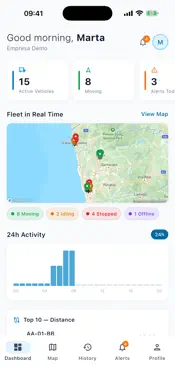
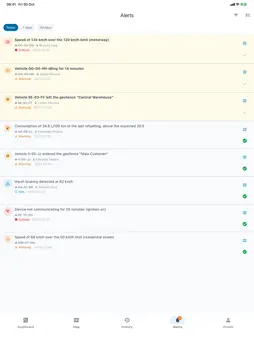
LogFleetIQ is the app for fleet managers at companies that use the LogFleetIQ platform. On your phone, it shows where the company's vehicles are, each day's route and the fleet's alerts, and lets you send messages to drivers. The platform is closed and intended for businesses: accounts are created by the customer company's administrator. There is no public sign-up, no ads and no in-app purchases. DASHBOARD Active vehicles, alerts and kilometres for the day; vehicles moving, idling, stopped and offline; the day's top 10 by distance; the fleet's fuel efficiency; the most recent alerts. LIVE MAP The company's vehicles on the map, in real time, with registration number, direction of travel and status colour (moving, idling, stopped). Tap a vehicle to see the address, driver, speed and time of its last position, or to follow it on the map. Street or satellite view and address search across the whole Iberian Peninsula. The vehicle list is organised by the company's operations, with search and a filter by status; that is where you choose the vehicles to show on the map. Vehicles with no positions for more than 24 hours do not appear on the map: they remain in the list and in the "Offline" counter. ROUTE HISTORY Choose a vehicle and a day to see the route on the map, with start, end and stops, and the summary: distance, top speed, duration and number of stops. ALERTS For today, the last 7 days or the last 30 days: speeding, harsh braking and acceleration, cornering, idling, fuel, geofences and GPS tracker not communicating. Filter by type, severity and status, mark as read or resolved and open the map at the alert's vehicle. It also shows the alerts for drivers' routes, AdBlue and fuel efficiency. NOTIFICATIONS For the alerts the platform sends and for drivers' replies to your messages. You only need to allow them once. MESSAGES TO DRIVERS Write a message, attach a PDF if you need to and send it to all drivers, by operation or only to the ones you choose. See, driver by driver, whether it is yet to be delivered, delivered or read, and when. Reply with text, a photo or a PDF. Drivers read, reply and start conversations in the LogFleetIQ Driver app. DRIVERS Ranking by driving score (day, week or month), fuel efficiency for the fleet and for each driver, and a searchable list of drivers. MAINTENANCE Records by vehicle, including the requests made by drivers. Create a record with type, description, date, odometer reading, garage and cost, and update its status. COMPLIANCE Fleet documents (periodic inspection, insurance, driving licence and others) with their expiry date. See the ones that are about to expire or have expired, open them and upload new files in PDF, JPG or PNG. VEHICLE MANAGEMENT Link or swap the GPS tracker, assign the driver, record odometer readings and consult the checklists that drivers complete when they take over the vehicle. GOOD TO KNOW • You need an active LogFleetIQ account, created by your company's administrator. You sign in with your email address and password; accounts with two-step verification also ask for the code. • Positions come from the GPS trackers installed in the company's vehicles, not from the phone. • The interface is in Portuguese, Spanish and English, and the app needs an internet connection. • What each person sees depends on the role assigned by the administrator: the view-only role has only the live map, and vehicle management is for management roles only. PRIVACY The phone's location is only requested if you tap the button for your own position on the live map, with the app open: it is used to centre the map, is handled by the maps component (Mapbox) and is not sent to LogFleetIQ's servers. The connection to the platform is encrypted. The app uses two external services: Firebase, for notifications and crash reports, and Mapbox, for maps and addresses.
What's New
Version 2.10.0 2026-10-30
Version 2.10.0 • Vehicle checklist: in Map › vehicle › Manage › Assignments, the checklist details show the driver's signature and the time they signed. Checkl... Technical Analysis
Package Overview Basic metadata
Bundle ID
com.logfleetiq.logfleetiqManager Current Version 2.10.0
Minimum iOS 15.0
Package Size App Store Size
Package Metadata 0 / 4 version records
Detailed binary, privacy manifest, framework, and Info.plist results have not been indexed for this package yet. The verified App Store and archive metadata above remains available.
Known Version Records
0 version records with stored package metadata • 4 known version records
Stored metadata does not guarantee a package is currently available to download.
| Details | Version / IDs | Version date | Action |
|---|---|---|---|
| Not archived | App Store ID: 884674410 | Unknown | Request Version |
| Not archived | App Store ID: 884563508 | Unknown | Request Version |
| Not archived | App Store ID: 884473920 | Unknown | Request Version |
| Not archived | App Store ID: 884249003 | Unknown | Request Version |