Preview






Description
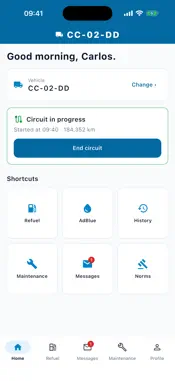
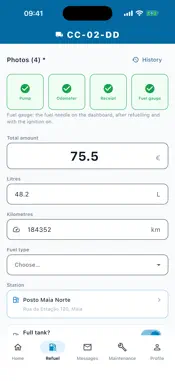
LogFleetIQ Driver is the app for drivers at companies that use the LogFleetIQ fleet management platform. It is used to record the day's route, fuel and AdBlue refuelling, vehicle changes and maintenance requests, and to exchange messages with the managers and receive the company's rules. The app only works with an account created by the company: the administrator creates the accounts and the driver signs in with the email address and PIN given by the fleet manager. On a phone used only by them, drivers can sign in with Face ID or Touch ID; the PIN keeps working. There is no public sign-up, no ads and no in-app purchases. The app is in Portuguese, Spanish and English. WHAT YOU DO IN THE APP • Home — the current vehicle, the route status (not started, in progress or finished), the driver's driving score (if the company uses it), highlighted notices and shortcuts to Refuel, AdBlue, History, Maintenance, Messages and Rules. • Start and end of route — when setting off on the route and at the end of the shift, the driver photographs the instrument panel and confirms the odometer reading, read from the photo when there is a network connection. • Choose and change vehicle — the list shows all the company's active vehicles: free ones first, then those in use, with the colleague's name, which can also be chosen. On taking the vehicle, the driver enters the odometer reading, answers the company's checklist and signs with a finger on the screen. • Refuel — four photos taken on the spot, one after the other (pump, odometer, receipt and fuel gauge), amount, litres, odometer reading, fuel type and filling station. The litres and amount read from the pump photo and the km from the odometer photo go straight into the fields, for the driver to check. The nearest filling station and the fuel of the vehicle's last refuel come already chosen. • AdBlue — a separate record, with three photos (odometer, pump and receipt), odometer reading and litres. With the company's AdBlue monitoring on, a warning appears when the vehicle has gone too long without a record. • Offline — the start and end of route, refuelling, AdBlue, the vehicle checklist and maintenance requests are saved on the phone, with their photos, and sent when the connection returns, with the app open. • History — list of refuelling records for the current vehicle, with date, filling station, litres and amount. • Messages — the company's messages and conversations with the managers, which the driver can also start, with text and up to 3 photos. PDFs and photos from the company open inside the app. The company sees when a message has been opened. • Company rules — when the company publishes or changes a rule, the driver reads it to the end and confirms having taken note of it before continuing. The rules in force and the confirmations remain available to consult. • Maintenance — request to the fleet manager, with the type and description of the problem, and a list of the requests and their status. • Notifications — alerts from the company's platform: new message or reply, rule awaiting confirmation, and AdBlue and route reminders. Tapping the alert opens the relevant screen. LOCATION AND PHOTOS • Location — only while the app is in use: a single position reading at each start or end of route, refuelling or AdBlue, which goes with that record and suggests the nearest filling station. The app does not track the phone in the background and does not record journeys. If location is refused, the records can still be made. • Photos — taken by the driver, they serve as proof of the records. PRIVACY Records are sent only to the LogFleetIQ platform's servers, over an encrypted connection, and are available to the driver's company for fleet management. The app has no advertising and no usage analytics tools. Privacy policy: https://app.logfleetiq.com/pt/privacy SUPPORT Questions about your account, PIN or vehicle: speak to your company's fleet manager.
What's New
Version 1.19.0 2026-10-30
Version 1.19.0 • Refuel in fewer taps: "Take the photos" takes all 4 in a row, the values read go straight into the fields, and the fuel and filling station co... Technical Analysis
Package Overview Basic metadata
Bundle ID
com.logfleetiq.logfleetiqDriver Current Version 1.19.0
Minimum iOS 15.5
Package Size App Store Size
Package Metadata 0 / 2 version records
Detailed binary, privacy manifest, framework, and Info.plist results have not been indexed for this package yet. The verified App Store and archive metadata above remains available.
Developer Information
Known Version Records
0 version records with stored package metadata • 2 known version records
Stored metadata does not guarantee a package is currently available to download.
| Details | Version / IDs | Version date | Action |
|---|---|---|---|
| Not archived | App Store ID: 884674625 | Unknown | Request Version |
| Not archived | App Store ID: 884604682 | Unknown | Request Version |