Preview

Description
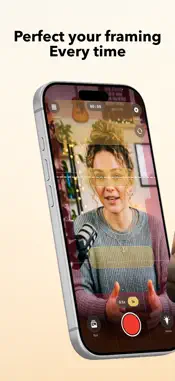
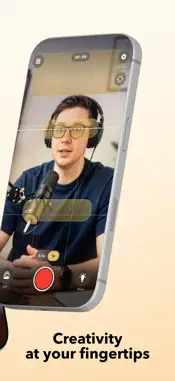
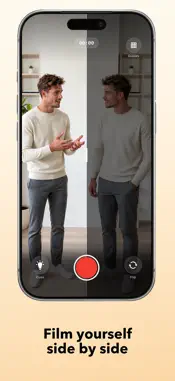
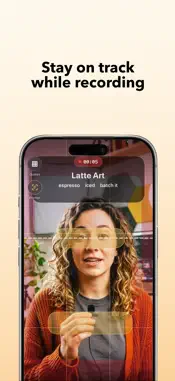
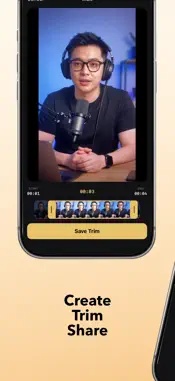
OnFrame is the camera built for Reels and TikToks that are framed right — before you hit record, not after. Most takes get ruined by framing you only notice later: eyes too low, the caption covering your face, the key moment hidden behind the app's own buttons. OnFrame lays precise guides over a full-screen preview, so every take lands where it should. FRAMING GUIDES • Eye line and eye zone, caption area, hook zone, and a rule-of-thirds grid • "Danger" and "avoid" zones that mirror where Instagram and TikTok cover the screen • Turn each guide on or off — positions measured to match the real apps FOUR WAYS TO FRAME • Standard: the full set of guides, free • Left / Right: film yourself twice, one take per side, without overlapping (Premium) • Conversation: an earlier clip plays in a small window, so you can talk to yourself (Premium) • See thru Frame: one frame of a clip over the camera, to line up a transition (Premium) These only help you while filming. Nothing from them ends up in your video, and you combine your takes in the editor of your choice. BUILT FOR CREATORS • Opens on the front camera; flip to the back with 0.5x / 1x / tele lenses • True 9:16 recording in 720p, 1080p or 4K, with sound • Recording timer and tap-to-focus TRIM WITHOUT LOSING ANYTHING • Non-destructive trimming — your original file is never changed • Widen the trim back out any time, then share or save the cut NEVER RUN OUT OF IDEAS • Offline topic generator: type one word, get themes and angles for your next video • Notes: save up to 50 video ideas the moment you have them • Your own cue cards: one main word and up to three cues, with up to 15 saved (Premium) • Cue words in frame: your topic and its angles sit in the shot while you record — words to glance at, not a scrolling script, and never in your video (Premium) MORE • Filming reminders on the days and times you choose • Open the camera or your notes from the Lock Screen or Control Center • One tap from your clips to Instagram or TikTok (Premium) • Full English and German • Works offline. No account, no sign-up, nothing uploaded — your videos stay on your device. OnFrame Premium unlocks the three extra guideline sets, your own cue cards, cue words in frame, unlimited topic ideas and the one-tap shortcut to Instagram or TikTok. • Monthly, 6 Months and Yearly plans, each with a 7-day free trial • Lifetime one-time purchase, no subscription Payment is charged to your Apple Account at confirmation of purchase. Subscriptions renew automatically unless canceled at least 24 hours before the end of the current period; manage or cancel anytime in your App Store account settings. Any unused portion of a free trial is forfeited when you buy a subscription. Terms of Use (EULA): https://www.apple.com/legal/internet-services/itunes/dev/stdeula/ Privacy Policy: https://www.bildungskongress.vision/onframe-privacy
What's New
Version 2.0 2026-11-08
• Three new guideline sets: Left / Right to film yourself twice, Conversation to talk to an earlier take, and See thru Frame to line up transitions (Premium) • ... Technical Analysis
Package Overview Basic metadata
Bundle ID
com.onframe.app Current Version 2.0
Minimum iOS 17.0
Package Size App Store Size
Package Metadata 0 / 0 version records
Detailed binary, privacy manifest, framework, and Info.plist results have not been indexed for this package yet. The verified App Store and archive metadata above remains available.
Known Version Records
0 version records with stored package metadata
Stored metadata does not guarantee a package is currently available to download.
| Details | Version / IDs | Version date | Action |
|---|