
Preview




Description
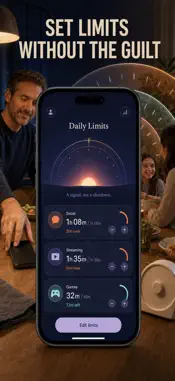
PREMIUM — PURCHASE REQUIRED: All features described below are part of Pro and require a purchase: a weekly or yearly auto-renewing subscription, or a one-time lifetime purchase. Log your screen time by hand — and finally understand what is happening. ScreenTimeLog is a manual screen time diary: after a scroll session you open the app, log the minutes, tag the category, and record how you felt. No automatic tracking, no blocking, no judgment — just the honest act of writing it down. That act is the whole point. Automatic trackers count minutes you never look at. Writing "45 min · Social · felt drained" with your own thumb is a mindfulness practice — and it is the precise moment your habits begin to change. Because every entry carries a mood, ScreenTimeLog reveals the one chart no automatic report has: whether your heavier phone days actually feel worse. WHAT YOU GET • Open the app and see today at a glance — 2h 14m logged, 3 entries, and a day streak you will not want to break • A doughnut showing where the day truly went — Social, Streaming, Games, Productivity, Reading — so "I was busy" becomes "I scrolled for 90 minutes" • A mood on every entry, from Drained to Refreshed, feeding a scatter plot of mood versus screen time with a plain-language verdict on your pattern • Daily limits per category with a live bar that turns amber at 80% and red when you exceed it • Detox goals such as "Screen-free dinner" or "No phone first hour", with weekly targets and screen-free streaks • A gentle reminder at the hour you choose, so the diary actually gets written each evening PERFECT FOR • Anyone who has seen the built-in weekly screen time report, winced for ten seconds, and changed nothing • People running a digital detox or unplugging challenge who want a written record, not another app blocker • Journallers who want phone habits and mood in one private space • Anyone who suspects doomscrolling drags their mood down — and wants proof either way WHY NOT JUST USE THE BUILT-IN REPORT? Because passive numbers do not change behaviour. The OS tells you a total on Sunday; a diary makes you face each session the day it happens. And no automatic report knows how you felt, lets you set a "Screen-free dinner" goal, or shows whether your worst-mood days are your heaviest-scroll days. Manual is not a limitation here — it is the method. PRIVATE BY DEFAULT Your diary stays on your iPhone. No account, no cloud, no analytics on your entries. What you log is nobody's business but yours. PREMIUM (PURCHASE REQUIRED) ScreenTimeLog Pro unlocks unlimited category limits, unlimited detox goals, the full Insights tab — trends, category breakdown, and mood-versus-screen-time correlation — plus CSV export of your entire log. Pro is available as a weekly subscription, a yearly subscription, or a one-time lifetime purchase. Tonight, before bed, log today's minutes. That one honest entry is where less screen time starts. Terms of Use: https://leanstudio.asia/terms-of-use Privacy Policy: https://leanstudio.asia/privacy-policy Support: [email protected]
What's New
Version 1.1 2026-10-06
Bug fixes and performance improvements. Thanks for using the app — your feedback keeps it getting better. Technical Analysis
Package Overview Basic metadata
Bundle ID
com.lean.screentimelog Current Version 1.1
Minimum iOS 17.0
Package Size App Store Size
Package Metadata 0 / 1 version records
Detailed binary, privacy manifest, framework, and Info.plist results have not been indexed for this package yet. The verified App Store and archive metadata above remains available.
Developer Information
Known Version Records
0 version records with stored package metadata • 1 known version records
Stored metadata does not guarantee a package is currently available to download.
| Details | Version / IDs | Version date | Action |
|---|---|---|---|
| Not archived | App Store ID: 886009587 | Unknown | Request Version |