
Preview





Description
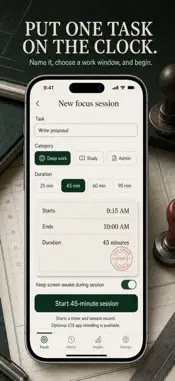
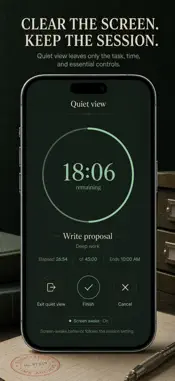
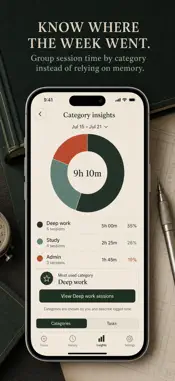
Put your phone under lockdown and get proper work done. FocusLock is a deep work timer paired with app blocking: launch a session and iOS Screen Time shields the apps you've chosen until the timer runs out. Most timers just tick while your worst distraction waits one tap away. FocusLock combines a precise wall-clock timer with Apple's Family Controls, so the apps that wreck your focus stay locked during the session — selected privately via Apple's picker, never visible to us. WHAT YOU GET • Start a 15, 25, 45, 60 or 90 minute session and your chosen apps lock behind a shield until time's up • A wall-clock timer that survives backgrounding and app relaunches — every minute logged is a minute genuinely elapsed • Zen Mode: a silent full-screen clock that keeps the display lit, nothing else visible • A daily minute goal with current and best streaks — maintain your chain, day after day • Complete on-device session history: categories, notes, search capability, and a seven-day chart across Deep work, Study, Creative and Admin PERFECT FOR • University students who need study blocks without social media interruptions • Freelancers and office workers protecting their deep work hours from their own phone • Illustrators, engineers and writers tracking genuine maker time • Anyone tackling a phone addiction one shielded session at a time WHY NOT JUST USE iOS SCREEN TIME LIMITS? System limits are simple to override and difficult to apply to single work blocks. FocusLock harnesses the same system capability but anchors it to an actual session: a beginning, an end, a target, and a log. You see precisely how many focused minutes you've genuinely earned. Should you decline Screen Time permission, the timer continues — FocusLock makes it clear that shielding is disabled. PRIVATE BY DEFAULT Sessions, goals, streaks and preferences stay on this device alone. App selections are opaque Apple tokens — FocusLock never discovers which apps or websites you picked. No account, no adverts, no analytics, no tracking. FULL ACCESS FocusLock requires Full Access via an auto-renewing Weekly or Yearly subscription, or a single Lifetime purchase. Every plan includes the session timer, app shielding, Zen Mode, full session history, streaks and lifetime totals. Subscriptions auto-renew unless you cancel via your Apple ID settings no later than 24 hours before the next renewal. Start one session now: select 25 minutes, shield your worst app, and watch the streak begin. Terms of Use: https://leanstudio.asia/terms-of-use Privacy Policy: https://leanstudio.asia/privacy-policy Support: [email protected]
What's New
Version 1.1 2026-09-13
A focused redesign with four-step setup, optional Screen Time shielding, completion review and notes, searchable sessions, category insights, optional daily rem...A focused redesign with four-step setup, optional Screen Time shielding, completion review and notes, searchable sessions, category insights, optional daily reminders, verified StoreKit purchases, and reliable timer recovery. Technical Analysis
Package Overview Basic metadata
Bundle ID
com.lean.focuslock Current Version 1.1
Minimum iOS 17.0
Package Size App Store Size
Package Metadata 1 / 1 version records
Detailed binary, privacy manifest, framework, and Info.plist results have not been indexed for this package yet. The verified App Store and archive metadata above remains available.
Developer Information
Known Version Records
1 version record with stored package metadata
Stored metadata does not guarantee a package is currently available to download.
| Details | Version / IDs | Version date | Action |
|---|---|---|---|
| 2.95 MB | v1.1 App Store ID: 886011179Build: 1.1 | 2026-09-13 14:45:14 | Get Version |