
Preview



Description
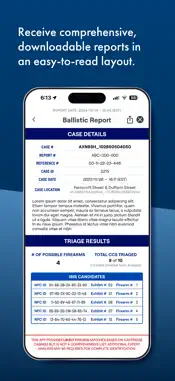
The IBIS ClearCase Mobile App is part of a fully automated cartridge case triage solution designed to help law enforcement agencies and forensic labs accelerate crime gun investigations with ease, objectivity and reliability. Built on the proven IBIS technology, the worldwide standard for ballistic identification, ClearCase streamlines ballistic evidence collection, processing and analysis, significantly reducing dependence on specialized resources. Any individual—trained or untrained—can rapidly triage fired cartridge cases (FCCs) recovered from crime scenes. Within minutes, users of the ClearCase solution can: • Capture exhibit images with GPS data and log evidence with NFC tags • Gain preliminary insights into the number and caliber of firearms involved in an incident • Identify the ideal casings for submission to ballistic identification networks (e.g., NIBIN) The mobile app works in tandem with a stationary acquisition unit that uses advanced algorithms to generate detailed 3D images of all collected evidence, capturing relevant data from each casing. Results are fast, reliable and free from human error or bias, ensuring actionable leads and faster submissions to NIBIN or other ballistic identification networks. This rapid crime gun intelligence helps law enforcement pursue leads and disrupt cycles of violence more quickly. ClearCase integrates with existing workflows and also supports advanced workflows for collecting and preserving trace evidence, such as DNA, fingerprints and gunshot residue, during triage. Key Features: • User-friendly mobile and web apps for evidence collection and management • NFC-based tagging for unique evidence identification • Support for trace evidence preservation • Proven, state-of-the-art algorithms for reliable, unbiased results • Detailed reports with incident maps and firearm trails Important: Access to the ClearCase Mobile App is restricted. Please contact LeadsOnline for more information and to gain access to this powerful tool for accelerating crime gun investigations. Sales: https://leadsonline.com/contact Support: [email protected]
What's New
Version 1.11.0 2026-10-29
User Management Roles & Permissions: Admin users can assign roles to users with different permission sets. There are three default roles: Administrator, User + ...User Management Roles & Permissions: Admin users can assign roles to users with different permission sets. There are three default roles: Administrator, User + InSights, and User. Each role has its own defined permissions. Admins can also create custom roles and adjust the permission sets for each custom role. Role visibility: Users can see their assigned role in Account Details. It also replaces the email address in the bottom-left account panel and its expanded menu. Permission updates: Permission changes made by an admin now take effect in real time, without the user having to sign out. If a change affects the screen a user is on, a dialog explains what was removed, narrowed, or granted. Screens adjust their available actions on the spot, or return the user to the case list if access is lost. Changes made while the app was closed are applied when the app resumes, and users whose session is invalidated are logged out. Subscriptions: The "Subscriptions" section within User Management allows Admin users to manage email subscriptions (e.g. InSights notifications). Admins can add ClearCase users or external email addresses as recipients. SSO Enhancements The attached document, ClearCase SSO Setup Guide V2.0, outlines updates to SSO since the last release. These updates include: Identity provider selection: When enabling SSO, admins now choose their identity provider (Microsoft Entra ID or Okta) first, and the form shows only the fields that provider requires. Okta support: Test Connection and the SSO login redirect now work against an agency's Okta domain. Okta-specific errors appear in plain language, and MFA enforced by Okta is respected. Role mapping layout: The SSO role mapping section now groups roles under "Default Roles" (Administrator, User + InSights, User) and "Custom Roles." Custom roles appear automatically once created, and the Custom Roles section is hidden when none exist. Mapping custom roles to groups: Admins can map a custom role to an Entra ID group when creating it, and the mapped group is shown on the role. Each role can map to only one group, and each group to only one role. Conflicts show a specific error naming the role and group involved. User Management for SSO agencies: The user list, member counts, Roles tab, and Members tab are visible but read-only, with a note that membership is managed through the organization's identity provider. Admins can still create custom roles, and the Subscription tab is unchanged. System Settings The "InSights Dashboard Agency Visibility" and "InSights Notifications" sections have been removed from System Settings. This is now handled in User Management. Case Address Users can now optionally add an address to a case. The address is shown in Case Details, InSights reports, the Full Report, and the Analysis Summary. In Case Details, the coordinates are now labeled "Location." Mapbox Migration Maps now use Mapbox instead of Google Maps. This is a provider change only. The screens, pins, overlays, and controls (zoom, satellite, fullscreen) work as before. Fixes Fixed login failures for accounts whose stored email contains uppercase letters. Technical Analysis
Package Overview Basic metadata
Bundle ID
com.leadsonline.ats Current Version 1.11.0
Minimum iOS 15.6
Package Size App Store Size
Package Metadata 0 / 7 version records
0.0 / 5.0 (0 ratings)
Detailed binary, privacy manifest, framework, and Info.plist results have not been indexed for this package yet. The verified App Store and archive metadata above remains available.
Developer Information
Known Version Records
0 version records with stored package metadata • 7 known version records
Stored metadata does not guarantee a package is currently available to download.
| Details | Version / IDs | Version date | Action |
|---|---|---|---|
| Not archived | App Store ID: 889940396 | Unknown | Request Version |
| Not archived | App Store ID: 886123546 | Unknown | Request Version |
| Not archived | App Store ID: 883840812 | Unknown | Request Version |
| Not archived | App Store ID: 880489692 | Unknown | Request Version |
| Not archived | App Store ID: 875446365 | Unknown | Request Version |
| Not archived | App Store ID: 873038506 | Unknown | Request Version |
| Not archived | App Store ID: 871568798 | Unknown | Request Version |