
Preview




Description
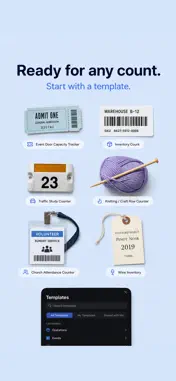
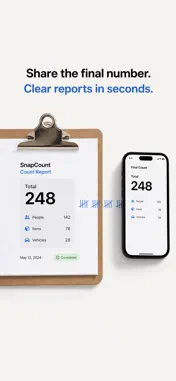
Each store or worker counts on their own phone, and you see every count and the total live, instead of adding up tally sheets. No sensors, nothing to install. Start free. A guest session needs no account: share its code or QR code and up to 10 phones count into the same total, live. With Pro or Enterprise, your team opens the same saved counters on every phone, and changes appear on every screen in real time. Built for daily counts: foot traffic and stock-outs per store, output per worker, stocktakes, event capacity, church attendance and more. COUNT FAST - Large plus and minus keys, steps for counting by the case or pack, goals with a progress bar, and haptics. - Count with the volume buttons, with the phone in a pocket (turn it on in Settings). - The screen stays on while you count. - Reset by mistake? Undo it for 10 seconds. - No signal? The app opens with your saved counters, and taps wait on your phone with their time and sync when you are back online, never counted twice. COUNT WITHOUT OPENING THE APP - Widgets for the Home Screen, Lock Screen and StandBy. Choose a counter for each widget and tap plus, or minus on the medium widget (iOS 17 or later). On iOS 26, widgets update as your team counts. - A control for Control Center, the Lock Screen or the Action button (iOS 18 or later). - Siri and Shortcuts: "Add one to Main door in SnapCount". - Keep the live total on your Lock Screen and in the Dynamic Island (iOS 17 or later). COUNT TOGETHER - Guest sessions: no accounts, up to 10 phones, a QR code to join, and each phone names its door. - Let others count: share a link or QR code for any saved counter or group, and anyone who opens it counts into your workspace without an account. Stop it any time. - Totals by item: counters with the same name in different groups add up on one Totals tab, ready for a TV. - Templates for church attendance, event capacity, inventory, pitch counts, laps and more. Each shows the board it makes before you use it. - Public views: a read-only live total to share as a link or QR code, for a lobby screen or a team. - Groups with sum or net totals, capacity alerts (as notifications on Enterprise), scheduled email reports, busiest times, archive and restore, and a headcount summary when a Live Run closes. PLANS Every new organization starts with a free 7-day Pro trial that does not charge automatically. For 7 days after the trial, free limits apply (1 counter and a maximum count of 20), then counting pauses until you choose a plan. Your counters stay saved, and guest sessions are always free. - Pro: one organization, up to 10 seats, unlimited shared counters, real-time sync, CSV or JSON export, scheduled reports and counter stats. - Enterprise adds unlimited seats, activity history, timestamped exports, automatic resets, counter access, locking and capacity alerts. API keys and webhooks are set up on the SnapCount web dashboard. Pro and Enterprise are auto-renewable subscriptions through Apple, and each covers one organization. An Event Pass gives one organization 72 hours of Pro or seven days of Enterprise and does not renew. StoreKit shows the price before you buy. Payment is charged to your Apple ID at confirmation of purchase. Subscriptions renew automatically unless cancelled at least 24 hours before the period ends. Manage or cancel in your Apple ID account settings. Earlier lifetime purchases keep their access. ACCESSIBILITY VoiceOver, Dynamic Type, Reduce Motion, Reduce Transparency, and light and dark appearance. PRIVACY No advertising, and no tracking across other companies' apps or websites. We use account-linked product analytics, crash reports and session replay (which may include on-screen content and non-password input) to improve the app and provide support. Privacy policy: https://snapcount.app/privacy-policy Terms of Use: https://www.apple.com/legal/internet-services/itunes/dev/stdeula/
What's New
Version 1.3.13 2026-11-24
See when your doors are busiest, and keep a guest count. - Enterprise counter analytics now show busy hours by weekday: Monday to Sunday by the hours you count...See when your doors are busiest, and keep a guest count. - Enterprise counter analytics now show busy hours by weekday: Monday to Sunday by the hours you count, shaded by how many came in, with the busiest hour named above. Tap any hour to see its number. - Export report adds Busy hours by weekday, as a CSV. - A free count you started can now be emailed to you as a CSV once it passes 50 or two hours, with a link that keeps it in a free account. No account needed, and tips by email only if you tick the box. - Capacity alerts have a one-tap "Warn me at 80% and 95%" on Enterprise. - Counts made offline are now kept when the counter is locked or a live run is on, and sent once it opens again. - Live counts from other phones start arriving again by themselves after a long signal drop. - Tapping fast now counts every tap once and in order, with no jumps, on counters, guest counts, the widget and the volume buttons. - When held counts can't be sent, the message now says why: the plan's count limit, an ended trial, or removed access. - VoiceOver can open counters from the Counters list again, and hears each counter's name and count. - When you create a numbered set, tapping Prefix or How many selects the value, so typing replaces it. - Opening a team invite while signed in with another email now takes you to create the invited account when it doesn't exist yet, and says when Sign in with Apple hid your email. Technical Analysis
Package Overview Basic metadata
Bundle ID
app.snapcount.ios Current Version 1.3.13
Minimum iOS 15.1
Package Size App Store Size
Package Metadata 0 / 2 version records
Detailed binary, privacy manifest, framework, and Info.plist results have not been indexed for this package yet. The verified App Store and archive metadata above remains available.
Developer Information
Known Version Records
0 version records with stored package metadata • 2 known version records
Stored metadata does not guarantee a package is currently available to download.
| Details | Version / IDs | Version date | Action |
|---|---|---|---|
| Not archived | App Store ID: 886011580 | Unknown | Request Version |
| Not archived | App Store ID: 884730987 | Unknown | Request Version |