Preview


Description
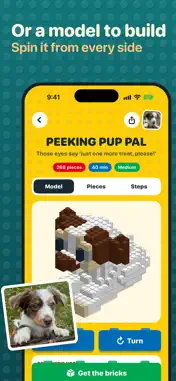
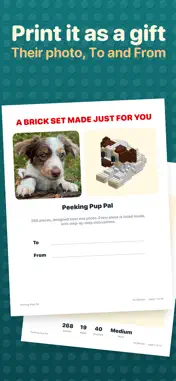
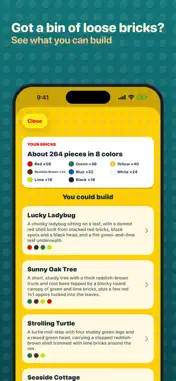
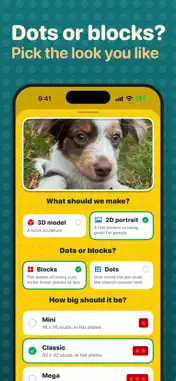
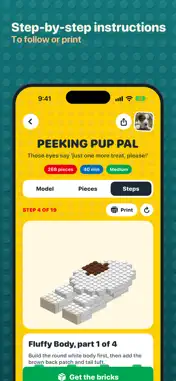
Turn a photo of your dog, your cat or your favorite things into a brick set you can really build: a 3D model with every piece listed and step-by-step instructions, or a flat portrait of a pet or a person you love. A gift they won't find in a shop. Print the instruction booklet with a gift page on the front: their photo, the finished model and a To and From line. Wrap the booklet now and order the bricks when you're ready. 3D MODELS Pick a size, from a pocket-size Mini of about 75 pieces to a Mega showpiece of about 500, and choose classic bricks or a finer version with plates and tiles. In a minute or two you can spin the finished model and look at it from every side. Noses, ears and tongues stay on, and a dog lying down comes out full size. Adding a side or back photo helps with shape. If it isn't right, ask for changes or start over; a build is only used when you keep a design. PORTRAITS Prefer something to hang on the wall? A 2D portrait frames the face and lifts your pet or person onto a clean background. It's ready in seconds and made right on your phone. The new Blocks style covers each patch of color with flat plates of every size, so the same picture takes far fewer pieces: a Classic 32 by 32 portrait comes to about 200 to 500 pieces instead of 1,028 round tiles. In our tests the estimated parts cost fell from about $51 to about $25 to $35. Like the classic mosaic look? Dots, one round tile per stud, is still there. EVERY PIECE, EVERY STEP Every design you keep comes with a full parts list (sizes, colors and BrickLink part numbers), step-by-step instructions you can follow on screen or print, and an estimated cost for the bricks. One tap copies your list and opens BrickLink, the large marketplace for single bricks. GOT A BIN OF LOOSE BRICKS? Photograph it with "What can I build with my bricks?" and the app counts your pieces by color and size, suggests models, and designs one using only what you own. Switch that off for a bigger build, and the parts list shows just the extra pieces to add. Your first 2 builds are free. After that, builds come in packs of 5 or 15 whenever you want them. There is no subscription and no account. Designs are made by Claude, an AI model from Anthropic, from the photo you choose; the photo is used only for your design and isn't kept. Pic2Bricks is an independent app from LastLap Lab LLC and is not affiliated with, sponsored by, or endorsed by the LEGO Group.
What's New
Version 1.6.4 2026-11-20
Bug fix: the Add button for a side or back view now opens your photo library, so you can add extra photos to a 3D build. Technical Analysis
Package Overview Basic metadata
Bundle ID
com.geoffbaron.Pic2Bricks Current Version 1.6.4
Minimum iOS 17.0
Package Size App Store Size
Package Metadata 0 / 0 version records
Detailed binary, privacy manifest, framework, and Info.plist results have not been indexed for this package yet. The verified App Store and archive metadata above remains available.
Developer Information
Known Version Records
0 version records with stored package metadata
Stored metadata does not guarantee a package is currently available to download.
| Details | Version / IDs | Version date | Action |
|---|