
Preview




Description
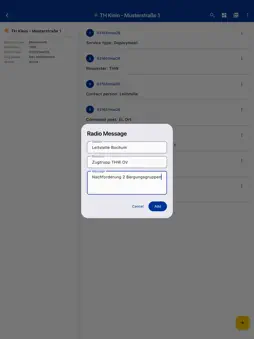
The digital operations diary for missions and drills in civil protection. Create and manage operations diaries right on your smartphone — fully offline and without registration. MISSION WIZARD Create new missions in seconds. The guided wizard captures all relevant data — from mission type and requester to command post and alarm time — and automatically generates the first log entries. Duplicate existing missions with a single tap. COMPLETE DOCUMENTATION Record events chronologically with automatic date-time group (DTG). Use categorized quick actions for common entries — from strength and radio reports to GPS/weather data and handovers. Create custom quick actions and share them via QR code. DIGITAL SIGNATURES & HANDOVERS Sign mission closures and diary handovers digitally. Both leaders sign during handover — signatures appear correctly assigned in the PDF export. Optionally transfer the mission directly to the new leader's device. SITUATION REPORTS & MISSION REPORTS Create structured situation reports with auto-fill from mission data and export them as PDF in official form style. Mission reports summarize operations with a milestone timeline and statistics. UNIT REGISTRATION Register deployed units with personnel, vehicles, and strength. Registration forms are automatically saved as PDF attachments to log entries. Templates for recurring units speed up registration — shareable via QR code. STRENGTH REPORTS Report personnel strength with leaders, sub-leaders, and crew. The dashboard shows total strength from reports or active units. PHOTO DOCUMENTATION Attach photos directly from the camera or gallery to log entries. Compression is adjustable, images appear as attachments in the PDF export. DASHBOARD & SEARCH The interactive dashboard shows mission strength, location, and a dynamic milestone timeline. Search and filter chips on the home screen help find missions quickly. PDF EXPORT Export the complete operations diary as a print-ready A4 PDF — with digital signatures, handover protocols, and photo attachments. The correct signature appears automatically based on handover timing. MORE FEATURES • Guided onboarding with permissions and profile setup • Night mode (red light) for night operations • Export, import, and transfer missions between devices • Backup & restore all data as .etb file • Fully offline — all data stays on your device • German and English
What's New
Version 2.4.0 2026-10-27
New: situation map Via "+" → "Situation map" a map opens at your current location. You can draw tactical signs (incident site, staging area, hazards, THW units... Technical Analysis
Package Overview Basic metadata
Bundle ID
de.drydendigital.einsatztagebuch Current Version 2.4.0
Minimum iOS 15.5
Package Size App Store Size
Package Metadata 1 / 9 version records
Detailed binary, privacy manifest, framework, and Info.plist results have not been indexed for this package yet. The verified App Store and archive metadata above remains available.
Developer Information
Known Version Records
1 version record with stored package metadata • 9 known version records
Stored metadata does not guarantee a package is currently available to download.
| Details | Version / IDs | Version date | Action |
|---|---|---|---|
| 32.3 MB | v2.2.2 App Store ID: 887819327Build: 2.2.2 | 2026-09-02 15:39:43 | Paid / Arcade |
| Not archived | App Store ID: 886607950 | Unknown | Paid / Arcade |
| Not archived | App Store ID: 885211834 | Unknown | Paid / Arcade |
| Not archived | App Store ID: 885178351 | Unknown | Paid / Arcade |
| Not archived | App Store ID: 884967429 | Unknown | Paid / Arcade |
| Not archived | App Store ID: 884248198 | Unknown | Paid / Arcade |
| Not archived | App Store ID: 884105929 | Unknown | Paid / Arcade |
| Not archived | App Store ID: 883811103 | Unknown | Paid / Arcade |
| Not archived | App Store ID: 883355951 | Unknown | Paid / Arcade |