
Preview




Description
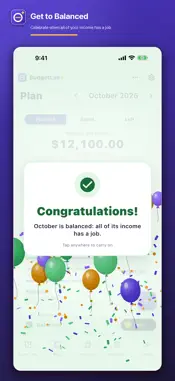
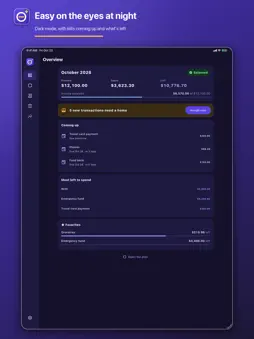
Give your money a plan. Get to Balanced. BudgetLab+ is a zero-based budget for you and your partner. Give this month’s income a plan, line by line, until nothing is left to plan, then give each new transaction a home as it arrives. One shared budget on iPhone, iPad and the web. THREE STEPS, EVERY MONTH • Plan the month: write down this month’s income, then give all of it a line: rent, groceries, savings, giving. Until it all has a place, BudgetLab+ shows what’s still to plan. • Give each purchase a home: as money comes and goes, put each transaction on its line. You see what’s left on every line, every day, before you spend it. • Get to Balanced: when income minus everything you’ve planned is exactly zero, the month is Balanced. The first time each month you get there, BudgetLab+ celebrates with you. A MINUTE A DAY New transactions wait in a tray at the bottom of your plan. Tap one and BudgetLab+ suggests a line: where that payee went last time, or one that fits the kind of shop. One tap to accept it, or pick another line. Split a purchase across lines, mark a transfer, or make a new line right from the purchase. A KEYPAD MADE FOR MONEY Every amount opens a money keypad with a built-in calculator. While you type, a banner shows what is still to plan this month, or how far over you’d go: amber to plan, red over, green Balanced. ONE BUDGET, TWO OF YOU Start a household and invite your partner with a link. You both plan, assign and see the same budget on your own devices, and every change syncs to the other. Sign in with Apple or Google. YOUR BANK, IN YOUR BUDGET (PREMIUM) Connect your banks through Plaid in about a minute, and new transactions usually arrive within hours, ready to give a home. Balances stay up to date on the Accounts page. • Read-only: BudgetLab+ can’t move money • You sign in to your bank in Plaid’s secure window, never in BudgetLab+ • Transfers between your own accounts are spotted • Pending purchases are counted once, when they clear • Remove a bank any time, and its link is deleted at once BRING YOUR HISTORY WITH YOU Import the CSV exports of other budgeting apps (Copilot Money, EveryDollar, Goodbudget, Mint, Monarch, PocketGuard, Quicken Simplifi, Rocket Money, Tiller and YNAB), or any spreadsheet or bank CSV. See exactly what will be added before anything changes, and undo the whole import in one go. Export your own budget to CSV whenever you like. PRIVATE BY DESIGN No ads, no trackers, no selling your data. Lock the app with Face ID, Touch ID or your passcode. Delete your account and your budget in the app at any time. FREE TO BUDGET, PREMIUM FOR YOUR BANK Planning, assigning, the shared household, import and export are free on every device. BudgetLab+ Premium adds bank connections through Plaid (up to 6 bank logins) and full Trends, for the whole household. Premium is an auto-renewing subscription: weekly with a 3-day free trial for new subscribers, monthly, or yearly. Prices are shown in the app before you buy. Payment is charged to your Apple ID when you confirm the purchase, or when the free trial ends. The subscription renews automatically for the same length and price unless you cancel at least 24 hours before the end of the current period, and your account is charged for the renewal within the 24 hours before that. Manage or cancel any time in your App Store account settings. Terms of Use: https://budgetlabplus.com/terms Privacy Policy: https://budgetlabplus.com/privacy Support: [email protected]
What's New
Version 1.0.4 2026-11-01
New month, no confusion: when you give a home to a transaction from last month, BudgetLab+ asks whether to track it in this month's plan or last month's, with a... Technical Analysis
Package Overview Basic metadata
Bundle ID
com.labarchitect.budgetlabPlus Current Version 1.0.4
Minimum iOS 15.0
Package Size App Store Size
Package Metadata 0 / 0 version records
Detailed binary, privacy manifest, framework, and Info.plist results have not been indexed for this package yet. The verified App Store and archive metadata above remains available.
Developer Information
Known Version Records
0 version records with stored package metadata
Stored metadata does not guarantee a package is currently available to download.
| Details | Version / IDs | Version date | Action |
|---|