
Preview



Description
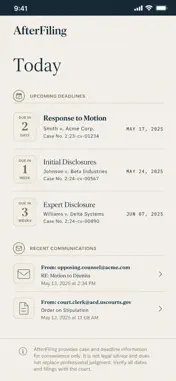
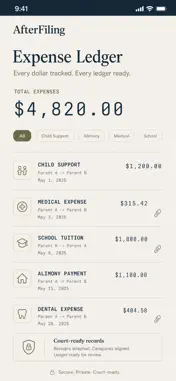
After Filing is a calm, organized home for everything your divorce generates: court filings, financial disclosures, custody schedules, coparent messages, child-support payments, and the decisions that follow you for years afterward. DOCUMENT VAULT Photograph or upload court filings, financial disclosures, settlement drafts, and court orders. OCR makes every document full-text searchable. Categorized by type and case stage — so you can find what your attorney needs in seconds, not hours. TIMELINE & DEADLINES Court dates, response deadlines, mediation appointments, financial-disclosure due dates. After Filing's AI extracts dates from your documents automatically and adds them to the timeline. Typography weight — not urgent red — indicates severity. TONE REWRITER You type what you want to say. After Filing rewrites it in calm, court-safe, child-centered language. You see both versions side by side and choose which to send. This is the feature your attorney wishes you had. CUSTODY SCHEDULE A visual calendar showing custody days, handoffs, holidays, school events. One tap syncs to your system calendar. Never argue about the schedule again — it's in writing. EXPENSE LEDGER Track child-support payments, alimony, shared medical and school expenses. Generate a clean ledger for court or your accountant. Export as PDF. DECISION JOURNAL When you face a major decision — which school, which house — structure your thinking with AI prompts. Saved for future reference and visible to your attorney if needed. ATTORNEY BRIEF GENERATOR Before each attorney meeting, generate a structured memo: what's happened since last meeting, open items, questions to ask. Maximize your billable-hour value. NAME CHANGE CHECKLIST Post-decree, the 40+ institutions you have to update — tracked, with AI-drafted notification letters. NEW IN THIS UPDATE • Deadline Reminders — get notified before every court date and response deadline, so nothing slips. • Court-Countdown Widget & Live Activity (NEW) — your next hearing on the Home and Lock Screen, counting down. • Encrypted iCloud Sync (NEW) — open your case on iPhone and iPad, safely backed up in your own private iCloud. • Case Binder Export (NEW) — one tap builds a complete PDF binder (documents, timeline, ledger, brief) plus a CSV for your accountant. • AI Reply Coach (NEW) — paste the message you received and your reaction; get a court-safe reply and see what changed. • Multi-Case Workspace (NEW) — manage the original decree and later modifications side by side. PRIVACY FIRST Divorce documents are uniquely sensitive. After Filing stores everything on-device by default. iCloud sync is opt-in and stays in your own private iCloud. Face ID locks access. All AI runs on-device — your messages and documents never leave your phone. No ads. No data brokers. --- After Filing is a document-organization tool. It does not provide legal advice. Consult a licensed attorney for legal guidance. Subscription: After Filing $19.99/month or $179/year (save 25%). Pro (iCloud sync, widget, reply coach) $24.99/month or $229/year. Family (multiple cases) $29.99/month. 30-day free trial. Cancel anytime in Settings > Subscriptions. ——— Terms of Use (EULA): https://www.apple.com/legal/internet-services/itunes/dev/stdeula/ Privacy Policy: https://brainrash.com/apps/after-filing/privacy
What's New
Version 2.0.2 2026-09-02
• iCloud sync keeps your data up to date across your devices • Clearer subscription details on the upgrade screen • Stability and performance improvements Technical Analysis
Package Overview Basic metadata
Bundle ID
com.brainrash.afterfiling Current Version 2.0.2
Minimum iOS 26.0
Package Size App Store Size
Package Metadata 0 / 0 version records
Detailed binary, privacy manifest, framework, and Info.plist results have not been indexed for this package yet. The verified App Store and archive metadata above remains available.
Developer Information
Known Version Records
0 version records with stored package metadata
Stored metadata does not guarantee a package is currently available to download.
| Details | Version / IDs | Version date | Action |
|---|