Preview


Description
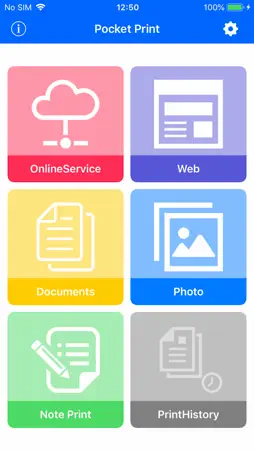
Pocket Print is intended for printing from mobile & label printer of Brother Industries, Ltd. This application has been pursued functional and convenience as compared to [Mobile Print for brother]. Anytime, anywhere, you can print ! The Great combination of Brother Industries printers(PJ-673, PJ-773, PJ-763FMi, RJ-4040, RJ-3040, RJ-3150) and Pocket Print ,will assist you with your mobile printing. You can print web pages and files to Brother Industries printers from iPad/iPhone with Pocket Print. (A connection method is wireless LAN. ) PDF, JPEG, PNG, TIFF, BMP, TXT can be printed. Furthermore, the file of MS Office can also be printed. (doc, docx, xls, xlsx, ppt, pptx) However, there are some caveats. Look the Note (*1) [Keyfeatures] - Print files from iPad/iPhone Supported file formats: PDF, JPEG , PNG, TIFF, BMP, TXT (Note *1) - Print the file is being saved to the online service Supported online service: iCloud, Dropbox, Google Drive Supported file formats: PDF, JPEG, PNG, TIFF, BMP, TXT (Note *1) - Print web page Web authentication is supported. (SSL, Digest, Basic) - Print photo - Print note Print of the input text. (Does not have the ability to save notes.) - Print P-touch Templete(RJ-4040、RJ-3050、RJ-3150) The template created by P-touch Editor can be transmitted. - Print history - Print preview - Printer Setup - Open-In Print Print from other apps using Open-In. - Simple Print (iOS 8 or later) (Note *2) Print the file you have saved in other applications without launching the Pocket Print by utilizing the Pocket Print simple print from other applications. - Print function restriction and lock function - Layout Print (PJ-673, 773, 763 only) Supported A5 cut sheet. (PJ-673, 773, 763) Note (*1) doc, docx, xls, xlsx, ppt, pptx becomes the simple printing. However, the file of MS Office may be unable to be printed correctly. In that case, please print after changing into PDF. By specification change of iOS, there is a case where it becomes impossible to use this function. * Printing requires the add-on purchase. Watermark will be printed if do not buy the add-on. Please confirm that you can print in this state first before you buy. * At the time of Adhoc connection, when it is a model without 3G or LTE, Web connection cannot be performed. (In the case of Wi-Fi model, printer and Internet connection simultaneously is not possible.) Note (*2) * Please do the printer setting in the configuration screen before use. (Necessary in order to apply the purchased add-on in simple print function.) Please pre-connected to the printer. ------------------------------------------- ■ Price App download : Free Add-on feature (release of the watermark) : Pay - Charging, will be charged to your iTunes account. - Release the watermark is required for each printer you use. - After your purchase, refund and cancellation is not possible. - Please perform the restore if the billing process is not reflected. ------------------------------------------- Printers Supported <Brother Industries, Ltd> ・PJ-673 ・PJ-773 ・RJ-4040 ・RJ-3050 ・RJ-3150 ・RJ-2050 ・RJ-2150 ・PJ-763MFi Support OS ・iOS 11~14 Support Device ・ IPhone 6 or later ・ IPad 5 generation or later [Note] In the terminal that supports the AirDrop, the Bluetooth will recommend the use of at OFF. (During the Open-In and simple print,communication with the printer and the iOS device is disconnected.)
What's New
Version 2.21 2021-03-28
-Supports printing from iCloud and files. -Minor bug fixes. -Added print speed selection to PJ printer settings Technical Analysis
Package Overview Basic metadata
Bundle ID
jp.co.kuo.pocketprint Current Version 2.21
Minimum iOS 11.0
Package Size App Store Size
Package Metadata 0 / 21 version records
Detailed binary, privacy manifest, framework, and Info.plist results have not been indexed for this package yet. The verified App Store and archive metadata above remains available.
Developer Information
Known Version Records
0 version records with stored package metadata • 21 known version records
Stored metadata does not guarantee a package is currently available to download.
| Details | Version / IDs | Version date | Action |
|---|---|---|---|
| Not archived | App Store ID: 838240363 | Unknown | Request Version |
| Not archived | App Store ID: 837931538 | Unknown | Request Version |
| Not archived | App Store ID: 831057537 | Unknown | Request Version |
| Not archived | App Store ID: 829956602 | Unknown | Request Version |
| Not archived | App Store ID: 825645490 | Unknown | Request Version |
| Not archived | App Store ID: 820330160 | Unknown | Request Version |
| Not archived | App Store ID: 813034785 | Unknown | Request Version |
| Not archived | App Store ID: 812770850 | Unknown | Request Version |
| Not archived | App Store ID: 811673419 | Unknown | Request Version |
| Not archived | App Store ID: 811375636 | Unknown | Request Version |
| Not archived | App Store ID: 810827997 | Unknown | Request Version |
| Not archived | App Store ID: 750722661 | Unknown | Request Version |
| Not archived | App Store ID: 631562645 | Unknown | Request Version |
| Not archived | App Store ID: 613782663 | Unknown | Request Version |
| Not archived | App Store ID: 251802660 | Unknown | Request Version |
| Not archived | App Store ID: 85272765 | Unknown | Request Version |
| Not archived | App Store ID: 15991481 | Unknown | Request Version |
| Not archived | App Store ID: 15133784 | Unknown | Request Version |
| Not archived | App Store ID: 14905099 | Unknown | Request Version |
| Not archived | App Store ID: 14495862 | Unknown | Request Version |
| Not archived | App Store ID: 13477452 | Unknown | Request Version |