Preview



Description
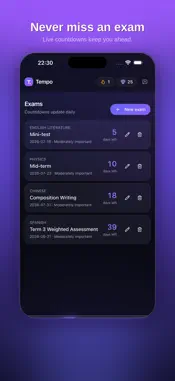
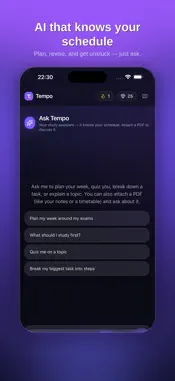
Tempo turns a chaotic week of homework, exams, and CCAs into one clear plan — so you always know what to do next. Built by students, for students, Tempo brings everything together in one calm, focused place: PLAN YOUR WEEK • Track homework and tasks, sorted automatically by priority and due date • See a clear week-at-a-glance view of what's coming up • Live countdowns to every exam, with reminders at 30, 7, 5, and 3 days out AN AI ASSISTANT THAT KNOWS YOUR SCHEDULE • Ask Tempo to plan your week, and it works around your real exams, tasks, and commitments • Get quizzes, summaries, and explanations to help you revise • Upload a PDF timetable and Tempo helps you add your exams and classes STAY MOTIVATED • Build a daily streak by getting things done • Earn gems and keep your momentum going • Gentle nudges keep you ahead, never overwhelmed DESIGNED TO FEEL CALM • A clean, modern interface that reduces stress instead of adding to it • Your data stays private — you can view, edit, or permanently delete it anytime Tempo helps you find your rhythm and take the stress out of studying. Note: Tempo's AI features use text you provide to generate study help and can occasionally make mistakes — always double-check important dates.
What's New
Version 1.1 2026-07-17
• Home-screen widget: see your streak, today's tasks, and next exam at a glance • Daily reminders so you never miss a deadline • Add to your schedule by typing ... Technical Analysis
Package Overview Basic metadata
Bundle ID
com.tempo.studyplanner Current Version 1.1
Minimum iOS 15.0
Package Size App Store Size
Package Metadata 0 / 0 version records
Detailed binary, privacy manifest, framework, and Info.plist results have not been indexed for this package yet. The verified App Store and archive metadata above remains available.
Known Version Records
0 version records with stored package metadata
Stored metadata does not guarantee a package is currently available to download.
| Details | Version / IDs | Version date | Action |
|---|