Preview




Description
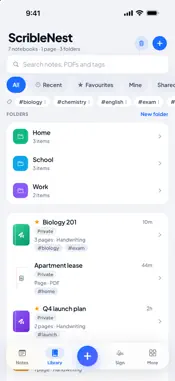
ScribleNest is one notebook for everything you write: handwritten notes, typed pages and PDFs, kept in a single library on your iPhone and iPad. WRITE THE WAY YOU LIKE • Handwrite with Apple Pencil or your finger on lined, grid, dotted or blank paper • Fountain, ballpoint and brush pens, a pencil and a highlighter, in many colours and widths down to a hairline • Erasers that take a whole stroke or just part of one • Pinch to zoom up to 1000%, with fine lines when you're zoomed in, and palm rejection • Add text boxes, sticky notes, shapes and tape, then pick any of them up to move, edit or delete • Type pages with headings, bullets and checklists • Sketch on whiteboards • Scan paper pages or add photos, then write straight on them MARK UP PDFS • Import a PDF from Files, Mail or iCloud Drive and write on it • Highlight, circle, underline and add notes in the margin • Share the PDF with your handwriting drawn in AI THAT READS YOUR NOTES • ScribleNest reads your handwriting so you can search it • Summaries turn a notebook into key points and action items • Translate a page, a scan or a PDF into more than 40 languages, and save the translation as a page FIND AND SHARE • Notebooks, folders, pages inside pages, tags, favourites and a 30-day trash • Search typed notes, the text inside PDFs and handwriting ScribleNest has read • Share a notebook with your team, or send a view-only link to anyone WORKS WITH NO SIGNAL • Start a note, add pages and keep writing offline • Everything syncs when you're back online, and anything still waiting is clearly marked • Offline copies on your device are encrypted PRIVATE BY DESIGN • Your notes stay private until you share them • Lock the app with Face ID or Touch ID • No ads and no tracking • Delete your account from inside the app at any time ScribleNest is free, with unlimited notebooks. Questions or ideas? Visit scriblenest.com/support.
What's New
Version 1.2.2 2026-11-03
• Turn pages like a book: swipe a page sideways for the next or previous one. Swipe past the last page to add a new one. Tap the page name at the top to jump to...• Turn pages like a book: swipe a page sideways for the next or previous one. Swipe past the last page to add a new one. Tap the page name at the top to jump to any page. • Lasso: draw a loop round writing, drawings, pictures or shapes to move, resize, turn, cut, copy or paste them, even onto another page or notebook. • Rotate pictures, shapes, text boxes and notes with the handle on top, or tap Rotate. • Paste photos or text copied from other apps. • Move or delete several notebooks at once in Library (tap Select). • Add the next page with + at the top; share any page or notebook as a PDF by AirDrop, even offline. • Pictures on typed pages, Clear page, and Report a problem / Share an idea under More. Fixes: new notes and pages open straight away offline; flipping pages no longer reloads; typed pages with pictures can be edited again; undo after clearing a page works properly. Technical Analysis
Package Overview Basic metadata
Bundle ID
com.scriblenest.app Current Version 1.2.2
Minimum iOS 16.4
Package Size App Store Size
Package Metadata 0 / 0 version records
Detailed binary, privacy manifest, framework, and Info.plist results have not been indexed for this package yet. The verified App Store and archive metadata above remains available.
Developer Information
Known Version Records
0 version records with stored package metadata
Stored metadata does not guarantee a package is currently available to download.
| Details | Version / IDs | Version date | Action |
|---|