
Preview




Description
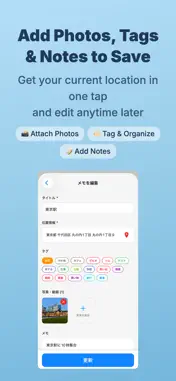
What is PinMark? PinMark is a simple location memo app that lets you pin notes to places on a map. One tap captures your GPS coordinates, auto-fills the address, and saves your memo with photos, videos, notes, and tags. Organize memos by purpose in workspaces, then search across every workspace whenever you need to find a place again. -------------------- Who is PinMark for? -------------------- 1. People who forget where they parked - Save parking spots with photos and get directions back 2. Workers who visit multiple locations - Record site addresses and photos together - Navigate with one-tap directions 3. Anyone who loves collecting places - Save favorite cafes, parks, and travel memories - Build your personal map of experiences -------------------- Main Features -------------------- One-tap location saving Tap "+" to capture GPS and auto-fill the address. No manual input needed. Map with pins All memos appear as pins on the map. Tap a pin to view details or get directions. Photos & video Attach multiple photos or videos from camera or library. Preview and share with one tap. Tag organization 16 preset tags (Parking, Work, Travel, Gourmet, etc.) plus custom tags with your own colors. Workspace organization Organize memos and navigations for work, travel, personal plans, or any purpose. Create unlimited workspaces on every plan, choose from 120 icons, and move a memo from its edit screen. 3 view modes Swipe between List, Gallery, and Map views to browse memos your way. Cross-workspace search & sort Search titles, memo text, and addresses across every workspace, then filter results by workspace. Within each workspace, sort by title, address, created date, or updated date and combine sorting with tag filters. Place search & manual pin Search any address from the location picker and fine-tune the pin on the map before saving. Directions Open Apple Maps or Google Maps for directions to any saved location. Multi-Navigation Bundle multiple memos into a "navigation" with an ordered destination list. From your current location, see the full route to each destination on the map. Mark destinations complete to auto-advance the next-destination highlight. Great for trips, errand runs, sales rounds, and any multi-stop plan. Light & dark mode Follows your device appearance automatically. Offline ready Browse, create, and edit memos without an internet connection. (Map tiles, address lookup, place search, and route planning require a connection.) -------------------- Plans -------------------- Free - Every feature with no limits - Unlimited workspaces - Includes banner ads and full-screen ads when the app opens Remove Ads (monthly / annual) - Hides all ads - Every feature remains available with no limits - Cancel anytime Subscriptions are billed through your Apple ID or Google account and renew automatically. Prices are shown at the time of purchase. -------------------- Security & Privacy -------------------- Memos, media, tags, workspaces, and navigations are stored on your device. PinMark does not provide cloud sync or automatically upload this content to our servers. Map display, address lookup, place search, and route planning send required coordinates, search text, and related request data to map or OS services. Memo text, photos, tags, and workspace names are not sent automatically. -------------------- Use Cases -------------------- - Parking: Save where you parked with a photo, navigate back easily - Food & cafes: Tag and organize restaurants you want to visit - Travel: Build a photo map of places you visited - Work: Record site locations with photos for reports - Trip planning: Bundle multiple stops into a Multi-Navigation and follow them in order -------------------- Support -------------------- Questions? Email: [email protected] Terms of Use: https://pinmark.sikalab.app/terms Privacy Policy: https://pinmark.sikalab.app/policy PinMark - save your favorite places on the map.
What's New
Version 1.4.0 2026-09-15
- Added workspaces. - Keep memos and navigations organized by purpose, such as work, travel, and personal. - Changed the support contact address to support@sik...- Added workspaces. - Keep memos and navigations organized by purpose, such as work, travel, and personal. - Changed the support contact address to [email protected]. - Improved the UI and the app internals. Technical Analysis
Package Overview Basic metadata
Bundle ID
com.sikakou.cocomemo Current Version 1.4.0
Minimum iOS 15.1
Package Size App Store Size
Package Metadata 0 / 7 version records
Detailed binary, privacy manifest, framework, and Info.plist results have not been indexed for this package yet. The verified App Store and archive metadata above remains available.
Developer Information
Known Version Records
0 version records with stored package metadata • 7 known version records
Stored metadata does not guarantee a package is currently available to download.
| Details | Version / IDs | Version date | Action |
|---|---|---|---|
| Not archived | App Store ID: 886051014 | Unknown | Request Version |
| Not archived | App Store ID: 885154748 | Unknown | Request Version |
| Not archived | App Store ID: 882971648 | Unknown | Request Version |
| Not archived | App Store ID: 879630290 | Unknown | Request Version |
| Not archived | App Store ID: 879423943 | Unknown | Request Version |
| Not archived | App Store ID: 879336300 | Unknown | Request Version |
| Not archived | App Store ID: 879149726 | Unknown | Request Version |