Preview




Description
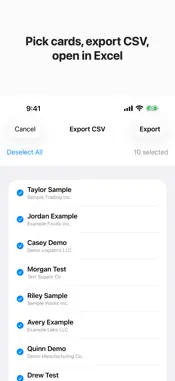
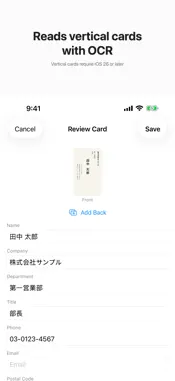
Still sorting the business cards you collected at trade shows and events? Boothcard reads a business card from a photo, fills in each field, and keeps your cards organized. MAIN FEATURES Quick card scanning Just take a photo of a card. OCR reads the name, company, department, title, phone number, email address, postal code, and address into their fields. You can check and correct everything before saving. You can also import from Photos. Fax numbers and additional phone numbers, such as mobile numbers, go in the memo field. Reading vertically written cards requires iOS 26 or later. Use the memo field for anything important from your conversation at the show. Scanning is designed for Japanese business cards. Cards written only in English may need more corrections. Folders and importance Create a folder for each trade show or event and sort your cards into them. You can also filter by importance (High, Medium, Low). Search Find cards by name, company, phone number, memo, and more. Voice input On the edit screen, you can fill in each field by voice, in English or Japanese. Touch and hold the mic button to switch languages. The email field always uses English. CSV export Choose cards and export them as a CSV file. The file is encoded in Shift_JIS and opens in Excel. It includes a postal code column. Characters that Shift_JIS can't represent become "?" in the file, and the app warns you before you export. Send the file to mail and other apps from the iPhone share menu. Privacy Card images and the details read from them are stored on your device, and scanning runs on your device. Nothing is sent to the developer's servers. With voice input, audio may be sent to Apple's servers for recognition, depending on your iOS version, device, and settings. If iCloud Backup is turned on, your data may be included in the backup. PLANS - Free: Save up to 30 cards in total. Import from Photos one at a time. - Premium (one-time purchase): Save unlimited cards. Import up to 20 photos at once. Sort your cards on the train home from the show, and start your follow-ups smoothly the next day.
What's New
Version 1.3.2 2026-11-05
Boothcard is now available in English. If your device language isn't Japanese, the app appears in English. New - Voice input supports English and Japanese. Tou...Boothcard is now available in English. If your device language isn't Japanese, the app appears in English. New - Voice input supports English and Japanese. Touch and hold the mic button to switch. The email field always uses English. - Recording starts with a tap, with haptic feedback and elapsed time. - CSV headers and importance values follow the screen language. The file is still encoded in Shift_JIS. - The app warns you when characters would become "?" in the CSV. - New app icon. Fixes - Fixed an issue where the search field didn't appear in the card list. 日本語: Technical Analysis
Package Overview Basic metadata
Bundle ID
com.kaz.BusinessCardScanner Current Version 1.3.2
Minimum iOS 17.0
Package Size App Store Size
Package Metadata 0 / 2 version records
Detailed binary, privacy manifest, framework, and Info.plist results have not been indexed for this package yet. The verified App Store and archive metadata above remains available.
Developer Information
Known Version Records
0 version records with stored package metadata • 2 known version records
Stored metadata does not guarantee a package is currently available to download.
| Details | Version / IDs | Version date | Action |
|---|---|---|---|
| Not archived | App Store ID: 887065384 | Unknown | Request Version |
| Not archived | App Store ID: 881839564 | Unknown | Request Version |