Preview




Description
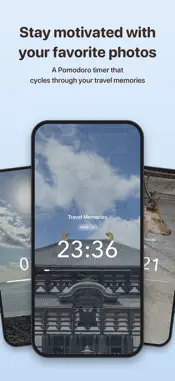
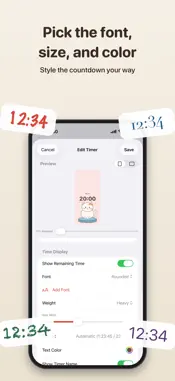
DressUp Alarm & Timer is an alarm and timer you can dress up any way you like, from the way it looks to the way it sounds. Wake up to your favorite characters, or to a cat that wakes up a little more with every snooze. Stay on track with a Pomodoro timer that shows photos from your favorite trips. With a little creativity, you can make a clock that's truly yours. DRESS UP YOUR ALARMS • Use any picture or color as the background of the ringing screen • Pick the font, weight, size, and color of the time • 6 time formats, including 6:30, 06:30, and 6:30 AM. Show or hide the alarm name and the date • A live preview stays at the top of the editor, so you can check portrait and landscape at a glance A NEW PICTURE AND SOUND EVERY TIME • Add several backgrounds and switch to the next one each time the alarm rings, even after a snooze • Add several sounds and switch them the same way • Switch in order or at random • The sample alarm "Animals" plays a horse, a chicken, or a cat at random A SNOOZE BUTTON YOUR WAY • Style the snooze button: font, weight, size, text color, button color, and opacity • Snooze for 1 to 30 minutes • While snoozing, see when it will ring again in the alarm list, on the Lock Screen, and in the Dynamic Island • Open the app from the Lock Screen or the Dynamic Island to see that alarm's screen ALARMS THAT RING • Alarms are set as system alarms, so they ring even when the app is closed • Like the built-in Clock app, they sound until you stop them, even in Silent Mode or during a Focus • Choose the days to repeat. One-time alarms turn off after they ring DRESS UP YOUR TIMERS • Use any image from your photo library as the background, zoomed and positioned separately for portrait and landscape • Dim the image so the countdown stays easy to read • Backgrounds change as time passes: add as many images or colors as you like, in order or shuffled • Choose from 6 transitions, including Switch at Intervals, Fade, and Top to Bottom, or let the background gradually fade into a color • 7 countdown formats, including 1:23:45, 1h 23m 45s, and percent remaining • Show or hide the timer name and the progress bar MADE FOR POMODORO • Repeat work and break intervals • Set the break length, the number of rounds, and long breaks. The next phase starts automatically • Give your breaks their own background and text style YOUR OWN SOUNDS • Record a sound right in the app, or import audio from a video in Photos or from a file • Trim it on the waveform to play just the part you want • Saved sounds can be used by all your alarms and timers • Vibration settings, too YOUR OWN FONTS • Import your favorite font files (.ttf / .otf) and use them for alarms and timers EASY TO USE • Save as many alarms and timers as you like, and start any timer with a single tap • Switch between alarms and timers with the tabs at the bottom, just like the Clock app • The screen stays on while a timer is running • See the time left on a timer on the Lock Screen and in the Dynamic Island • Get a notification when a timer is up, even when the app is closed Comes with the sample alarm "Animals" and two sample timers, Pomodoro and Instant Noodles. Notes: • The app is free and supported by ads. Ads are never shown while a timer is running or an alarm is on screen. • Alarms and timer notifications use only the first 30 seconds of an imported sound. • Alarms need your permission to ring. The app asks the first time you turn on an alarm.
What's New
Version 2.0 2026-10-24
Version 2.0 adds alarms, and the app is now called DressUp Alarm & Timer. ALARMS • Set the time, the days to repeat, and the snooze length (1 to 30 minutes) • ... Technical Analysis
Package Overview Basic metadata
Bundle ID
com.debussynetwork.DressUpTimer Current Version 2.0
Minimum iOS 26.0
Package Size App Store Size
Package Metadata 0 / 0 version records
Detailed binary, privacy manifest, framework, and Info.plist results have not been indexed for this package yet. The verified App Store and archive metadata above remains available.
Developer Information
Known Version Records
0 version records with stored package metadata
Stored metadata does not guarantee a package is currently available to download.
| Details | Version / IDs | Version date | Action |
|---|