
Preview

Description
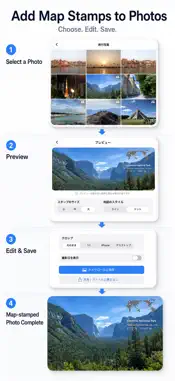
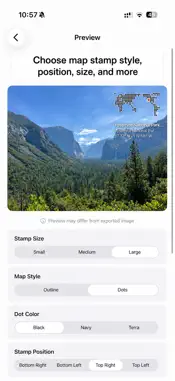
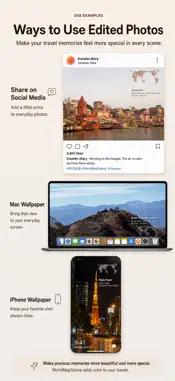
Where was this photo taken again? MapStamp is a simple app that adds a small world map stamp to your photos. Just select a photo with GPS data, and the app will create a beautiful stamp featuring a world map with a pin marking the location, along with the place name and coordinates. It’s perfect for travel logs, social media posts, organizing photo albums, and even creating wallpapers. ===Features=== - Transparent World Map Stamps Choose between a simple outline or a hand-drawn dot style. Both styles blend naturally into your photos. Select from large, medium, or small sizes to suit your preference. - Place Names via Apple Maps Integration Automatically retrieves and displays famous landmarks at the shooting location, such as Tokyo Tower, the Ganges River, and the Eiffel Tower. In areas without notable landmarks, it displays the city, prefecture, and country names. - Fast Performance & Privacy Protection World map data is stored within the app, so you can create photos with world maps instantly without needing cloud integration. There’s no need to upload your precious photos to the cloud. - Save in High Resolution with the Original Image Photos with stamps overlaid are saved to your Camera Roll at the same resolution as when they were taken. You can use them as-is for iPhone wallpapers or Mac desktop backgrounds. ===MapStamp Pro=== A one-time purchase unlocks greater freedom in photo creation. ・You can remove the logo from your photos (the “MapStamp” logo in the corner). ・You can choose from three colors for the dot-style map. ・You can place the stamp in your preferred position: bottom right, bottom left, top right, or top left. ・The photo cropping feature allows you to resize photos to fit your specific use case. (Choose from 4 cropping options: Original / 1:1 (for Instagram) / 9:19.5 (for iPhone wallpaper) / 16:9 (for PC or Mac desktop backgrounds) ・You can add the photo’s capture date to the stamp. (Only available if the photo contains capture date data.) ===Recommended for=== ・Those who want to preserve travel memories along with the locations where they were taken ・Those who want to share unique photos on Instagram or X ・Those who use their favorite photos as iPhone wallpapers or Mac desktop backgrounds Terms of Use (EULA): https://www.apple.com/legal/internet-services/itunes/dev/stdeula/
What's New
Version 1.0.2 2026-05-23
Changes in Version 1.0.2 ・UI fixes in the preview screen Technical Analysis
Package Overview Basic metadata
Bundle ID
com.arrowwoodapp.MapStamp Current Version 1.0.2
Minimum iOS 26.0
Package Size App Store Size
Package Metadata 0 / 0 version records
Detailed binary, privacy manifest, framework, and Info.plist results have not been indexed for this package yet. The verified App Store and archive metadata above remains available.
Developer Information
Known Version Records
0 version records with stored package metadata
Stored metadata does not guarantee a package is currently available to download.
| Details | Version / IDs | Version date | Action |
|---|