
Preview




Description
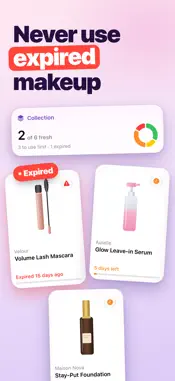
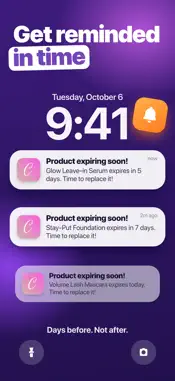
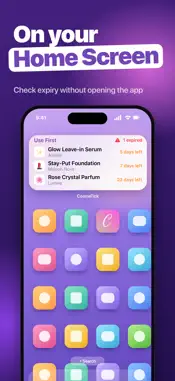
CosmeTick is a makeup and skincare expiration tracker for iPhone and iPad. Scan a product's barcode, enter the day you opened it, and CosmeTick works out when it expires from its PAO (period after opening), then reminds you before it goes off. It is made for anyone with a full makeup bag or bathroom shelf who has ever wondered how old that mascara really is: beauty and skincare fans, people doing project pan, and anyone who wants to waste fewer products and stop putting expired ones on their skin. HOW IT WORKS 1. Scan the barcode, or add the product by hand. 2. Choose the date you opened it. 3. CosmeTick calculates the expiry date and shows a clear status: Fresh, Use first or Expired. 4. You get a reminder 14 days before, 3 days before and on the day it expires. WHAT IS PAO? PAO, or period after opening, is the open-jar symbol on the packaging with a number such as 6M or 12M. It tells you how many months a product stays good once it is opened. When a scanned product is found, CosmeTick fills in its name, brand, category and PAO for you. You can change the PAO at any time. Typical PAO periods: • Mascara and liquid eyeliner: 3–6 months • Liquid foundation and concealer: 6–12 months • Serums, creams and moisturizers: 6–12 months • Sunscreen: about 12 months, or the printed date • Lipstick and lip gloss: 12–24 months • Powder, blush and eyeshadow: about 24 months • Perfume: 36 months or more FEATURES • Barcode scanner that fills in product details automatically • Expiry date calculated from the opening date and PAO • Reminders 14 days and 3 days before expiry and on the day, plus an optional weekly check-in • Filter your shelf by All, Use first or Expired • Search across your whole collection • Categories for makeup, face care, body care, hair care, perfume, nail care and more • Shelf overview: how much is fresh, how much to use first and how much to replace • Home Screen widgets in small, medium and large sizes, and Lock Screen widgets • Export to CSV or Excel and import it back, for a backup or a new device • Light and dark mode, iPhone and iPad, portrait and landscape • No account needed: your products are stored on your device FREE AND PREMIUM CosmeTick is free to download and lets you track up to 5 products. CosmeTick Premium unlocks unlimited products, plus data export and import. COMMON QUESTIONS How do I know when my makeup expires? Look for the PAO symbol on the packaging, or scan the barcode, and CosmeTick counts down from the day you opened it. Can I add products without a barcode? Yes. Type the name and pick the PAO period yourself. Does it work for skincare, perfume and hair care? Yes. Any product with a shelf life after opening can be tracked. CosmeTick Premium is an auto-renewing subscription, available weekly or yearly. Payment is charged to your Apple Account at confirmation of purchase. The subscription renews automatically unless it is cancelled at least 24 hours before the end of the current period. You can manage or cancel it in your Account Settings. Expiry dates are estimates based on the opening date and PAO you enter, and the typical periods above are general guidance. Always check the packaging and use your own judgement. Privacy Policy: https://telegra.ph/Privacy-Notice-08-19 Terms of Use: https://telegra.ph/Terms-and-Conditions-08-19-3
What's New
Version 1.2.0 2026-11-08
Smoother scanning, more reliable reminders and widgets, and a cleaner shelf, plus performance and stability improvements. Thank you for using CosmeTick. If som...Smoother scanning, more reliable reminders and widgets, and a cleaner shelf, plus performance and stability improvements. Thank you for using CosmeTick. If something does not work the way you expect, let us know through Settings. Technical Analysis
Package Overview Basic metadata
Bundle ID
com.krizhanovskii.CosmeticExpires Current Version 1.2.0
Minimum iOS 18.0
Package Size App Store Size
Package Metadata 2 / 4 version records
Detailed binary, privacy manifest, framework, and Info.plist results have not been indexed for this package yet. The verified App Store and archive metadata above remains available.
Known Version Records
2 version records with stored package metadata • 4 known version records
Stored metadata does not guarantee a package is currently available to download.
| Details | Version / IDs | Version date | Action |
|---|---|---|---|
| 34.92 MB | v1.0.3 App Store ID: 888945104Build: 1.0.3 | 2026-07-28 22:04:36 | Get Version |
| 34.92 MB | v1.0.3 App Store ID: 877721805Build: 1.0.3 | 2026-07-28 22:04:36 | Get Version |
| Not archived | App Store ID: 877677941 | Unknown | Request Version |
| Not archived | App Store ID: 877320466 | Unknown | Request Version |