Preview



Description
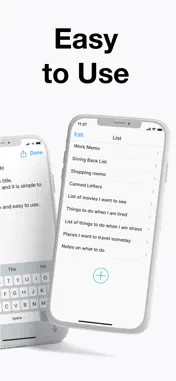
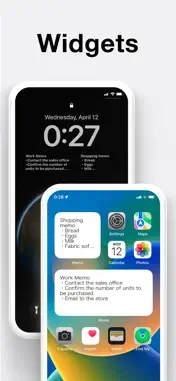
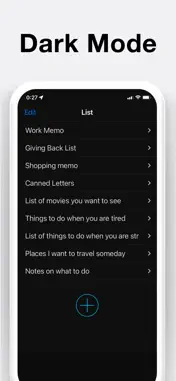
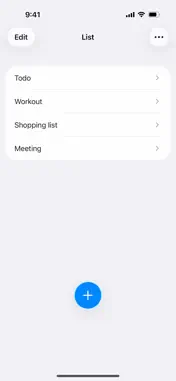
Notepad is a simple, lightweight, free note-taking app that opens fast, so you can start writing right away. No account or sign-up needed. It works offline, and everything you type saves automatically. One idea has guided us for over 10 years: keep it simple, so you can just write. [Features] · Opens fast, write right away · Autosave: no save button needed · Search: find any note by its content · Home Screen widgets: pin notes like sticky notes · Lock Screen widget: check notes without unlocking · Color-code notes with 6 colors · Character count (also without spaces and line breaks) · Dark mode · No account, works offline · For iPhone and iPad (iOS 14 or later) · Free (one-time purchase to remove ads) [Function Details] ■ Widgets Pin notes to your Home Screen like sticky notes, always in view. On iOS 16 or later, you can also show a note on your Lock Screen with 4 font sizes, no unlocking needed. · 3 sizes; scroll inside the widget to read long notes · Add multiple widgets, each showing a different note · The "Add Note" widget starts a new note with one tap ■ Search Find any note in seconds by searching its text. ■ Autosave Your text is saved automatically, even if a call comes in or you switch to another app. Half-written notes stay where you left them. ■ Color-Code Notes Swipe right on a note and choose one of 6 colors: red for shopping, blue for work. Spot the note you need at a glance, no folders required. ■ Basic Controls · Delete: swipe left on a note · Reorder: press and hold a note, then drag it up or down · Copy: copy a whole note at once · Share: send any note via social media or email [Ways to Use It] · Jot down thoughts as they come to mind · Shopping lists and to-do lists · A scratchpad for copy and paste · Draft reports, meeting minutes and stories · Memos of things to remember · Enter notes by voice via iOS Dictation [Who It's For] · Anyone who finds feature-heavy note apps hard to use · Anyone who wants a light, everyday notepad · Anyone replacing paper sticky notes and memo pads [Pricing] The app is free to use, with ads. A one-time purchase removes ads for good. [Your Data and Design Policy] · Notes are stored only on your device, never sent outside the app · No cloud sync or backup feature of its own: everything stays on your device · A text-only notepad: no photo attachments, folders, reminders or checklists · No built-in lock, but iOS can require Face ID to open it (see FAQ) [FAQ] ** How do I delete notes? Swipe left on the note to bring up the [Delete] button. ** How do I reorder notes? Tap and hold the note, then drag it up or down. ** How do I add a note to my Lock Screen? Requires iOS 16 or later. Touch and hold the Lock Screen, then tap [Customize] at the bottom. Select [Lock Screen], tap [Add Widgets], and select this app and the widget you want. If this app is not displayed, restart your device. ** How do I add a note to my Home Screen? Tap and hold an empty area on your Home Screen, then tap the [+] button. Select the [Notepad] widget, choose from three sizes, and tap [Add]. To choose the note shown, tap and hold the widget, then pick from [Edit Widget] - [Notes]. ** How do I change the color of my notes? Swipe right on the note to add a color. ** How do I lock the app? Requires iOS 18 or later. Touch and hold the app icon, then tap [Require Face ID] (or Touch ID / Passcode). The app will then require it each time it opens. ** Will my notes transfer to a new iPhone? Yes. Notes are stored inside the app and carry over when you set up a new iPhone with the standard data transfer or a backup restore. ** What about data security? This app never collects or sends any text you enter to servers or anywhere outside the app. Its only communication relates to advertising. All the data you enter stays in the app. 【Terms of Service】 https://komorebi-studio.com/tos_en.html 【Privacy Policy】 https://komorebi-studio.com/policyredirect.html
What's New
Version 4.1.1 2026-10-28
Now supports iPhone Duo. Technical Analysis
Package Overview Basic metadata
Bundle ID
com.sawadaru.memo Current Version 4.1.1
Minimum iOS 15.0
Package Size App Store Size
Package Metadata 2 / 56 version records
4.8 / 5.0 (5,667 ratings)
Detailed binary, privacy manifest, framework, and Info.plist results have not been indexed for this package yet. The verified App Store and archive metadata above remains available.
Developer Information
Known Version Records
2 version records with stored package metadata • 56 known version records
Stored metadata does not guarantee a package is currently available to download.
| Details | Version / IDs | Version date | Action |
|---|---|---|---|
 Not archived | App Store ID: 835051875 | Unknown | Request Version |
| Not archived | App Store ID: 834860244 | Unknown | Request Version |
| Not archived | App Store ID: 830578677 | Unknown | Request Version |
| Not archived | App Store ID: 829473197 | Unknown | Request Version |
| Not archived | App Store ID: 827399693 | Unknown | Request Version |
| Not archived | App Store ID: 822443908 | Unknown | Request Version |
| Not archived | App Store ID: 817006494 | Unknown | Request Version |
| Not archived | App Store ID: 816869468 | Unknown | Request Version |
| Not archived | App Store ID: 816250877 | Unknown | Request Version |
| Not archived | App Store ID: 816247287 | Unknown | Request Version |
| Not archived | App Store ID: 815961858 | Unknown | Request Version |
| Not archived | App Store ID: 815832756 | Unknown | Request Version |
| Not archived | App Store ID: 815669932 | Unknown | Request Version |
| Not archived | App Store ID: 815467060 | Unknown | Request Version |
| Not archived | App Store ID: 812905392 | Unknown | Request Version |
| Not archived | App Store ID: 812614125 | Unknown | Request Version |