
Preview

Description
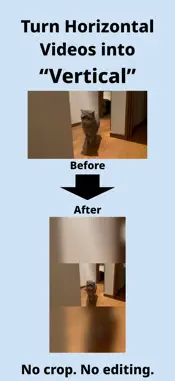
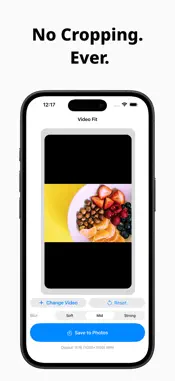
Video Fit turns landscape videos into vertical ones—without cropping, and without a complicated editor. Tried posting an old YouTube video to TikTok, Instagram Reels, or YouTube Shorts? • The sides get cut off • Faces and key subjects fall out of frame • Full-featured editors feel like overkill Video Fit keeps the whole video and adds a natural blurred background, so you get a clean 9:16 clip in moments. ■ What you can do • Turn landscape (16:9) into vertical (9:16) • Keep every bit of the original frame • Build a blurred background from the video itself • Export a vertical file that’s ready to post No timeline. No layers. No extra steps you don’t need. ■ Three simple steps Pick a video Check the preview Save You can start right away—even if you’ve never edited a video. ■ Built for short-form Video Fit is a good fit for the big vertical platforms: • TikTok • Instagram Reels • YouTube Shorts Exports are 9:16 (1080×1920) MP4, ready to upload as-is. ■ A background that looks natural Instead of blowing the clip up and chopping the edges, Video Fit uses a blurred copy of the same video behind it. • Main picture stays centered • The original frame stays intact • The vertical layout is easy to watch • Pick a blur strength that matches your style ■ Processed on your iPhone • No account to create • Conversion happens on the device • Nothing is sent to a conversion server Your video stays on your device. * The free version needs an internet connection to load and watch a rewarded ad when you save. ■ A good match if you • Want to reuse long videos as short clips • Share a piece of a stream or YouTube video in vertical form • Need landscape-to-vertical without cropping • Want the result now, not a crash course in editing Video Fit is not a video editor. It’s a simple converter: landscape in, vertical out.
What's New
Version 1.3 2026-09-14
Added support for more languages. Technical Analysis
Package Overview Basic metadata
Bundle ID
com.creamworks.VideoFit Current Version 1.3
Minimum iOS 26.0
Package Size App Store Size
Package Metadata 1 / 4 version records
Detailed binary, privacy manifest, framework, and Info.plist results have not been indexed for this package yet. The verified App Store and archive metadata above remains available.
Developer Information
Known Version Records
1 version record with stored package metadata • 4 known version records
Stored metadata does not guarantee a package is currently available to download.
| Details | Version / IDs | Version date | Action |
|---|---|---|---|
| Not archived | App Store ID: 891242119 | Unknown | Request Version |
| Not archived | App Store ID: 889636962 | Unknown | Request Version |
| 4.84 MB | v1.3 App Store ID: 882691000Build: 1.3 | 2026-09-14 10:43:12 | Get Version |
| Not archived | App Store ID: 881656821 | Unknown | Request Version |