Preview






Description
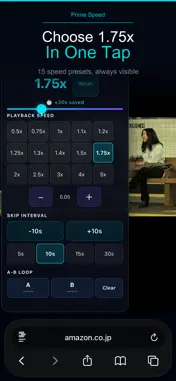
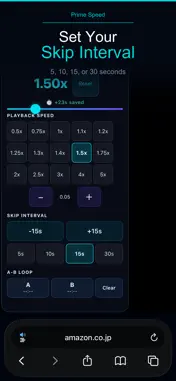
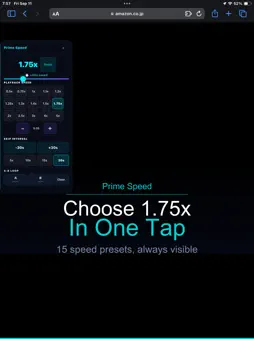
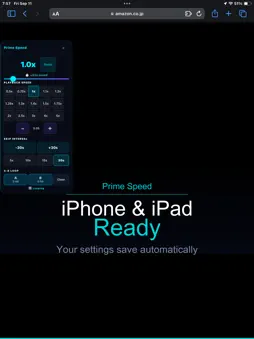
Prime Speed Controller is a Safari extension that adds A-B loop repeat, playback speed control, seek, and time-saved tracking exclusively to Prime Video on iPhone and iPad. Perfect for language learners and anyone who wants to get more out of Prime Video. ■ A-B Loop Repeat Tap A to mark a start point, tap B to mark an end point — the video loops that segment continuously. Replay any dialogue, scene, or lecture as many times as you need. ■ Playback Speed 15 presets from 0.5x to 5x, with 0.05x fine-tuning. Subtle steps like 1.1x and 1.2x let you boost speed while keeping audio clear. ■ Forward & Rewind Choose 5, 10, 15, or 30-second intervals. Jump back instantly to catch missed dialogue. ■ Time-Saved Tracker The panel shows how much real time you have saved by watching above 1.0x speed, accumulated across sessions. Key Features • A-B Loop: mark any segment for continuous repeat • 15 playback speed presets from 0.5x to 5x • Fine-tune in 0.05x steps • Forward and rewind at 5, 10, 15, or 30 seconds • Time-saved tracker displayed in the panel • Settings saved automatically across sessions • Works on iPhone and iPad • Activates only on Prime Video — no other sites • No data sent to external servers How to Use 1. Follow the in-app guide to enable the extension in Safari Settings. 2. Open Prime Video in Safari and start a video. 3. Use the floating panel to set speed, seek interval, or A-B loop points. Playback speed or seeking may be restricted by Prime Video for certain titles. This app does not detect or skip advertisements. This is an independent, unofficial Safari extension. It is not provided, endorsed, or approved by Amazon, Prime Video, or their affiliates. Amazon and Prime Video are trademarks or registered trademarks of their respective owners.
Technical Analysis
Package Overview Basic metadata
Bundle ID
com.kohei.PrimeSpeed Current Version 1.0
Minimum iOS 15.0
Package Size App Store Size
Package Metadata 0 / 0 version records
Detailed binary, privacy manifest, framework, and Info.plist results have not been indexed for this package yet. The verified App Store and archive metadata above remains available.
Developer Information
Known Version Records
0 version records with stored package metadata
Stored metadata does not guarantee a package is currently available to download.
| Details | Version / IDs | Version date | Action |
|---|