
Preview





Description
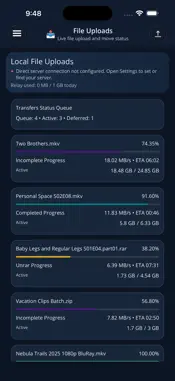
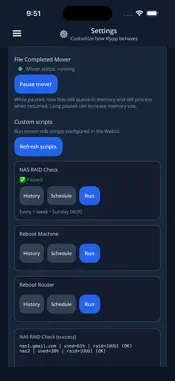
Your files. Your server. Your control. Klypp puts your files, media library, and home server in your pocket. Upload and organize files, monitor processing, and run your own custom scripts from your iPhone or iPad. Klypp requires Klypp Server. Your server does the work, and the mobile app lets you manage it from anywhere. EASY SERVER CONNECTION Install Klypp Server, choose your folders, and sign in. Klypp connects your mobile device to your server without router port forwarding, VPN setup, dynamic DNS, or manual API keys. Use Klypp with local drives, mounted storage, and network shares. No separate media platform is required. MANAGE YOUR FILES AND MEDIA • Upload videos, photos, and other files through the native iOS Files picker • Organize and move supported media across your storage locations • Monitor processing queues and transfer progress, speed, and estimated time remaining • Pause and resume the server’s file mover • Review recently processed media and completed transfers • Keep your media folders structured and easy to browse YOUR SERVER, YOUR SCRIPTS Turn your own server scripts into actions you can run from your phone. Run backups, manage services, check storage, or automate maintenance routines. • Launch configured scripts with a tap • Set and adjust schedules from the mobile app • Review run history, results, and script output • Receive push notifications for failures or both successful and failed runs • Tap a notification to open the script results Configure scripts on your server, then run and schedule them from your iPhone or iPad. Scripts use the access and permissions available to your Klypp Server. KEEP UP WITH YOUR COLLECTION • Track upcoming TV episodes based on your library • Browse upcoming digital movie releases • Add movie reminders and view them alongside your upcoming episodes • Find missed media and dismiss unwanted reminders • Review recently processed movies, shows, and music MAKE YOUR DASHBOARD YOUR OWN Choose which sections appear on your home dashboard and arrange them in the order you prefer. Available sections include My Media Today, Missed Media, Recently Converted, Digital Movie Releases, and Upcoming Music. GETTING STARTED 1. Install Klypp Server on a supported Windows, macOS, Linux, or Docker setup. 2. Choose the folders and storage locations you want it to manage. 3. Sign in with your Klypp account on the server and mobile app. 4. Start managing your files and server tasks from your iPhone or iPad. Klypp Server is required; the mobile app does not work on its own. Server downloads and setup instructions are available at https://www.klyppedit.com. YOUR MEDIA, YOUR CONTROL Klypp helps you manage files you already own or are licensed to use. It does not provide third-party media downloads, streaming catalogs, or unauthorized access to media. Digital release listings and reminders provide information and tracking only; they do not download or unlock content. Some features require Klypp Pro. Upload limits depend on your plan and connection mode. Privacy Policy: https://www.klyppedit.com/privacy/index.html Terms of Use (EULA): https://www.apple.com/legal/internet-services/itunes/dev/stdeula/
What's New
Version 2.13 2026-10-21
• Choose which dashboard sections appear and arrange them in your preferred order. • Browse upcoming digital movie releases and add movie reminders. • See TV ep... Technical Analysis
Package Overview Basic metadata
Bundle ID
com.klyppedit.klypp Current Version 2.13
Minimum iOS 15.0
Package Size App Store Size
Package Metadata 0 / 2 version records
Detailed binary, privacy manifest, framework, and Info.plist results have not been indexed for this package yet. The verified App Store and archive metadata above remains available.
Developer Information
Known Version Records
0 version records with stored package metadata • 2 known version records
Stored metadata does not guarantee a package is currently available to download.
| Details | Version / IDs | Version date | Action |
|---|---|---|---|
| Not archived | App Store ID: 884139844 | Unknown | Request Version |
| Not archived | App Store ID: 878746180 | Unknown | Request Version |