
Preview





Description
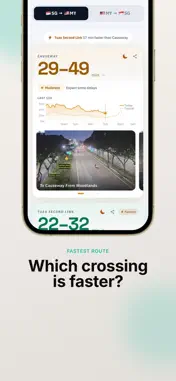
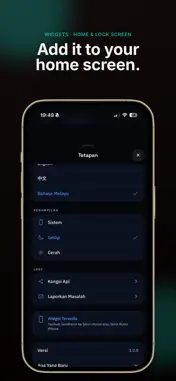
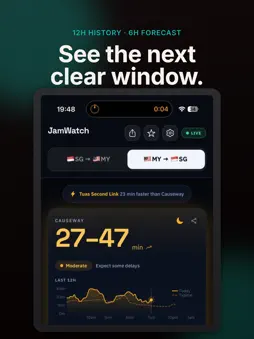
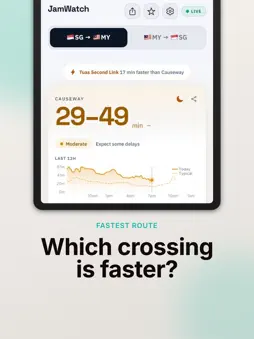
Causeway jam right now? JamWatch tells you exactly how long the crossing takes at Woodlands Checkpoint and Tuas Second Link — live, in both directions, before you leave the house. Two crossings. One glance. No guessing. WHAT JAMWATCH ANSWERS "How bad is the Causeway jam now?" Live travel time for Woodlands Causeway, refreshed continuously while the app is open. "Woodlands or Tuas — which one is faster?" JamWatch names the faster crossing and tells you exactly how many minutes you save by taking it. "Can I check without picking up my phone?" Yes. JamWatch runs on Apple CarPlay and on Apple Watch. On the car screen both crossings and both directions are listed at once, fastest first. On your wrist, one swipe changes direction, and a complication keeps the wait on your watch face. "When should I leave?" Every crossing shows 12 hours of real traffic history against a typical-day average, then projects 6 hours ahead so you can see the next clear window instead of guessing. "What does it actually look like right now?" Live camera stills from both checkpoints — approaching, entering and exiting — sourced from Singapore and Malaysia traffic cameras. "Will the weather make it worse?" Rain and thunderstorms automatically add buffer time to your estimate, so the number you see is the number you should plan for. FEATURES Live travel times Real-time estimates for Woodlands Causeway and Tuas Second Link, both directions, SG to MY and MY to SG. Home Screen and Lock Screen widgets Small (2x2) and Medium (4x2) WidgetKit widgets show the current wait without opening the app. Glance at your Lock Screen and decide whether to go now or wait. Apple CarPlay All four crossings on one CarPlay screen — Woodlands and Tuas, SG to MY and MY to SG — ordered fastest first with the minutes saved in the section header. Refreshes every 2 minutes and needs no taps while you are driving. Apple Watch app A standalone watchOS 10 app. Swipe between SG to MY and MY to SG for each crossing's wait range, congestion level and 12-hour trend sparkline. Four complication styles — circular, rectangular, inline and corner — put the current wait on your watch face. Fastest route The faster of the two crossings is highlighted with the exact time saved. Congestion at a glance Four clear levels — Smooth, Moderate, Heavy, Severe — colour-coded so you know the situation in under a second. Smart departure buffers Recommended buffer times based on current congestion and weather at each checkpoint. Direction toggle One tap to flip between SG to MY and MY to SG. Trend charts 12 hours of history with a dashed typical-day overlay, plus a 6-hour forecast. Three languages English, Chinese and Bahasa Melayu. Switch anytime in Settings and the whole interface changes instantly. Share and refresh Send the current wait to a friend or your group chat through the standard share sheet. Pull down to refresh. WHO IT IS FOR Daily commuters crossing for work. Families heading to Johor Bahru for the weekend. Anyone catching a bus, driving, or riding a motorcycle across the Causeway or the Second Link. Anyone who has ever sat on the Causeway for two hours wondering if the other crossing was clear. WHERE THE DATA COMES FROM JamWatch aggregates official checkpoint APIs, traffic sensors, and LTA camera feeds into a single live picture of both crossings. PRIVACY No account. No sign-up. No ads. No subscriptions. JamWatch does not collect your name, email, or location, and does not request GPS access. Usage analytics are anonymous. Everything the app shows is publicly available traffic and weather data. Requires iOS 14.0 or later. The Apple Watch app requires watchOS 10 or later. jamwatchsg.com
What's New
Version 1.3.1 2026-08-05
- watchOS version - updated carplay visuals Technical Analysis
Package Overview Basic metadata
Bundle ID
com.exp00.JamWatch Current Version 1.3.1
Minimum iOS 15.1
Package Size App Store Size
Package Metadata 1 / 6 version records
Detailed binary, privacy manifest, framework, and Info.plist results have not been indexed for this package yet. The verified App Store and archive metadata above remains available.
Developer Information
Known Version Records
1 version record with stored package metadata • 6 known version records
Stored metadata does not guarantee a package is currently available to download.
| Details | Version / IDs | Version date | Action |
|---|---|---|---|
| 48.72 MB | v1.3.1 App Store ID: 888180501Build: 1.3.1 | 2026-08-05 17:21:15 | Get Version |
| Not archived | App Store ID: 887170425 | Unknown | Request Version |
| Not archived | App Store ID: 883445388 | Unknown | Request Version |
| Not archived | App Store ID: 883138031 | Unknown | Request Version |
| Not archived | App Store ID: 883090437 | Unknown | Request Version |
| Not archived | App Store ID: 882903491 | Unknown | Request Version |