
Preview


Description
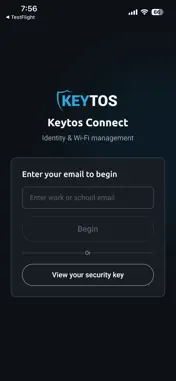
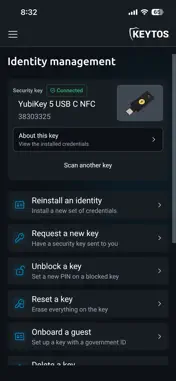
Keytos Connect gives students, employees and guests secure, passwordless access from their own devices: certificate-based WPA-Enterprise Wi-Fi and, new in this version, Identity Security for phishing-resistant security keys. Sign in once with your Microsoft Entra ID account and Keytos Connect does the rest. No costly MDM subscriptions, no complex instructions, and no IT tickets. IDENTITY SECURITY (NEW) Unlike passwords and SMS codes, security keys can't be phished. With Identity Security, your IT team issues security keys and you set them up yourself in the app. • Set up your security key: Keytos Connect installs smart card certificates and a FIDO2 passkey on your security key, ready for passwordless sign-in to your Entra ID account. • Protect your key with a PIN that meets your organization's policy, so only you can use it. • See what's on your key, from smart card certificates to passkeys. • Request a new key, shipped to you or ready to pick up at the office. • Unblock a key with a code from your IT team, reset it, reinstall your credentials or remove a lost key from your account. • Verify your identity with a quick selfie and a scan of your government ID when your organization requires it. • IT staff can onboard guests and set up or unblock keys for their users from the same app. SECURE WI-FI Keytos Connect configures your device with an 802.1X certificate and Wi-Fi profile, so every device is authenticated with EAP-TLS certificate-based access, not shared passwords. And it doesn't just get you connected, it keeps you connected: Keytos Connect maintains your Wi-Fi profiles and certificates over time, so your access stays up to date without you lifting a finger. FOR IT TEAMS Keytos Connect is included at no additional cost with EZRADIUS and EZCA. Identity Security is managed in Keytos Shield. REQUIREMENTS Keytos Connect requires a work or school account from an organization that uses Keytos. Identity Security must be turned on by your IT team and works with security keys over NFC or USB-C. Adding a passkey from an iPhone requires a YubiKey with NFC.
What's New
Version 2.1.2 2026-11-12
Keytos Connect now supports organizations in the US Government cloud (GCC High). Sign in with your work account and Keytos Connect connects to the right cloud a...Keytos Connect now supports organizations in the US Government cloud (GCC High). Sign in with your work account and Keytos Connect connects to the right cloud automatically, then manages your Wi-Fi networks and security keys as usual. Nothing else has changed. Technical Analysis
Package Overview Basic metadata
Bundle ID
com.keytos.connect Current Version 2.1.2
Minimum iOS 15.0
Package Size App Store Size
Package Metadata 0 / 0 version records
Detailed binary, privacy manifest, framework, and Info.plist results have not been indexed for this package yet. The verified App Store and archive metadata above remains available.
Developer Information
Known Version Records
0 version records with stored package metadata
Stored metadata does not guarantee a package is currently available to download.
| Details | Version / IDs | Version date | Action |
|---|