
Preview





Description
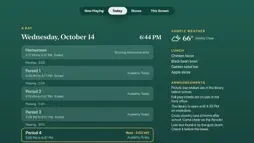
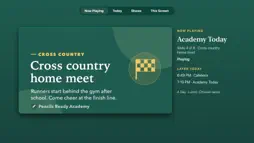
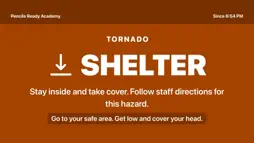
Pencils Ready Broadcast turns every Apple TV in your school into a campus screen: announcements, the bell schedule, lunch, weather and emergency alerts, all run from one place. TRY IT NOW Choose Explore the demo to visit Pencils Ready Academy, a sample school built into the app. It needs no account and no network. Watch a period count down to the bell, see what is for lunch, hold and step through slides with the remote, open Screen Home and run a drill. THE CAMPUS LAYOUT • The date, the day's label (like A Day or B Day) and a clock on your school's time. • Now and Next: the current period and the minutes until the bell. • Between classes, a full-screen countdown to the next bell. • Weather from the National Weather Service, with warnings for your campus. • Today's lunch with dietary tags, and a ticker of short announcements. • Your school's slides beside it all, or full screen. ON THE SIRI REMOTE • Play/Pause holds a slide. Left and right step through the show. • Click for details: what is playing, what comes next and this screen's name. • Back opens Screen Home: Now Playing, Today, Shows and This Screen. • Lock the remote from the website for screens in public spaces. • Put Broadcast in the top row and the Top Shelf shows today at your school and what is playing. ALERTS AND DRILLS • Staff send Hold, Secure, Lockdown, Evacuate or Shelter to the whole school, a building, a floor or one audience. • Each alert covers the screen within seconds, in its own color, with your school's words and a sound. • Drills say DRILL on every screen. All Clear brings each show back to the slide it left. • Screens marked as classrooms can show a dim, silent card during a Lockdown. • While an alert is up, the remote cannot put it away. MADE FOR SCHOOL SCREENS • Join one Apple TV with a code or a QR code, or every Apple TV at once through your device management service. • Changes reach screens within seconds, and each Apple TV keeps playing its saved show if the network drops. • Images, GIFs, video and audio with crossfades, and HDR and frame-rate matching for full-screen video. • A classroom screen with nothing scheduled shows how to share to it with AirPlay. • Text size for each screen, VoiceOver, Reduce Motion, Increase Contrast, and a slow drift that protects panels from burn-in. The app is free, with no purchases and no ads. Live screens need your school's Pencils Ready Broadcast account; staff build shows, schedules and alerts at broadcast.pencilsready.com.
Technical Analysis
Package Overview Basic metadata
Bundle ID
com.pencilsready.broadcast Current Version 1.1
Minimum iOS 26.0
Package Size App Store Size
Package Metadata 0 / 0 version records
Detailed binary, privacy manifest, framework, and Info.plist results have not been indexed for this package yet. The verified App Store and archive metadata above remains available.
Known Version Records
0 version records with stored package metadata
Stored metadata does not guarantee a package is currently available to download.
| Details | Version / IDs | Version date | Action |
|---|