Preview




Description
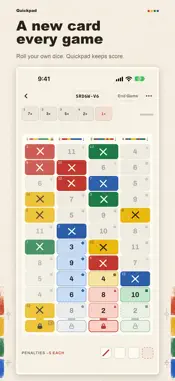
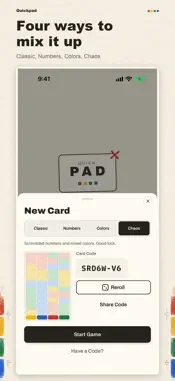
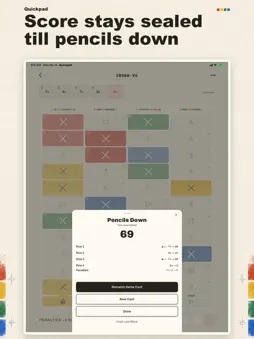
Quickpad replaces the paper scorecard for four-row roll-and-write dice games. Everyone at the table still rolls real dice. Quickpad doesn't roll anything; it only keeps score. It's the four-row game where you race to lock rows before anyone else, with a fresh card every time you play. A paper pad is the same card on every sheet, and it runs out, usually right when somebody wants another round. Quickpad makes a new card whenever you ask for one. FOUR MODES Classic is the card you already know: red and yellow run 2 to 12, green and blue run 12 to 2. Numbers keeps every row a single color and scrambles the numbers. Colors leaves the numbers in order and splits the four colors into blocks across each row. Chaos does both. ONE CARD FOR THE WHOLE TABLE Every card has a 7-character code. Share it from the game or read it out loud. Everyone else taps "Have a code?" on the home screen, types it in, and plays the exact same card. PLAYING A CARD Tap a number to cross it off. Rows only move forward, so anything you skip past is dead, the same rule as on paper. If you marked the wrong one, tap it twice to lift the mark. Once a row has five marks, its lock is armed. Cross off the last number and the row locks, with a bonus cross for you. When someone else locks a row, tap that lock on your card to close it there too. Penalties are 5 points each. Two locked rows end the game, and so does a fourth penalty. If the game ends on somebody else's card, tap End Game and yours is scored. SCORING Each row scores on its own, whatever colors its cells are, the same as the paper card. Your score stays hidden until the game is over, then Show my score reveals the total and the breakdown for each row. If you'd rather watch it add up as you go, turn on Live score in Settings. Rematch plays the same card again. A game in progress saves on its own, so you can close the app and pick it back up from the home screen. ALSO Color tags add a small symbol to each color, for players who have trouble telling them apart. Turn your phone sideways for the long horizontal card, laid out like the paper one. It works on iPhone and iPad, in light or dark. There's a short How to Play in the app if anyone at the table is new. Quickpad works offline and there's no account to make. There are no ads or in-app purchases, and I don't collect anything. Bring your own dice.
What's New
Version 1.7.0 2026-11-10
Quickpad now fills the screen on iPad. The card, score bar and penalty boxes grow with the screen, upright or sideways. Start Game and Join Card stay put at the...Quickpad now fills the screen on iPad. The card, score bar and penalty boxes grow with the screen, upright or sideways. Start Game and Join Card stay put at the bottom of the New Card sheet, so you never have to scroll to find them, even with your phone sideways. The buttons at the end of a game work the same way. Technical Analysis
Package Overview Basic metadata
Bundle ID
com.stauss.quickpad Current Version 1.7.0
Minimum iOS 16.4
Package Size App Store Size
Package Metadata 0 / 0 version records
Detailed binary, privacy manifest, framework, and Info.plist results have not been indexed for this package yet. The verified App Store and archive metadata above remains available.
Developer Information
Known Version Records
0 version records with stored package metadata
Stored metadata does not guarantee a package is currently available to download.
| Details | Version / IDs | Version date | Action |
|---|