
Preview



Description
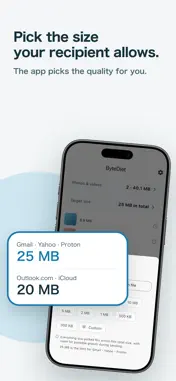
Too big to email. Rejected by the upload form. ByteDiet fits your photos and videos under a size you choose. ■ Just pick the number Choose the situation — "Gmail attachment", "Upload limit 2MB" — and that is it. ByteDiet works out the rest and gives you the best-looking result that still fits. There is no "set quality to 70%" here. The target size is fixed instead, and the quality and resolution are searched automatically. ■ Leave room for email Email attachment limits apply to all attachments together, not to each file separately. Depending on how an email is sent, base64 encoding can make the data about 1.3 times as large. Whether the limit applies before or after encoding depends on the email service and other factors. ByteDiet compresses files a little smaller to leave room for sending overhead, and shares the total size budget across multiple files. ■ Limits you can pick · Workspace 50MB (Enterprise Plus) · Gmail / Yahoo 25MB · Outlook / iCloud 20MB · Email up to 10MB · Upload limits: 5MB / 2MB / 1MB / 500KB / 300KB · Or type your own number ■ Everything stays on your device Your photos and videos are never uploaded anywhere. All processing finishes on your own device, and it works offline. ■ Back into your photo library Shrunk files are saved to Photos, keeping their original capture date so your library stays in order. From there, send them the way you always do.
What's New
Version 1.0.5 2026-11-18
Internal improvements. Technical Analysis
Package Overview Basic metadata
Bundle ID
com.starhoshi.bytediet Current Version 1.0.5
Minimum iOS 15.0
Package Size App Store Size
Package Metadata 0 / 0 version records
Detailed binary, privacy manifest, framework, and Info.plist results have not been indexed for this package yet. The verified App Store and archive metadata above remains available.
Developer Information
Known Version Records
0 version records with stored package metadata
Stored metadata does not guarantee a package is currently available to download.
| Details | Version / IDs | Version date | Action |
|---|