Preview



Description
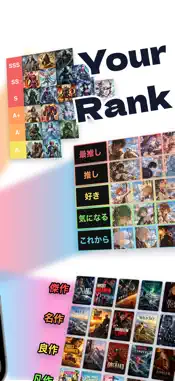
Rank anything you love, your way. Tier List Maker lets you put characters, games, anime, food, your favorite idols — anything — into S, A, B… tiers and build your own tier list. Just add images and move them into a tier. When you're done, save your list as an image and share it on social media. ---------------------------------------- Easy to make ---------------------------------------- ■ Turn images into items Import images from Photos or the clipboard and crop them into items. ■ Drag or tap to place items Long-press and drag items, or tap them and move them with the arrows — pick the way you like. You can also select several items and move them to another tier at once. ■ Show items as images or text Choose images only, text only (square or wide), or images with text. No images? You can build a list with text alone. ---------------------------------------- Make it look the way you want ---------------------------------------- ■ Spacing and outlines Widen or narrow the space between tiers, between tiers and items, and between items. Choose outline width, corner radius, and color (white, black, gray, tier color, or neon). ■ Tier label style Change the width and height of tier labels, choose filled or text-only, and turn borders on or off. You can even change the label text size, weight, color, and text outline. ■ Background and zoom Choose a black or white list background. Pinch to zoom in and out. Style settings are saved for each list, so it looks the same the next time you open it. ---------------------------------------- Save as an image ---------------------------------------- ■ Choose the size and background Pick a size and save to Photos. Keep the list background or make it transparent. ■ Enhance with AI When saving at a large size, AI can sharpen item images before saving (Premium. On the free plan, you can use it by watching a video ad to the end). ---------------------------------------- Organize and look back ---------------------------------------- ■ Categories Sort your lists into categories and filter by category. You can also reorder them. ■ Duplicate Duplicate a list to use as the starting point for a new one. ■ iCloud sync Your lists are saved to iCloud and synced across devices signed in to the same Apple Account. ■ AI analysis AI scores your list and tells you what works and what could be better (only on devices that support Apple Intelligence. On the free plan, you can use it by watching a video ad). ■ Light and dark Choose Light, Dark, or match your device's appearance. ---------------------------------------- Premium ---------------------------------------- With Premium, you can: ・Remove ads ・Create unlimited tier lists (up to 3 on the free plan) ・Use up to 26 tiers (S to G, 8 tiers, on the free plan) ・Edit tier names and colors ・Swap tiers (move a tier together with its items) ・Remove image backgrounds ・Enhance images with AI when saving (no ads) ● Plans ・Monthly plan (auto-renewing subscription) ・Lifetime plan (a one-time purchase that includes features added in the future) ● About the monthly plan ・Your subscription renews and is charged automatically unless you cancel at least 24 hours before the end of the free trial or the current period ・You can cancel anytime in your App Store settings. You can keep using Premium until the next renewal date ・Payment is charged to your Apple Account when you confirm the purchase ● Cancellations and refunds Cancellations and refunds for the lifetime plan are not available in the app. ---------------------------------------- Terms of Service & Privacy Policy ---------------------------------------- ● Terms of Service https://legal.sakes9.com/terms-of-service ● Privacy Policy https://legal.sakes9.com/privacy-policy
What's New
Version 5.16.0 2026-11-13
[New] • Added "Unranked": import lots of photos at once and sort them into ranks later • Added "Tile" and "Neon Sign" templates, and every template is now free ...[New] • Added "Unranked": import lots of photos at once and sort them into ranks later • Added "Tile" and "Neon Sign" templates, and every template is now free • Lists still arriving from iCloud are now shown [Design] • "Select" and "Add Photos" are now in the menu at the bottom right of the editor • Moved the Boost button to the bar at the bottom of the editor [Improvements & Fixes] • If you go back without saving, you can now save right there • Fixed an issue where tapping onboarding buttons quickly could skip pages • Improved performance and stability Technical Analysis
Package Overview Basic metadata
Bundle ID
jp.co.TierMaker Current Version 5.16.0
Minimum iOS 17.0
Package Size App Store Size
Package Metadata 3 / 64 version records
Detailed binary, privacy manifest, framework, and Info.plist results have not been indexed for this package yet. The verified App Store and archive metadata above remains available.
Developer Information
Known Version Records
3 version records with stored package metadata • 64 known version records
Stored metadata does not guarantee a package is currently available to download.
| Details | Version / IDs | Version date | Action |
|---|---|---|---|
 24.98 MB | v5.1.1 App Store ID: 886578566Build: 5.1.1 | 2026-09-07 01:17:14 | Get Version |
| Not archived | App Store ID: 886348192 | Unknown | Request Version |
| Not archived | App Store ID: 886065012 | Unknown | Request Version |
| Not archived | App Store ID: 885993906 | Unknown | Request Version |
| Not archived | App Store ID: 885814928 | Unknown | Request Version |
| Not archived | App Store ID: 885614341 | Unknown | Request Version |
| Not archived | App Store ID: 885508603 | Unknown | Request Version |
| Not archived | App Store ID: 885454763 | Unknown | Request Version |
| Not archived | App Store ID: 885270112 | Unknown | Request Version |
| Not archived | App Store ID: 882080346 | Unknown | Request Version |
| Not archived | App Store ID: 881926314 | Unknown | Request Version |
| Not archived | App Store ID: 881804721 | Unknown | Request Version |
| Not archived | App Store ID: 881740996 | Unknown | Request Version |
| Not archived | App Store ID: 881606937 | Unknown | Request Version |
| Not archived | App Store ID: 881175794 | Unknown | Request Version |
| Not archived | App Store ID: 880430551 | Unknown | Request Version |
| Not archived | App Store ID: 880415310 | Unknown | Request Version |
| Not archived | App Store ID: 880008206 | Unknown | Request Version |
| Not archived | App Store ID: 879993784 | Unknown | Request Version |
| Not archived | App Store ID: 875049293 | Unknown | Request Version |
| Not archived | App Store ID: 875008339 | Unknown | Request Version |
| Not archived | App Store ID: 874862675 | Unknown | Request Version |
| Not archived | App Store ID: 874736576 | Unknown | Request Version |
| Not archived | App Store ID: 874521273 | Unknown | Request Version |
| Not archived | App Store ID: 873455775 | Unknown | Request Version |
| Not archived | App Store ID: 873363949 | Unknown | Request Version |
| Not archived | App Store ID: 872549474 | Unknown | Request Version |
| Not archived | App Store ID: 871439259 | Unknown | Request Version |
| Not archived | App Store ID: 870807576 | Unknown | Request Version |
| Not archived | App Store ID: 870724540 | Unknown | Request Version |
| Not archived | App Store ID: 870631633 | Unknown | Request Version |
| Not archived | App Store ID: 870617536 | Unknown | Request Version |
| Not archived | App Store ID: 870578171 | Unknown | Request Version |
| Not archived | App Store ID: 870520766 | Unknown | Request Version |
| 32.94 MB | v1.9.0 App Store ID: 870425214Build: 43 | 2024-11-14 15:49:10 | Get Version |
| Not archived | App Store ID: 870354550 | Unknown | Request Version |
| Not archived | App Store ID: 870282913 | Unknown | Request Version |
| Not archived | App Store ID: 870228086 | Unknown | Request Version |
| Not archived | App Store ID: 870174709 | Unknown | Request Version |
| Not archived | App Store ID: 870150886 | Unknown | Request Version |