
Preview


Description
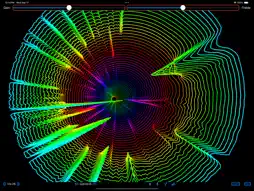
MuVis is an open-source macOS & iOS app for music visualization. It renders informative (and musically useful) graphical displays in real time from music files being played - or from the device's microphone. Real-time music visualization is an exciting endeavor - providing the user with dynamic visual and aural stimulation and edification. When the MuVis app first opens, the on-screen display should look somewhat like the first screenshot shown above and the computer's speakers should be playing music from a pre-loaded royalty-free music file. (Currently, the song file is "The Elevator Bossa Nova" from Bensound.com.) The on-screen display shows a real-time dynamic visual representation of the audio that you are hearing. The top and bottom toolbars contains buttons and sliders to allow you to control what you see. Triple-tap your screen to show/hide these toolbars. At the bottom left are two buttons labelled by left- and right-chevrons. Clicking the left one changes the display to the previous visualization, and clicking the right one changes the display to the next visualization - which allows you to cycle through the thirty-four visualizations currently provided by the app. Also, you can simply swipe left or right to change the visualization. Adjacent to these Visualization chevrons are two Option chevrons. When programming these visualization algorithms, there are numerous variations and options available to the developer. These buttons allow the user to select to see any of eight variations. The particular variation rendered is different for each visualization. Also, you can simply swipe up or down to change the option rendered. Adjacent to these Option chevrons is a “Pause” button. When clicked, it stops the music playback and freezes the visualization display. The button label changes to “Play” which, when clicked, causes the music playback and the visualization display to continue. The adjacent button has a "Microphone" icon. When pressed it stops playing the audio from the selected song file (and also stops it's visualization), and starts playing the live audio from the microphone (and starts it's visualization). The label then becomes a slashed microphone - which, when pressed, performs the reverse actions and changes the icon back to "Microphone". The next button has a "Music List" icon. It allows you to select whatever songs you want from your own iCloudDrive folder. Selecting a song causes that song to play - and the visualization to render its dynamic attributes. The adjacent button has a “Waveform” icon with a minus sign. When clicked, it passes the audio signal through a “spectral enhancer” filter which reduces the display of noise (usually percussive effects which smear spectral energy over a large frequency range), and enhances the display of spectral lines (usually the harmonics of musical notes). Finally, at the right end of the bottom toolbar are two buttons labelled UserG (for User Guide) and VisG (for Visualization Guide). Clicking either button activates a “Quick Look” popup window to display the app's documentation. The top toolbar contains two sliders - one controlling "Visualization Gain" and the other controlling "Visualization Treble Boost". As their names imply, sliding them adjusts the gain and slope of the visual data representation. The source code for this app is posted at www.github.com/Keith-43
What's New
Version 3.0.1 2026-04-05
Single tap to show/hide toolbars. Technical Analysis
Package Overview Basic metadata
Bundle ID
GZ962756J3.com.me.kbromley.MuVis Current Version 3.0.1
Minimum iOS 17.0
Package Size App Store Size
Package Metadata 1 / 10 version records
Detailed binary, privacy manifest, framework, and Info.plist results have not been indexed for this package yet. The verified App Store and archive metadata above remains available.
Developer Information
Known Version Records
1 version record with stored package metadata • 10 known version records
Stored metadata does not guarantee a package is currently available to download.
| Details | Version / IDs | Version date | Action |
|---|---|---|---|
| 17.79 MB | v3.0.1 App Store ID: 884153187Build: 3.0.1 | 2026-04-05 22:48:21 | Get Version |
| Not archived | App Store ID: 878108239 | Unknown | Request Version |
| Not archived | App Store ID: 857916428 | Unknown | Request Version |
| Not archived | App Store ID: 857809438 | Unknown | Request Version |
| Not archived | App Store ID: 855751947 | Unknown | Request Version |
| Not archived | App Store ID: 854187890 | Unknown | Request Version |
| Not archived | App Store ID: 850396672 | Unknown | Request Version |
| Not archived | App Store ID: 849506350 | Unknown | Request Version |
| Not archived | App Store ID: 848006912 | Unknown | Request Version |
| Not archived | App Store ID: 844496466 | Unknown | Request Version |