Preview


Description
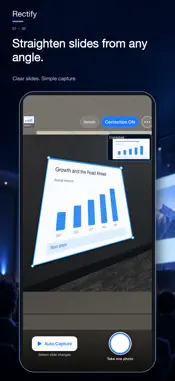
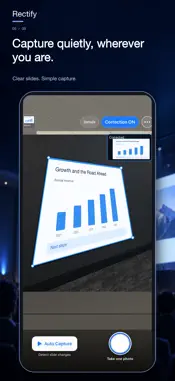
Turn angled slide photos into front-facing images. Use Rectify as a silent camera, too. Rectify captures presentation slides and corrects their perspective on your iPhone. Keep useful slides from lectures, conferences and meetings in a format that is easier to revisit, without straightening each photo by hand. STRAIGHTEN SLIDES AS YOU SHOOT Rectify detects the four corners of a slide and corrects the tilted shape. See the detected outline and a live corrected preview before capturing, so you can check what will be included. SILENT CAMERA FOR EVERYDAY PHOTOS Take photos without a shutter sound. Capture presentation slides during lectures and meetings without interrupting others with camera noise. Turn correction off to photograph food, objects and everyday moments without cropping the image to a slide. To save these photos directly to Photos, choose Photos as the save destination for original images in Settings. AUTO CAPTURE FOR SLIDE CHANGES Start Auto Capture and keep the camera aimed at the screen. Rectify uses changes in readable slide text to detect a slide change and trigger a capture. Use the shutter button whenever you want to capture a slide yourself, including while Auto Capture is running. OPEN STRAIGHT TO THE CAMERA Open the app directly to the camera. Take a single photo, start Auto Capture or turn correction on or off from the same screen. SAVE EACH VERSION WHERE YOU WANT Choose a separate destination for the original and corrected image: in the app, in Photos, in both places, or don't save. By default, originals stay in the app and corrected images go to Photos. If correction fails, Rectify saves the original instead. When the original is set to "Don't save," that fallback is kept in the app. FIND YOUR CAPTURES BY DATE Browse in-app images by date, zoom in, share them, save them to Photos or select several to delete. Deleting an in-app image leaves its copy in Photos untouched. Images stored only in the app are removed when you delete the app. IMAGE PROCESSING ON YOUR IPHONE Slide detection and perspective correction run on your device. Captured images are not uploaded to an external server for processing. Rectify does not record audio. For lectures, conference talks, training sessions, projected meeting materials, whiteboards and large displays. Only photograph content when permitted, and respect venue rules and other people's rights. Automatic detection depends on readable text, lighting and distance. Use manual capture for image-only slides or changes the app does not detect.
What's New
Version 1.3 2026-10-24
Improved layouts for iPhone Duo and reliability of image correction. Technical Analysis
Package Overview Basic metadata
Bundle ID
com.shiba6v.rectify Current Version 1.3
Minimum iOS 18.0
Package Size App Store Size
Package Metadata 0 / 0 version records
Detailed binary, privacy manifest, framework, and Info.plist results have not been indexed for this package yet. The verified App Store and archive metadata above remains available.
Developer Information
Known Version Records
0 version records with stored package metadata
Stored metadata does not guarantee a package is currently available to download.
| Details | Version / IDs | Version date | Action |
|---|