
Preview

Description
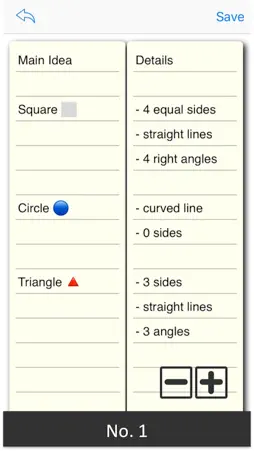
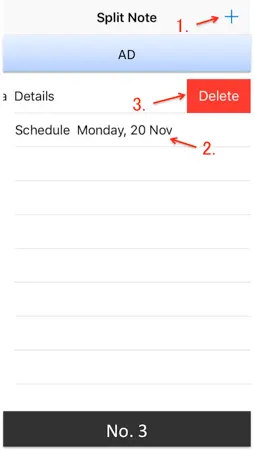
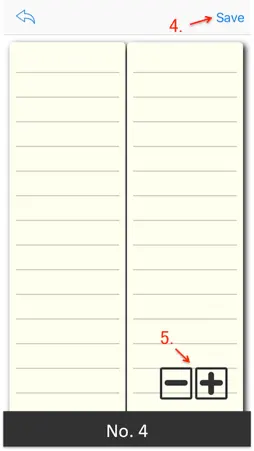
"Split Note" is a simple notebook app that you can write in 2 columns as its name suggests. Writing notes in two columns makes effective use of the screen size. In addition, since it allows you to enter and view two items at the same time in parallel, it also leads to more efficient work. # Example of use - Idea Memo Left column: fill in the theme Right column: fill in details - Schedule Left column: fill in date and time Right column: fill in the details of the schedule - Vocabulary Notebook Left column: fill in English words Right column: fill in Japanese translation - List of Baggage Contents Left column: fill in the list of your own belongings Right column: fill in the list of children's belongings - Cooking Menu Left column: fill in a weekly cooking menu Right column: fill in required foodstuff The rest is up to your ingenuity. Taking notes in two columns is said to be "Two-Column Note-Taking", and as one of effective methods to write notes in a clear and systematic manner, attention is very much in the field of education and business We are gathering. It is a simple and easy way to fill in the subject in the left column and fill the details in the right column, but it is useful for structuring the relationship of things by organizing in two stages. # Usage (See screenshots No.3,4) 1. You can create a new document by tapping the "+" icon. 2. You can edit by tapping the saved document. 3. You can delete saved documents by swiping left. 4. You can save the document by tapping the "Save" icon. 5. You can change the character size by tapping the "+" icon, "-" icon in the bottom right. The screen will not be locked while using this application, so you can concentrate on your work. By all means, please try this.
What's New
Version 1.0.1 2018-01-02
A minor bug was fixed. Technical Analysis
Package Overview Package analysis available
Bundle ID
npj.SplitNotes Current Version 1.0.1
Minimum iOS 9.0
Package Size Latest Recorded Package Size
Package Metadata 1 / 3 version records
GoogleToolboxForMac
org.cocoapods.GoogleToolboxForMac v2.1.3iOS 8.0+175.67 KB
nanopb
org.cocoapods.nanopb v0.3.8iOS 8.0+192.11 KB
2.7 / 5.0 (7 ratings)
Developer Information
Known Version Records
1 version record with stored package metadata • 3 known version records
Stored metadata does not guarantee a package is currently available to download.
| Details | Version / IDs | Version date | Action |
|---|---|---|---|
 10.98 MB | v1.0.1 App Store ID: 841852240Build: 1.0.1 | 2021-04-23 19:26:54 | Get Version |
| Not archived | App Store ID: 825489686 | Unknown | Request Version |
| Not archived | App Store ID: 825450617 | Unknown | Request Version |