Preview




Description
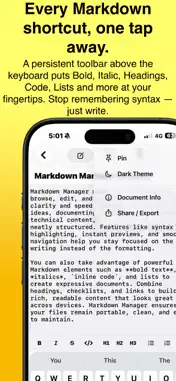
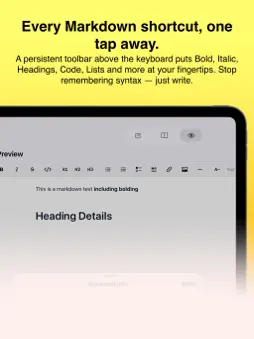
Markdown Manager is a clean, powerful Markdown editor for iPhone, iPad and Mac — built for writers, developers, students and note-takers who want a serious tool without a serious price tag. Pay once. Use forever. No monthly fees, no annual renewals, no "Pro" tier locked behind a paywall. Just a great app that's yours to keep. WRITE IN MARKDOWN. SEE IT INSTANTLY. Tap Edit and write raw Markdown. Tap Preview to see your beautifully rendered result. Or use Split view to see both side by side — even on iPhone. The live preview renders via GitHub Flavoured Markdown (GFM) so what you see is exactly what you get. FORMATTING MADE FAST A persistent shortcut bar sits above the keyboard so you never have to remember syntax: • Bold, Italic, Strikethrough, Inline Code • Headings H1, H2, H3 • Bullet list, Numbered list, Task / checkbox list • Blockquote, Hyperlink, Horizontal rule • Font size A− / A+ controls Stop switching apps just to look up "how do I do a table again." Everything is one tap away. EVERYTHING SYNCS AUTOMATICALLY All your documents sync silently across every device via iCloud. Start a note on your iPhone on the train, polish it on your iPad at home, finish it on your Mac at the desk. It's all there, automatically, no setup required. FULL GITHUB FLAVOURED MARKDOWN Markdown Manager renders the full GFM spec using the industry-standard marked.js library: • Tables with alignment • Task lists • Strikethrough • Fenced code blocks with syntax highlighting • Blockquotes, nested lists, inline HTML SHARE & EXPORT ANYWHERE Your content is never trapped: • Export or share your document as a .md file • Copy rendered HTML to paste into any CMS or website • Print to paper or save as PDF via the system share sheet • Open .md files directly from Files app, Mail, Safari or any other app THOUGHTFUL DESIGN • Document library with search and sort (by title, date modified, date created) • Pin important documents to the top • Word count and character count always visible • Dark and Light theme, follows system appearance automatically • Smooth, native SwiftUI design — not a web wrapper ONE PRICE. NO TRICKS. Most Markdown editors on the App Store fall into one of two camps: too basic to be useful, or locked behind a $20–$50/year subscription. Markdown Manager is neither. Pay a single low price once. No nag screens. No "your trial has expired." No features held back. The app you download today is the complete app. PERFECT FOR Developers writing README files and documentation Students taking structured notes Writers drafting articles and blog posts Anyone who wants their notes to look great without fighting the tool People who are just done paying monthly for a text editor Download Markdown Manager today and own it forever.
What's New
Version 1.2 2026-09-16
Your documents now sync. Markdown Manager now keeps your documents as real .md files in iCloud Drive, so the same library appears on your Mac, iPad and iPhone —... Technical Analysis
Package Overview Basic metadata
Bundle ID
com.keepingupwithtechnology.MarkdownManagerIOS Current Version 1.2
Minimum iOS 17.0
Package Size App Store Size
Package Metadata 0 / 2 version records
Detailed binary, privacy manifest, framework, and Info.plist results have not been indexed for this package yet. The verified App Store and archive metadata above remains available.
Developer Information
Known Version Records
0 version records with stored package metadata • 2 known version records
Stored metadata does not guarantee a package is currently available to download.
| Details | Version / IDs | Version date | Action |
|---|---|---|---|
| Not archived | App Store ID: 887818323 | Unknown | Paid / Arcade |
| Not archived | App Store ID: 884971034 | Unknown | Paid / Arcade |