
Preview


Description
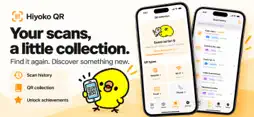
Quick scans. A little joy in your history. Hiyoko QR reads QR codes with your camera or from saved photos and screenshots, then keeps your scan history on your device. SCAN WITH YOUR CAMERA Open the app and start scanning. Tap to refocus, turn on the light, and adjust its brightness on supported devices. SCAN FROM PHOTOS Choose a saved image or screenshot containing a QR code. If a photo contains multiple readable codes, see them marked with numbered frames and choose the one you want. Identical contents in the same photo are grouped together. FIND THAT QR AGAIN Search your history, add your own labels, or fetch a website's page title with a tap. If you scan the same QR again, see its previous scan date and scan count. OPEN LINKS YOUR WAY Choose the in-app browser or your device's default browser. Copy or share the scanned content. Links, email addresses, and phone numbers detected in plain text appear as separate actions. URLs do not open automatically when scanned. BUILD A LITTLE COLLECTION Discover seven QR types: websites, Wi-Fi, email, phone, contacts, locations, and text. Unlock achievements for total scans, consecutive scanning days, and other discoveries. A little chick keeps you company along the way. JAPANESE AND ENGLISH The app follows your device's preferred language. You can also choose Japanese or English near the bottom of Settings. Your QR contents and custom history labels stay as they are. No account or purchase is required. The app contains ads. No ads appear on the camera scanning screen. Other screens may show banners or native ads, and limited full-screen ads may appear when moving from scanning to History or Collection. Wi-Fi, contact, and location QR codes support viewing and copying their contents. The app does not automatically join Wi-Fi networks, add contacts, or obtain your current location. QR image processing happens on your device. Ads, user-requested page-title fetching, and opening links use network connections. Lifetime totals and unlocked achievements remain when you delete scan history.
What's New
Version 1.1 2026-10-25
• Added English and an in-app language selector. • Choose between multiple QR codes in a photo using numbered frames and position labels. • Improved the scan re... Technical Analysis
Package Overview Basic metadata
Bundle ID
jp.hiyoko.qrreader Current Version 1.1
Minimum iOS 17.0
Package Size App Store Size
Package Metadata 0 / 0 version records
Detailed binary, privacy manifest, framework, and Info.plist results have not been indexed for this package yet. The verified App Store and archive metadata above remains available.
Developer Information
Known Version Records
0 version records with stored package metadata
Stored metadata does not guarantee a package is currently available to download.
| Details | Version / IDs | Version date | Action |
|---|