Preview






Description
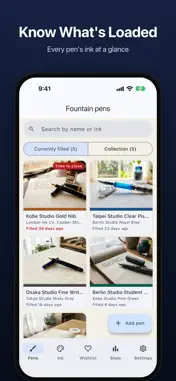
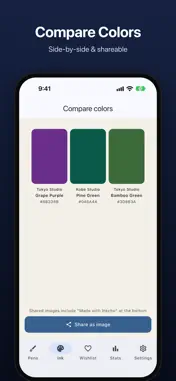
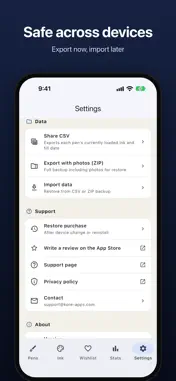
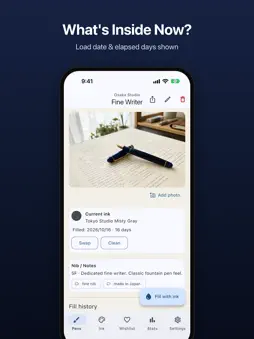
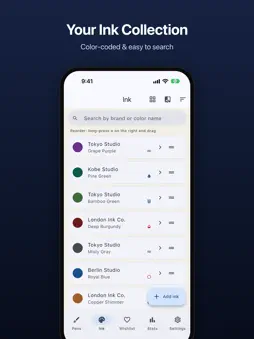
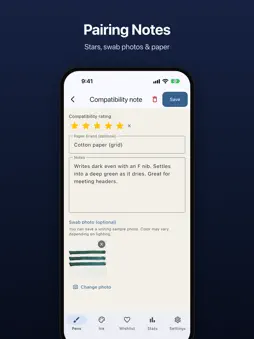
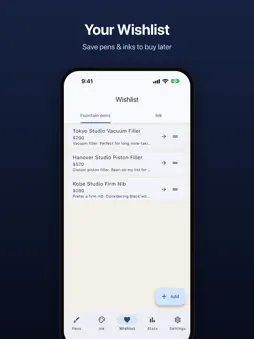
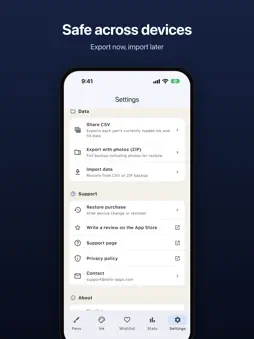
Never forget which ink is in which pen. Inkcho is a fountain pen ink tracker built for collectors who rotate multiple pens and juggle too many bottles. Whatever the brand, see every pen's current ink at a glance. Log changes, track history, and never refill the wrong color again. 【What you can do】 ▷ See what's loaded at a glance Photo cards for every inked pen and its current ink, with pens due for cleaning first. ▷ Log ink changes & cleaning Record the date, ink name, and notes every time you refill or flush a pen. ▷ Pairing notes Rate pen × ink × paper combinations with text, star ratings (1–5), and swab photos. ▷ Detailed ink management Record sheen, shimmer, water resistance, drying time, feathering, and bottle level (5 stages). Add custom tags for easy filtering. ▷ Wishlist Save pens and inks you want to buy — add them to your collection in one tap when you do. ▷ Statistics See your top 5 pens & inks, monthly loading chart, and brand breakdown. ▷ Color comparison Compare up to 8 inks side by side. Share the result as an image. ▷ Usage alerts Get a push notification when an ink has been loaded beyond your set number of days. ▷ Photo attachments Attach photos to pens, inks, and pairing notes — from camera or your photo library. Pens can have up to 4, like the cap top or the nib. ▷ Color management Register any color with the built-in picker. Sort inks by hue or brand, or browse them in the Swatch book view. ▷ Data export & import (free) Share a CSV for spreadsheet apps, export a ZIP with photos for full backup, or import from CSV / ZIP. 【Great for】 · Collectors who rotate multiple pens and lose track of what's loaded · Ink enthusiasts with more bottles than they can remember · Anyone who wants to capture what works for a specific pen × ink × paper combo · Anyone with inks from many different makers 【Your data stays on your device】 Everything is stored locally on your iPhone / iPad. No external servers. No account required. 【Pricing】 · Free: up to 5 pens & 10 inks. Every feature beyond the entry limit is free — stats, color compare, usage alerts, sorting, export, and more · Pro (one-time): unlimited pens & inks, and share cards without the watermark One payment. No subscription. Yours forever. --- Kore Apps [email protected]
What's New
Version 1.4.0 2026-11-01
• Now available in 6 more languages (German, French, Korean, and more) • Fixed the last item in lists being hidden behind the Add button, and more • Minor bug f... Technical Analysis
Package Overview Basic metadata
Bundle ID
com.korenori.inkcho Current Version 1.4.0
Minimum iOS 15.0
Package Size App Store Size
Package Metadata 0 / 10 version records
Detailed binary, privacy manifest, framework, and Info.plist results have not been indexed for this package yet. The verified App Store and archive metadata above remains available.
Developer Information
Known Version Records
0 version records with stored package metadata • 10 known version records
Stored metadata does not guarantee a package is currently available to download.
| Details | Version / IDs | Version date | Action |
|---|---|---|---|
| Not archived | App Store ID: 887572435 | Unknown | Request Version |
| Not archived | App Store ID: 886804689 | Unknown | Request Version |
| Not archived | App Store ID: 886503307 | Unknown | Request Version |
| Not archived | App Store ID: 886362265 | Unknown | Request Version |
| Not archived | App Store ID: 886226620 | Unknown | Request Version |
| Not archived | App Store ID: 885890462 | Unknown | Request Version |
| Not archived | App Store ID: 885740238 | Unknown | Request Version |
| Not archived | App Store ID: 885652728 | Unknown | Request Version |
| Not archived | App Store ID: 885551834 | Unknown | Request Version |
| Not archived | App Store ID: 884827253 | Unknown | Request Version |