
Preview







Description
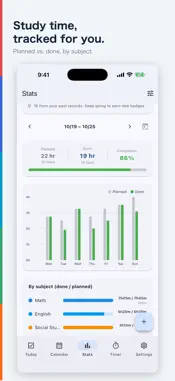
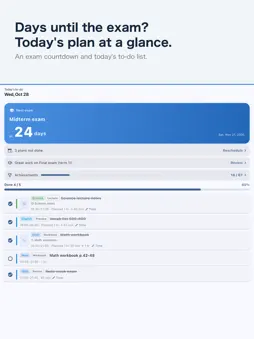
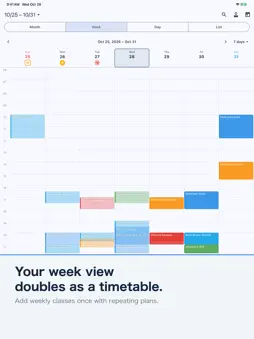
How many days until the exam? What should you study today? StudyCal is a study calendar that turns your plans into today's to-do list. Check a plan off and your study time adds up automatically. Exam countdowns, home screen widgets, a streak heatmap, a focus timer and more than 50 achievement badges are all included. No sign-in needed. With Pro+, you can reschedule missed plans in one tap, see your pace toward exam day, sync between iPhone and iPad, and share your progress with a parent. StudyCal brings your study plans, timetable, to-do list and study time tracking together in one simple app for middle school, high school and exam students. Plans you add appear on that day's to-do list, and a single tap marks them done. Subjects are color-coded, and your study time is shown in charts. ■ Made for - Students who want to keep studying every day - Anyone tired of using separate apps for a timetable and a to-do list - Students preparing for exams who want to see time spent on each subject - Anyone who wants to add weekly recurring classes in seconds ■ Main features - Today's to-do: today's study plans in one list, with your completion rate at a glance - Calendar: switch between month, week, day and list views in one tap. Color-coded subjects and recurring plans - Timetable: the week view works as a timetable (any number of periods) - Quick plans: pick a subject and a type, and the title fills in for you - Recurring plans: every week on one or more days, with an end date. Automatic numbering such as "Lesson 1, Lesson 2, Lesson 3..." - Check off: tap the circle to finish a plan; it goes straight into your totals - Stats: weekly, monthly and yearly study time in stacked bar charts, with a breakdown by subject - Materials and bookshelf: attach textbooks and workbooks to your plans and see the study time for each one (icon-only materials are unlimited; up to 5 with photos; unlimited with Pro) - Plan types: homework, preview, review, past exams, drills, workbooks and more (add your own) - Export to your iPhone calendar or Google Calendar - Automatic backup: once a day, your plans, records, settings and photos are backed up, including to iCloud, so you can restore them on a new device (keeping several devices in sync is Pro+) - Sharing with a parent (Pro+): once the student approves, a parent can see study time, time per subject, streak days and completion rate on their own phone. Plan names and notes are never sent. Parents can send stamps and short messages - Exam countdown: add an exam date to see the days left on the home tab and on widgets - Widgets: check today's to-do list and the days until your exam from the home screen - Streaks and badges: see the days you studied on a heatmap and collect badges as you keep going - Focus timer: a Pomodoro-style timer that alternates focus and breaks - No sign-in needed ■ Easy to start StudyCal needs no account and no sign-in. Your study records stay on your iPhone or iPad and in your own iCloud. Study totals are sent only when you use sharing with a parent. ■ Optional upgrades - StudyCal Pro (one-time purchase): app colors, calendar background photos, unlimited material photos, widget colors and background images, rewards, focus timer styles and custom stamps - StudyCal Pro+ (auto-renewing monthly or yearly subscription): reschedule missed plans, iPhone and iPad sync, pace toward exam day, past weekly reports, monthly reports, exam reviews and sharing with a parent (a parent can see up to 6 children if the parent subscribes). Includes everything in Pro All the basic features, including plans, to-do lists and stats, work without upgrading. Pro+ renews automatically unless canceled at least 24 hours before the end of the current period. You can cancel anytime from your subscription settings. Terms of Use: https://kazutaka.biz/kiyaku/ Privacy Policy: https://kazutaka.biz/privacy/
What's New
Version 1.2.21 2026-11-19
What's new in v1.2.21 - Event items now have a show/hide switch, just like study items. You can also hide items you added yourself. Tap an item to change its c...What's new in v1.2.21 - Event items now have a show/hide switch, just like study items. You can also hide items you added yourself. Tap an item to change its color (and the name of items you added), and delete items you added from there. Technical Analysis
Package Overview Basic metadata
Bundle ID
biz.kazutaka.studycal Current Version 1.2.21
Minimum iOS 15.0
Package Size App Store Size
Package Metadata 1 / 4 version records
Detailed binary, privacy manifest, framework, and Info.plist results have not been indexed for this package yet. The verified App Store and archive metadata above remains available.
Developer Information
Known Version Records
1 version record with stored package metadata • 4 known version records
Stored metadata does not guarantee a package is currently available to download.
| Details | Version / IDs | Version date | Action |
|---|---|---|---|
| 77.57 MB | v1.1.1 App Store ID: 889485843Build: 1.1.1 | 2026-09-18 20:33:45 | Get Version |
| Not archived | App Store ID: 888034583 | Unknown | Request Version |
| Not archived | App Store ID: 887993321 | Unknown | Request Version |
| Not archived | App Store ID: 887648931 | Unknown | Request Version |