Preview




Description
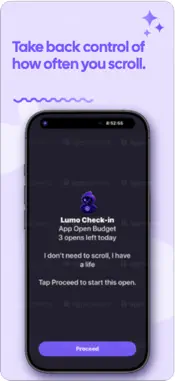
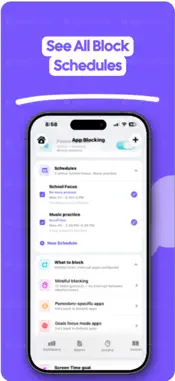
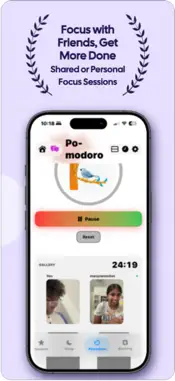
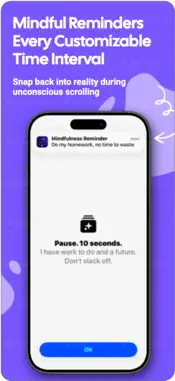
Meet Scroll Sense’s new Focus Blocking system: a smarter, more human way to protect your attention when it matters most. Most blockers force you into one rigid rule and hope you remember to turn it on. Scroll Sense does the opposite: it adapts to your real life. You can block apps around your goals, your focus sessions, and your sleep windows, with personalized rules that work automatically in the background. Here’s what makes it different: Goal-based blocking that actually follows your schedule Set a goal with a start and end time (like “Do AP Stats Homework, 4:00–6:00 PM”), choose exactly which apps should be blocked for that goal, and Scroll Sense enforces it automatically during that window. No getting distracted scrolling when you don't want to - Scroll Sense has got you covered, with one of the smartest blocking systems. No re-opening the app. No re-saving. No “did I turn it on?” anxiety. Per-goal customization (not one-size-fits-all) Different goals need different boundaries. You can block one set of apps for “Deep Work,” another for “Family Time,” and something totally different for “Exercise.” Pomodoro + Goals + Sleep + Main Focus, working together Instead of isolated features fighting each other, Scroll Sense combines them into one unified shielding engine. The app calculates what should be blocked right now based on all active contexts, then applies exactly that. Built for real attention, not fake streaks Reduce decision fatigue and self-negotiation in vulnerable moments. You define your boundaries once, and Scroll Sense helps you keep them when your future self needs backup. If you’ve ever told yourself “just 2 minutes” and lost hours, this feature is for you. Main App Blocking as your default safety net Set a core block list once, and Scroll Sense uses it as your baseline protection when no specific override is needed. This gives you always-on guardrails for the apps that derail your day most often, without forcing you to constantly configure every scenario from scratch. Easily add new blocking schedules—maybe one for school focus, and one for winding down at night—and Scroll Sense applies the right protection at the right time, automatically. Your default block list stays in place as the foundation, while each schedule can target exactly what you need in that moment: social apps during study hours, games after bedtime, or anything else that pulls you off track. The result is protection that feels intentional, not rigid—you set it up once, turn schedules on when you need them, and get back hours of focus without babysitting your phone all day. Mindful Awareness System - Want to scroll just for 30 minutes, but worry you will lose track of time and completely forget? Destroy mindless scrolling and snap yourself back into reality. At the end of a chosen interval, Scroll Sense blocks distracting apps for 4 seconds—enough to snap you out of mindless scrolling and not lose hours. Sleep Blocking that protects your nights and mornings Set a bedtime boundary and let Scroll Sense automatically shield distracting apps during your sleep window. You can use separate weekday and weekend settings, so your rules match your real routine. It reduce late-night scrolling and protects sleep. App Open Budget: A new way to stay in control of apps you open on autopilot. Instead of only blocking an app completely, App Open Budget lets you set how many times per day you can open it and how long each open can last. It also offers 5 short checks, if something important happens. Pomodoro Blocking that starts with focus and ends with relief When a focus session begins, Scroll Sense can instantly block your selected distraction apps for that interval, then release them when the session ends. This destroys distractions during focus - when it matters most. This creates clear mental boundaries around work sprints. Scroll Sense isn’t just blocking apps. It’s helping you reclaim your time-automatically, respectfully, and on your terms.
What's New
Version 4.0.5 2026-11-25
Scroll Sense — Digital wellness that actually sticks Scroll Sense brings Screen Time blocking, goals, mindful habits, parent controls, and friend accountabilit...Scroll Sense — Digital wellness that actually sticks Scroll Sense brings Screen Time blocking, goals, mindful habits, parent controls, and friend accountability into one app—built for school nights, family rules, and the scroll that “just five more minutes” turns into an hour. Parent Mode Link your account to your child’s Scroll Sense. From your phone, set schedules, sleep rules, Open App Budget limits, and goal restrictions that apply on their device—even when they’re not in the app. Your home view shows screen time, what’s blocked, and what needs your attention. Sensitive edits can require your Parent PIN, and changes can sync to their phone in the background so rules stay what you meant. Goal restrictions Turn real tasks into phone-enforced goals. You pick which apps stay blocked and when the goal starts. With camera proof on, those apps stay blocked until your child submits on-device proof of completion—and until you approve it with your Parent PIN. Submitting proof alone does not unlock; your approval does. Without camera proof, blocking lifts when they complete the goal on their phone, per your settings. Clear for them, trustworthy for you. Blocking: Standard, Hard, and Commitment Standard schedules block chosen apps during set hours. Hard Mode adds real friction: opening or leaving during a restricted window can require an exercise you choose—breathing, push-ups, reflection, puzzles, and more—so auto-scrolling breaks. Set schedules that stick - you can't bypass one whenever you feel like it. Icons: Scroll Sense now has 8 characters, including Lumo, Riva, Astra, and more, and when you equip a character in Rewards Shop, it changes the icon of the app. Each character has it's own personalities. Plan Your Day with Voice! Easily plan out your full day by talking - and know exactly when you need to finish with live activities, widgets, and use of dynamic island. Friends: goals, sharing, and leaderboards Connect with friends and choose what you share: goal progress, blocking status, budgets, and more. See how friends are doing when they opt in. Friend leaderboards offer friendly competition on metrics you enable (for example, lower screen time today). Widgets and shared Plan Your Day Widgets on the Home and Lock Screen show screen time vs goal, blocking status, mindful timers, Pomodoro, and Plan Your Day progress at a glance. Plan Your Day is your daily blueprint: activities, goals, notes, and percent complete. Parents can add or edit a child’s Plan Your Day entries and schedules so the family stays aligned; children can be notified when plans change. Progress and notes remain after the day ends. Calendar ties each day to what actually applied—saved entry, that day’s schedule, or today’s menu—so history stays useful. Also in Scroll Sense Mindful timed awareness (interval reminders with short pauses or exercises on chosen apps), Open App Budget with optional “why did you open?” prompts, sleep and location blocking, Pomodoro, and rich Screen Time insights—designed to work together. Scroll Sense is for families who need rules on the child’s phone, friends who motivate each other, and anyone who wants blocking and goals to feel clear, fair, and finishable—with camera proof when trust needs a boost. Bring playlists into Scroll Sense without rebuilding them by hand. Import from Screenshot reads song titles from a photo of your track list, searches YouTube for a playable match (official audio when we can find it), and lets you review and edit before saving. Your playlists stay in the library for Pomodoro and everyday playback. Study Together: When you run a group Pomodoro, shared playlists stay in sync so everyone can focus on the same music. Friends can share playlists from the library; you’ll see a notice on Home, preview the list, then accept or decline. App icons: Choose a look that fits the season from Settings—default plus themed options like spring, summer, Halloween, and winter—without reinstalling the app Technical Analysis
Package Overview Basic metadata
Bundle ID
arjun.officialapp.Scroll-Sense Current Version 4.0.5
Minimum iOS 26.0
Package Size App Store Size
Package Metadata 0 / 19 version records
Detailed binary, privacy manifest, framework, and Info.plist results have not been indexed for this package yet. The verified App Store and archive metadata above remains available.
Developer Information
Known Version Records
0 version records with stored package metadata • 19 known version records
Stored metadata does not guarantee a package is currently available to download.
| Details | Version / IDs | Version date | Action |
|---|---|---|---|
| Not archived | App Store ID: 886962462 | Unknown | Request Version |
| Not archived | App Store ID: 885199729 | Unknown | Request Version |
| Not archived | App Store ID: 885141568 | Unknown | Request Version |
| Not archived | App Store ID: 885104484 | Unknown | Request Version |
| Not archived | App Store ID: 884938054 | Unknown | Request Version |
| Not archived | App Store ID: 884871711 | Unknown | Request Version |
| Not archived | App Store ID: 884701199 | Unknown | Request Version |
| Not archived | App Store ID: 884657720 | Unknown | Request Version |
| Not archived | App Store ID: 884462161 | Unknown | Request Version |
| Not archived | App Store ID: 882519187 | Unknown | Request Version |
| Not archived | App Store ID: 882019908 | Unknown | Request Version |
| Not archived | App Store ID: 881693530 | Unknown | Request Version |
| Not archived | App Store ID: 881625697 | Unknown | Request Version |
| Not archived | App Store ID: 881604592 | Unknown | Request Version |
| Not archived | App Store ID: 881586681 | Unknown | Request Version |
| Not archived | App Store ID: 881336267 | Unknown | Request Version |
| Not archived | App Store ID: 881236131 | Unknown | Request Version |
| Not archived | App Store ID: 881205611 | Unknown | Request Version |
| Not archived | App Store ID: 880007059 | Unknown | Request Version |