
Preview







Description
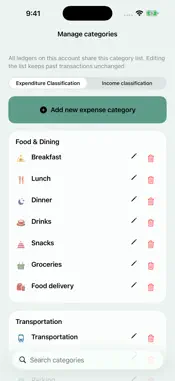
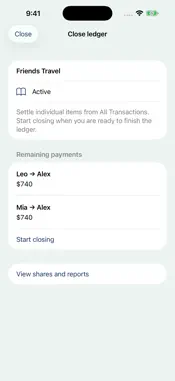
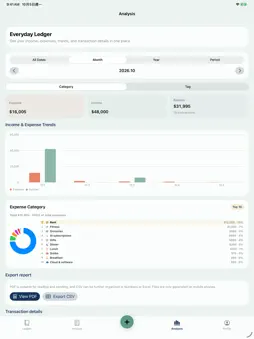
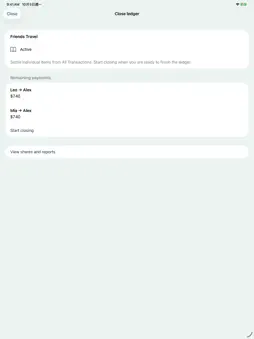
Mony Planet organizes daily expenses, travel and shared spending. FIVE ENTRY METHODS Tap + to open your default page; switch between Photo, Text, Voice, Quick Fill and Frequent. Text is a manual item/amount form. Quick Fill optionally uses AI to organize multiple items; Photo prepares editable receipt drafts. Review before saving. Set the default/order in Settings. Use multiple photos, saved receipts, foreign receipt translation and multiple currencies. Read Taiwan e-invoice QR codes and available items. Resume local photo/text drafts in the same account and ledger. Retry unfinished photos or complete them manually; save completed receipts first. TAGS AND ANALYSIS Create ledger tags for trips or projects. Tag receipts or individual items and update older records in bulk. Review income, expenses and balances by category/tag across a month, year, custom period or All Dates. Export PDF reports, CSV entries and personal JSON backups. SHARED LEDGERS AND PAYMENTS Choose who paid and who shares each item; review amounts owed and keep settlement notes and photos. Select pending records in the Unsettled list and confirm payment details before settling. After archiving cloud invoices, optionally register payment. Settlement status changes only after confirmation. View, add or edit payment details and proof photos for archived invoices. EVERYDAY ORGANIZATION Create frequent income/expense items; select dates, days and occurrences, then review before saving. Manage recurring entries, imports, duplicates and asset balances/transfers. Customize categories, reminders and colors; archive or restore ledgers. Layouts adapt to text size; replay 12 guide topics anytime. TRAVEL ITEM INSPECTION Off by default; enable in Ledger Settings and set destination/dates. Free local analysis organizes suspected, pending and all purchase items. Review examples, country rules, penalties, official links and luggage tutorials. Mark items carried, consumed or excluded. Optional front/back product photos are sent to Google Cloud Vertex AI after consent to extract labels and research arrival rules. Detailed queries need internet and credits; sharing scope and cost appear first. This non-government aid may be wrong. Results are reference only, never an entry permit; check official notices. JAPAN TAX-REFUND GUIDANCE Separate airport cash and online steps, inspection FAQs, kiosk illustrations and official links. Methods/deadlines depend on the platform. Some online methods work after returning home; customs confirmation is still required at departure. The app does not process refunds. LINE AND SYNC Use our official LINE account for entries, receipts and queries in Traditional Chinese. LINE categories are separate from ledger tags. Financial records save locally; tap Sync or pull to refresh to upload changes and load cloud updates. Frequent-item settings, entry order and default sync across web and phone for the same account. Offline edits remain for retry. AI AND ACCESS Some text and Taiwan Chinese receipts are recognized on device first. If unsupported/incomplete, Google Cloud Vertex AI processes requests after consent. Withdraw consent in Settings > AI Data Sharing. Review/edit results before saving. Ledger tools > AI Recognition categorizes selected imported expenses; review before saving. Cancel leaves records unchanged. Cloud AI requires internet, sharing consent, eligibility and credits. Finance Assistant is for designated accounts only; subscriptions/top-ups do not grant access. Inquiry credits remain usable for enabled travel research. Manual entry remains available without AI. See the app/App Store for plans and prices. Support: [email protected] Terms of Use (EULA): https://www.apple.com/legal/internet-services/itunes/dev/stdeula/
What's New
Version 1.1.20 2026-11-15
• Easier entry: switch between Photo, Text, Voice, Quick Fill and Frequent. Set the default and order in Settings, with simpler help. • Frequent income and expe...• Easier entry: switch between Photo, Text, Voice, Quick Fill and Frequent. Set the default and order in Settings, with simpler help. • Frequent income and expenses: choose dates, days and occurrences. Share frequent-item settings and entry preferences across web and phone under the same account. • Invoice payments: optionally register payment after archiving, then view or edit payment details, notes and proof photos. Settlement status changes only after payment confirmation. Technical Analysis
Package Overview Basic metadata
Bundle ID
com.kaiyu.MonyLocalFirst Current Version 1.1.20
Minimum iOS 17.0
Package Size App Store Size
Package Metadata 0 / 0 version records
Detailed binary, privacy manifest, framework, and Info.plist results have not been indexed for this package yet. The verified App Store and archive metadata above remains available.
Developer Information
Known Version Records
0 version records with stored package metadata
Stored metadata does not guarantee a package is currently available to download.
| Details | Version / IDs | Version date | Action |
|---|