
Preview





Description
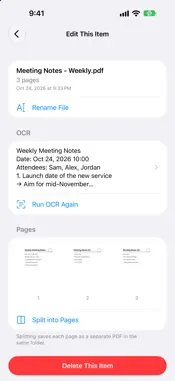
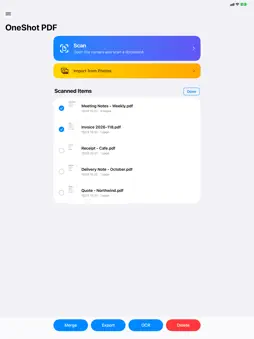
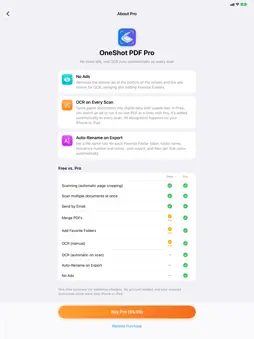
OneShot PDF is a document scanner built for speed. Shoot, tap Save, and your PDF is done — no confirmation screens, no extra choices along the way. ■ Just shoot — cropping is automatic • Point the camera at a document and a green frame locks onto the page edges • Pages are cropped and straightened automatically, at full image quality • Lay several documents on a desk and capture them all with one shot, each as its own page • You press the shutter, so you get the exact moment you want ■ No waiting — on to the next scan • After you tap Save, the PDF is built in the background, so you can scan the next document right away • Each scan becomes one PDF • You can also import photos from your photo library ■ Quick touch-ups later • Adjust page corners with your finger (with a magnifier), rotate or delete pages • Merge several PDFs into one, or split a PDF into single pages • Rename files • Original photos are kept in the app, so you can fix pages any time later ■ Export and share • Register your favorite folders and export to them in one step from the long-press menu (iCloud Drive and more) • With Pro, files are automatically renamed on export using a rule you set for each folder (date, folder name, sequence number and more) • Send by email (large PDFs are shrunk for email automatically), or share via AirDrop and other apps ■ OCR (text recognition) • Adds a text layer so your PDFs are searchable and copyable • Recognition runs entirely on your iPhone or iPad ■ Private by design • No account required • Your scanned documents are never sent to our servers ■ Free and Pro • Scanning, merging, exporting and the other core features are free to use (with ads; OCR, merging and adding favorite folders are available after watching an ad) • OneShot PDF Pro (one-time purchase): no ads, automatic OCR on every scan, and auto-rename on export It's a one-time purchase, not a subscription. Family Sharing is supported. ■ Available in 18 languages Japanese, English, Chinese (Simplified and Traditional), Korean, German, French, Spanish, Portuguese, Italian, Dutch, Polish, Turkish, Russian, Ukrainian, Thai, Vietnamese and Indonesian Works on both iPhone and iPad.
What's New
Version 1.1 2026-10-29
• Photos you pick from your library now become a PDF right away, without opening the camera • On iPad, lists, settings and other screens now use a comfortable r... Technical Analysis
Package Overview Basic metadata
Bundle ID
jp.kaihawk.scanner Current Version 1.1
Minimum iOS 17.0
Package Size App Store Size
Package Metadata 0 / 0 version records
Detailed binary, privacy manifest, framework, and Info.plist results have not been indexed for this package yet. The verified App Store and archive metadata above remains available.
Developer Information
Known Version Records
0 version records with stored package metadata
Stored metadata does not guarantee a package is currently available to download.
| Details | Version / IDs | Version date | Action |
|---|