
Preview





Description
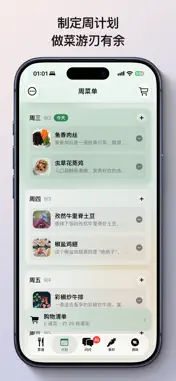
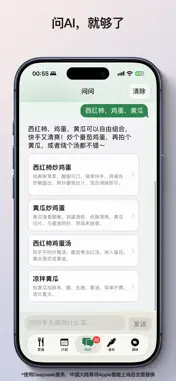
Private Recipe: Turn Your Cravings Into Real Meals Countless recipe links sit scattered in your photos, bookmarks and notes. Saved with excitement, they are forgotten when cooking time comes. The real problem is not lack of inspiration, but messy content: dead links, ad-filled tutorials and instructions buried in comments. When you cook, you need your own tidy cookbook with clear steps and grocery lists. Private Recipe is an iPhone local recipe app. Import online recipes and organize them with AI, or manually type recipes yourself to build a full workflow: collect recipes, make weekly menus, shop ingredients and cook. All data stays locally on your phone. No required login, no data shared with platforms and no annoying push alerts. Public recipe apps focus on discovering new dishes, while Private Recipe focuses on practical cooking. It fixes common troubles: saved links may break and lose formatting; food ideas do not automatically turn into meal plans; algorithm recommendations ignore your allergies, fridge ingredients and past meals; sharing links forces family to hunt for instructions again. This app keeps only recipes you like, filters meals by your preferences and creates simple shopping lists. Copy a recipe link to import directly. Your selected AI extracts title, ingredients and steps into clean text. Recipe photos can be zoomed while cooking. It handles webpage verification, and images save locally, so recipes remain intact even if original links expire. You can also create recipes manually from notes or family oral tips. AI sorts messy notes, and you can freely adjust steps later without extra AI polishing. Tag recipes as weekend meals, dinner parties, low-calorie or 15-minute quick dishes. Mark difficulty and cooking time. Track ingredients from your saved recipes to use leftovers easily. Titles and ingredient names adapt to your system language, while cooking steps keep original text to avoid wrong guidance. It uses iOS Liquid Glass design for fast launch and easy one-handed use by the stove. Once you save over 20 recipes, “What Should I Cook Today?” is available. It picks meals only from your collection. Set rules to skip foods you dislike, prioritize ingredients you own and avoid repeated dishes. Mark meals as cooked after finishing. Add the home widget to see recommendations quickly and reduce meal decision stress. Build weekly meal plans; only current and future dates can be edited, old plans clear automatically. Generate grocery lists that hide common seasonings. Export lists as images and share with family. The workflow: schedule meals, share shopping lists, cook from local steps and mark finished dishes. Generate recipe long images or cover cards locally and share through the system sheet, no server upload. Use Siri and Apple Shortcuts to import links. It supports URL Scheme for quick import from other apps. Built with Core Data, all recipes and images save on your iPhone. No mandatory sign-in. AI uses your own API key. Your recipe and taste data stay private and will not be used for ads. Please back up data regularly just like your photo album. This app works great for home cooks tired of meal decisions, people who save many unused recipe links, families planning menus and shopping together, users with special diets and power users preferring local storage. Recipes are easy to find, but turning cravings into finished meals is hard. Private Recipe uses AI for sorting, local storage for safety, weekly plans and shopping lists for execution. It will not turn you into a chef, but keeps instructions, photos and lists ready when you decide to cook. Terms of Use (EULA): [https://www.apple.com/legal/internet-services/itunes/dev/stdeula/](https://www.apple.com/legal/internet-services/itunes/dev/stdeula/)
What's New
Version 1.2.1 2026-10-29
Bug Fixes: 1. Step images failed to import when importing recipe via AI link. New Features: 1. Custom categories for recipes, multi-select supported 2. Split... Technical Analysis
Package Overview Basic metadata
Bundle ID
com.yvkd.mymenu Current Version 1.2.1
Minimum iOS 26.0
Package Size App Store Size
Package Metadata 0 / 0 version records
Detailed binary, privacy manifest, framework, and Info.plist results have not been indexed for this package yet. The verified App Store and archive metadata above remains available.
Known Version Records
0 version records with stored package metadata
Stored metadata does not guarantee a package is currently available to download.
| Details | Version / IDs | Version date | Action |
|---|