
Preview


Description
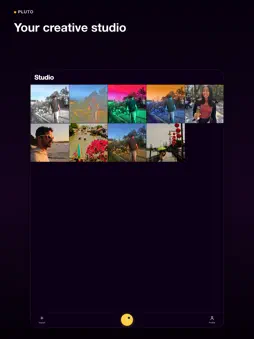
Find your look. Make it yours. Pluto is a photo editor for everyday moments, portraits, travel photos, and the sets you want to share. Start with a film-inspired look, adjust light and color, and refine the details. Edit one photo or bring up to 8 together in a set. No subscription is needed to use the editing tools. A LOOK THAT STARTS WITH YOUR PHOTO Preview curated signatures on your photo and adjust their strength. Explore the wider film-inspired collection, save your own looks, and reuse them later. Share a look without sharing your private photo. AI ADJUST. YOU STAY IN CONTROL. Use AI Adjust directly in the editor for suggested light, color, and tone adjustments. You can use it on its own or choose Adapt this look in Signatures. The result uses editable controls: compare it with your starting photo, refine it, or undo it. AI results vary and may need manual refinement. ONE LOOK. ROOM FOR EACH PHOTO. Create a set of up to 8 photos. Choose a shared look, apply per-photo adjustments, and review the results. Open any photo to refine it, leave individual photos out, and export the included set with progress and retry options if something fails. BRIGHTEN YOUR SUBJECT. KEEP THE SCENE. Start with automatic subject or background selection when supported on your device, or paint a mask yourself. Refine it with Add and Subtract, then adjust Exposure, Saturation, Warmth, and Tint in the selected area. CLEAN UP AND REIMAGINE Paint over a distraction and let Magic Eraser generate a cleanup. Target Replace lets you describe a change inside a painted area. Generative Expand adds space around your photo. Review generated results before accepting them. YOUR FINISHING TOUCH Shape colors with HSL, add grain, softness, vignette, or light leaks, and rotate or straighten while keeping your edits. Undo and redo as you work. Reopen saved local projects on the same device. SAVE THE PHOTO YOU WANT TO KEEP Export finished photos as JPEGs, with original-size output for supported photos and edits. Available size and detail depend on your photo, edits, and device. Cloud AI sends a photo preview, and selection information where needed, for processing. It requires an internet connection and is subject to usage and capacity limits. Manual editing and built-in looks do not require a cloud AI request. Projects remain on the device; sharing a look does not synchronize photos or projects. Terms of Use (EULA): https://www.apple.com/legal/internet-services/itunes/dev/stdeula/
What's New
Version 2.9.11 2026-10-20
Bring out your best shot with AI Adjust, then make the result yours. - AI Adjust suggests editable light, color, and tone changes directly in the editor. Use A... Technical Analysis
Package Overview Basic metadata
Bundle ID
com.jcenterprises.photoeditor Current Version 2.9.11
Minimum iOS 17.0
Package Size App Store Size
Package Metadata 2 / 19 version records
5.0 / 5.0 (2 ratings)
Detailed binary, privacy manifest, framework, and Info.plist results have not been indexed for this package yet. The verified App Store and archive metadata above remains available.
Developer Information
Known Version Records
2 version records with stored package metadata • 19 known version records
Stored metadata does not guarantee a package is currently available to download.
| Details | Version / IDs | Version date | Action |
|---|---|---|---|
| Not archived | v2.9.7 App Store ID: 892062163Build: 2.9.7 | 2026-09-27 17:54:39 | Request Version |
| Not archived | v2.9.6 App Store ID: 891553831Build: 2.9.6 | 2026-09-20 16:30:57 | Request Version |
| 65.5 MB | v2.9.0 App Store ID: 890655356Build: 2.9.0 | 2026-09-02 22:48:05 | Get Version |
| 63.21 MB | v2.9.0 App Store ID: 889355950Build: 2.9.0 | 2026-09-02 22:48:05 | Get Version |
| Not archived | v2.7.6 App Store ID: 889018662Build: 2.7.6 | 2026-07-29 19:52:45 | Request Version |
| Not archived | v2.7.0 App Store ID: 888169132Build: 2.7.0 | 2026-07-12 19:28:27 | Request Version |
| Not archived | v2.6.5 App Store ID: 888135579Build: 2.6.5 | 2026-07-11 20:16:15 | Request Version |
| Not archived | v2.6.3 App Store ID: 888084929Build: 2.6.3 | 2026-07-10 18:56:42 | Request Version |
| Not archived | v2.6.1 App Store ID: 887364161Build: 2.6.1 | 2026-06-24 19:02:06 | Request Version |
| Not archived | v2.5.2 App Store ID: 887160329Build: 2.5.2 | 2026-06-18 23:21:11 | Request Version |
| Not archived | v2.5.1 App Store ID: 887096665Build: 2.5.1 | 2026-06-17 23:17:46 | Request Version |
| Not archived | v2.4.0 App Store ID: 885212497Build: 2.4.0 | 2026-05-04 02:24:35 | Request Version |
| Not archived | v2.3.0 App Store ID: 883856127Build: 2.3.0 | 2026-03-28 17:32:14 | Request Version |
| Not archived | v2.1.1 App Store ID: 883686262Build: 2.1.1 | 2026-03-24 22:38:14 | Request Version |
| Not archived | v2.1.0 App Store ID: 883591907Build: 2.1.0 | 2026-03-20 23:34:41 | Request Version |
| Not archived | v2.0.0 App Store ID: 883468797Build: 2.0.0 | 2026-03-17 23:34:13 | Request Version |
| Not archived | v1.8.0 App Store ID: 883107241Build: 1.8.0 | 2026-03-07 00:17:24 | Request Version |
| Not archived | v1.5.0 App Store ID: 882606501Build: 1.5.0 | 2026-02-20 01:05:59 | Request Version |
| Not archived | v1.0 App Store ID: 880701243Build: 1.0 | 2026-01-12 22:52:56 | Request Version |