Preview




Description
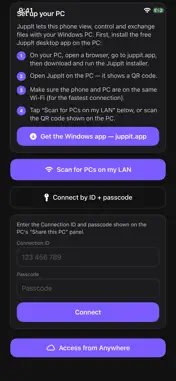
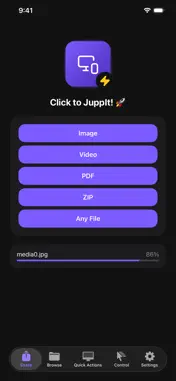
JuppIt turns your iPhone into a remote control for your Windows PC. View and control your desktop, browse your PC's drives, and move files between devices — over your home Wi‑Fi or from anywhere in the world. REMOTE CONTROL • Live desktop view with a smooth touchpad experience — drag to move, tap to click, long-press to right-click • Full keyboard input, plus dedicated left/right mouse buttons and scroll YOUR FILES, ANYWHERE • Browse your PC's drives (C:, D:, and more) right from your phone • Send photos, videos, PDFs, ZIPs, or any file to your PC in seconds • Pull files from the PC back to your phone QUICK ACTIONS • Lock, unlock, or sign out of your PC remotely • Shut down, restart, or sleep with one tap • Wake your PC with Wake‑on‑LAN • Grab an instant screenshot of your desktop CONNECT YOUR WAY • Same Wi‑Fi: scan a QR code on your PC and you're paired in seconds • Manual pairing with connection ID + passcode • Access from Anywhere: sign in with your free JuppIt account and reach your PC over the internet SETUP IN A MINUTE Install the free JuppIt desktop app from juppit.app on your Windows PC Open JuppIt on the phone and scan the QR code shown on the PC That's it — control, browse, and share Your connection is secured with device pairing and passcodes. JuppIt only connects to PCs you've explicitly authorized. JUPPIT PREMIUM (OPTIONAL SUBSCRIPTION) JuppIt is free on the same Wi-Fi. JuppIt Premium adds remote access to your PCs from anywhere, as an auto-renewable yearly subscription: • Premium – 1 PC: 1 year • Premium – 3 PCs: 1 year • Premium – 5 PCs: 1 year Payment is charged to your Apple ID at confirmation of purchase. The subscription renews automatically unless cancelled at least 24 hours before the end of the current period; your account is charged for renewal within 24 hours before the end of the period. Manage or cancel in your Apple ID settings (Settings → your name → Subscriptions). Terms of Use (EULA): https://www.apple.com/legal/internet-services/itunes/dev/stdeula/ Privacy Policy: https://juppit.app/privacy-policy.html
What's New
Version 1.3.0 2026-11-16
• JuppIt Premium: subscribe in the app to reach your PCs from anywhere (1, 3 or 5 PCs). On the same Wi‑Fi JuppIt stays free. • New-device approval: when you sig...• JuppIt Premium: subscribe in the app to reach your PCs from anywhere (1, 3 or 5 PCs). On the same Wi‑Fi JuppIt stays free. • New-device approval: when you sign in on a new iPhone, approve it from the email we send — keeps your PCs safe. • Easier first setup: clear steps and a link to get JuppIt on your PC. • Settings menu (≡): connect by ID, report an issue, rate the app, sign in, sign out and delete your account. • Clipboard: copy on your PC, then tap “Get it” on your iPhone. • Sync: each folder shows which PC it backs up to and waits until you connect. • Fixes and polish. Technical Analysis
Package Overview Basic metadata
Bundle ID
com.JuppIt.JuppViewer Current Version 1.3.0
Minimum iOS 17.0
Package Size App Store Size
Package Metadata 0 / 0 version records
Detailed binary, privacy manifest, framework, and Info.plist results have not been indexed for this package yet. The verified App Store and archive metadata above remains available.
Developer Information
Known Version Records
0 version records with stored package metadata
Stored metadata does not guarantee a package is currently available to download.
| Details | Version / IDs | Version date | Action |
|---|